


Overview
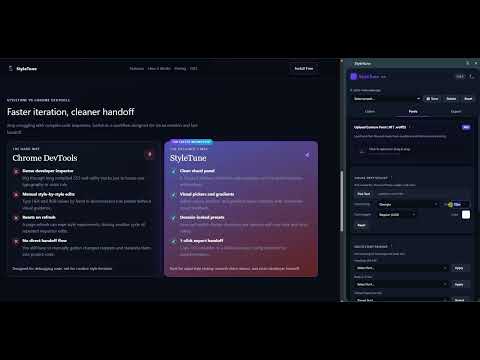
Figma-style visual CSS & Font editor. Customize colors, gradients, and typography on any live website. Export clean CSS or Tailwind.
Say goodbye to complex developer consoles and manual styling math. Meet StyleTune—the ultimate visual CSS and typography sandbox designed specifically for UI/UX designers, No-Code creators (Webflow, Framer), and frontend developers [4]. Whether you are preparing a quick client demo, testing alternative design iterations, or preparing a design handoff, StyleTune gives you Figma-style control directly inside your browser [4]. ✦ KEY FEATURES FOR DESIGNERS: 🎨 VISUAL STYLE SANDBOX (Colors & Gradients) • Recolor any element on any live website with an intuitive color picker and eyedropper. • Fallback engine: Works smoothly on static, legacy, and utility-CSS (Tailwind) sites. • Advanced Gradient Engine: Craft complex linear or radial CSS gradients with multi-stop bars. • Hue Shift: Instantly rotate the entire page's color spectrum to explore alternative themes. 🔤 FIGMA-STYLE TYPOGRAPHY (Font Pairing & Sizes) • Tweak fonts, sizes, weights (100–900), and line heights visually on any webpage. • Font Pairing: Change all Headings and Body/UI text simultaneously to test pair aesthetics. • Upload Custom Fonts: Import your local .ttf or .woff2 files and make them available instantly (PRO). 🚀 ZERO-CODE STYLE HANDOFF • Skip the manual CSS copy-pasting routine. • Export clean, compiled CSS variables or custom Tailwind CSS configs in a single click. • Move your visual design choices straight into Webflow, Framer, or production code. 💾 LOCAL DESIGN PRESETS • Save your progress as custom presets. • Toggle between different design variations (e.g., "Variant A", "Dark Mode Concept") instantly. • Presets are locked per domain and saved safely. ✦ 100% PRIVATE & OFFLINE-FIRST We believe in ultimate privacy. StyleTune does not use any cloud servers. • Your custom fonts, color presets, and design experiments are processed and stored entirely inside your browser's local storage (chrome.storage.local). • Works 100% offline. Zero tracking. Zero data ever leaves your machine. ✦ HOW IT WORKS: 1. Open any live website and click on the StyleTune icon in your toolbar. 2. Select any text or layout container using the "Pick" tools. 3. Change fonts, weights, colors, and gradients and see updates in real-time. 4. Copy the compiled CSS/Tailwind code on the Export tab and paste it into your project! --- StyleTune is free to use with generous daily limits. Upgrade to StyleTune PRO to unlock unlimited design exports, unlimited presets, and custom offline font uploads.
0 out of 5No ratings
Details
- Version1.6.0
- UpdatedJune 8, 2026
- Size67.06KiB
- LanguagesEnglish
- DeveloperWebsite
Email
dmitry.chekh@gmail.com - Non-traderThis developer has not identified itself as a trader. For consumers in the European Union, please note that consumer rights do not apply to contracts between you and this developer.
Privacy

This developer declares that your data is
- Not being sold to third parties, outside of the approved use cases
- Not being used or transferred for purposes that are unrelated to the item's core functionality
- Not being used or transferred to determine creditworthiness or for lending purposes
Support
For help with questions, suggestions, or problems, please open this page on your desktop browser