


Overview
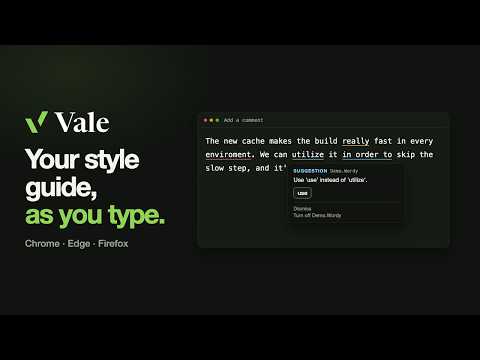
Check your writing against your style guide as you type, on any site. Private: your text never leaves your browser.
Vale checks your writing against a style guide as you type: in comment boxes, issues, pull requests, email, and anywhere else you write in a browser. It's the same prose linter documentation teams run in CI, and it runs entirely on your device. WHAT IT CHECKS Spelling, word choice, terminology, capitalization, wordiness, and whatever else your style guide says. Start with the built-in style, add a published one such as the Microsoft or Google style guide, or upload your team's own house style. HOW IT WORKS • Underlines issues as you type, on the sites you turn it on for. GitHub and GitLab are on from the start. • Click an underline, or press Alt+Enter, to see the fix and apply it in one click. You can also dismiss the issue, turn the rule off, or add the word to your vocabulary. • Checks Markdown, AsciiDoc, reStructuredText, HTML, and plain text. When you edit a file on GitHub or GitLab, it reads the file's format from its name. • Keeps the words you've added, rules you've turned off, and issues you've dismissed in one list, where any of it can be undone. • Checks on demand if you'd rather: turn off checking as you type, and check a field from the toolbar or with Alt+Shift+V. PRIVATE BY DESIGN Your text never leaves your browser. There is no account, no analytics, and no telemetry. The only downloads are the style guides you choose. Privacy policy: https://vale.sh/privacy/extension Free and open source under the MIT license: https://vale.sh
0 out of 5No ratings
Details
- Version0.3.1
- UpdatedNovember 26, 2026
- Size9.44MiB
- LanguagesEnglish (United States)
- DeveloperWebsite
Email
joseph@jdkato.io - Non-traderThis developer has not identified itself as a trader. For consumers in the European Union, please note that consumer rights do not apply to contracts between you and this developer.
Privacy

This developer declares that your data is
- Not being sold to third parties, outside of the approved use cases
- Not being used or transferred for purposes that are unrelated to the item's core functionality
- Not being used or transferred to determine creditworthiness or for lending purposes
Support
For help with questions, suggestions, or problems, visit the developer's support site