

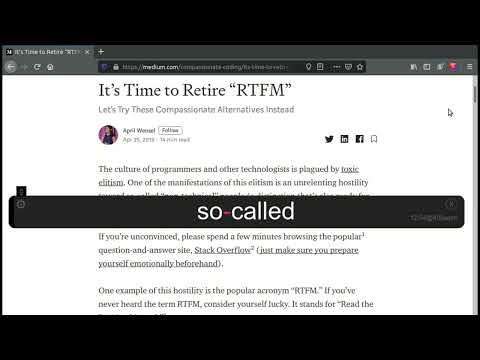
개요
RSVP for browsers
Read web content faster and easier with this open-source Rapid Serial Visual Presentation (RSVP) extension. You can begin running Stutter in one of three ways: Click on the icon in the browser to start Stuttering the full page. Press Alt+R to trigger Stutter by hotkey. Select text you'd like to Stutter and then right-click and choose "Stutter Selection". When Stutter is running, you can use the following hotkeys for control: Alt-R - Restart Stutter on the whole page Alt+P - Pause/Resume Alt+Left - Skip backwards Alt+Right - Skip forwards Alt+Up - Increase WPM by 50 Alt+Down - Decrease WPM by 50 Esc - Close Stutter Keep your eye focused on the red letters and let the words flash by. You'll quickly be reading faster than ever! Privacy Policy: No data is collected. Settings are stored locally or in Chrome sync if enabled.
5점 만점에 5점평점 9개
세부정보
개인정보 보호

개발자가 사용자 데이터에 관해 다음과 같이 선언했습니다
- 승인된 사용 사례를 제외하고 서드 파티에 판매하지 않음
- 항목의 핵심 기능과 관련 없는 목적으로 사용하거나 전송하지 않음
- 신용도 판단 또는 대출 목적으로 사용하거나 전송하지 않음
지원
질문, 제안 또는 문제와 관련하여 도움이 필요하면 데스크톱 브라우저에서 이 페이지를 여세요.