

Stripe Test Cards
4 ratings
)
Overview
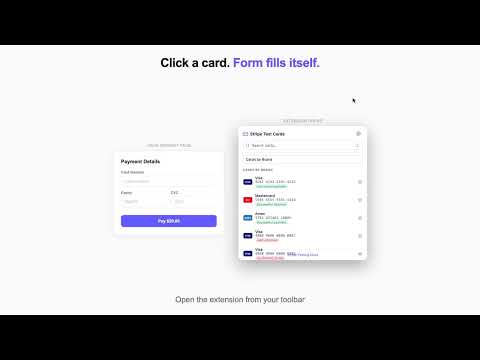
Quick access to Stripe test card numbers with auto-fill, search, favorites, and dark mode.
Stop digging through Stripe docs for test card numbers. Stripe Test Cards gives you every Stripe test card organized by category — by brand, by country, declined payments, fraud scenarios, and more. Click any card to instantly auto-fill it into your payment form, or copy it to your clipboard. Features: • Auto-Fill — Click a card and it fills the card number, expiry, and CVC directly into your payment form • 50+ Test Cards — Every Stripe test scenario: Visa, Mastercard, Amex, declines, disputes, 3D Secure, and more • Organized Categories — Cards grouped by brand, country, error codes, and fraud scenarios • Search — Find any card instantly by name, number, or scenario • Favorites — Star your go-to cards so they're always pinned at the top • Recents — Automatically tracks your last 5 used cards • Clipboard — Every click also copies the card number to your clipboard • Dark Mode — Automatic or manual, matches your system preference • Keyboard Shortcuts — / to search, arrow keys to navigate, Enter to fill Works with Stripe Checkout, Stripe Elements, and any custom payment form. Free. No account needed. No data collected.
5 out of 54 ratings
Details
- Version2.0.0
- UpdatedMarch 2, 2026
- Offered byTinyAI.Tools
- Size19.61KiB
- LanguagesEnglish
- Developer
Email
mohamed@tinyai.tools - Non-traderThis developer has not identified itself as a trader. For consumers in the European Union, please note that consumer rights do not apply to contracts between you and this developer.
Privacy

This developer declares that your data is
- Not being sold to third parties, outside of the approved use cases
- Not being used or transferred for purposes that are unrelated to the item's core functionality
- Not being used or transferred to determine creditworthiness or for lending purposes