

Stringify (by ShiftLytic)

Overview
Real-time Adobe Analytics & Target debugger. Parses s.products and AT.js/WebSDK calls into structured cards, no DevTools needed.
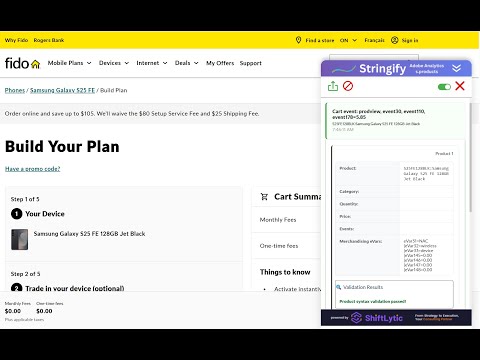
If you work in digital analytics or personalization, you know the pain: • Adobe Analytics product strings (s.products) that are hard to read and error-prone to debug • AT.js and WebSDK network calls buried in DevTools - dozens of requests to sift through • QA sessions that turn into hour-long hunts for the right payload • No easy way to confirm that a Target activity matched, fired, and was tracked in Analytics Say hello to Stringify - a Chrome extension that intercepts Adobe Target and Adobe Analytics network calls in real time and displays them as clean, structured cards in a side panel. No code changes. No DevTools digging. No Adobe login required. ANALYTICS - s.Products If you work with Adobe Analytics, you've probably dealt with the infamous s.products variable. It's powerful, but it's hard to read, error-prone to debug, and time-consuming to QA across multiple scenarios. Stringify parses every s.products and WebSDK product call on the page and turns it into a clean, readable card you can review at a glance: • Validates every field: product name, category, quantity, price, events and eVars • Flags errors inline with red highlighting - green checkmark when everything passes • Catches issues like missing product names, non-integer quantities, decimal prices with currency symbols, and malformed event or eVar tokens • Works for both Adobe Analytics (s.products beacon) and WebSDK (productListItems) STANDARD-TARGET TAB Shows standard Adobe Target tracking on every domain: • AT.js prefetch and mbox delivery responses - activity name, experience name, activity ID, experience ID • AT.js impression and click notifications to Target • WebSDK personalization decisions from the Edge Network - activity name, experience name, scope • WebSDK impression and click notifications • AA Analytics for Target (A4T) - confirms an AT.js delivery call was also tracked in Adobe Analytics via a matching supplemental data ID. Only shown when a real AT.js response card is present - no false positives from visitor-stitching beacons
0 out of 5No ratings
Details
- Version2.0.5
- UpdatedJune 30, 2026
- Offered bydev
- Size193KiB
- LanguagesEnglish (United States)
- Developer8 Newstead Crescent Brampton, ON L6V 2A7 CA
Email
dev@shiftlytic.ca - Non-traderThis developer has not identified itself as a trader. For consumers in the European Union, please note that consumer rights do not apply to contracts between you and this developer.
Privacy

This developer declares that your data is
- Not being sold to third parties, outside of the approved use cases
- Not being used or transferred for purposes that are unrelated to the item's core functionality
- Not being used or transferred to determine creditworthiness or for lending purposes
Support
For help with questions, suggestions, or problems, visit the developer's support site