


Overview
Add synchronized lyrics to YouTube Music with customizable typography and OBS display for TikTok and other live streams.
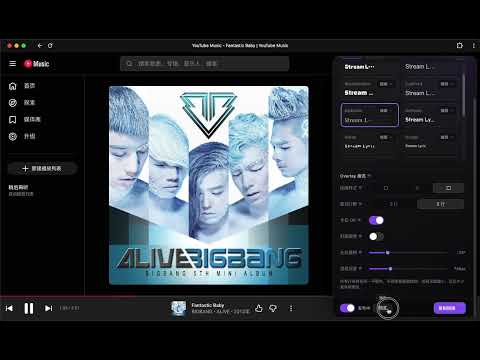
StreamLyric is a lyric visual and OBS overlay settings extension designed for YouTube Music. It adds a StreamLyric entry and a right-side settings panel to YouTube Music, helping you configure how lyrics appear in OBS, TikTok Live, recordings, and other streaming setups. Main features: • Open a dedicated StreamLyric settings panel inside YouTube Music • Customize lyric fonts, text size, text color, opacity, background color, and background opacity • Adjust bold text, outlines, shadows, alignment, and lyric spacing • Configure multi-line overlay layouts, karaoke-style visual effects, 3D views, tilt, and perspective depth • Use fonts installed on your device • Preview lyric visual settings in the panel • Manage and copy an overlay link for an OBS browser source • Respect the system reduced-motion preference for improved accessibility • Use a right-side overlay panel without pushing or rearranging the YouTube Music page Why install StreamLyric? StreamLyric lets you configure lyric visuals directly from YouTube Music and prepare a clearer, more personalized presentation for OBS, TikTok Live, recordings, and other live-streaming workflows. After installing StreamLyric, you can: • Match lyric visuals to your preferred fonts, colors, and layout • Prepare a cleaner lyric presentation for viewers and recordings • Configure the experience from YouTube Music without repeatedly switching setup pages • Use a dedicated overlay as an OBS browser source • Manage lyric visuals without changing YouTube Music playback controls or page layout StreamLyric works only on YouTube Music and does not support other music websites. Some cloud synchronization and overlay features require a StreamLyric account. Privacy Policy: https://streamlyric.com/privacy —————————————————————————————————————————————————————— StreamLyric 是一款专为 YouTube Music 设计的歌词视觉与 OBS Overlay 设置扩展。 它会在 YouTube Music 页面中增加 StreamLyric 设置入口和右侧设置面板,帮助你配置歌词在 OBS、TikTok 直播、录屏和其他直播场景中的显示效果。 主要功能: • 在 YouTube Music 页面中打开独立的 StreamLyric 设置面板 • 自定义歌词字体、字号、文字颜色、透明度、背景色和背景透明度 • 调整粗体、描边、阴影、对齐方式和歌词间距 • 配置 Overlay 多行布局、卡拉 OK 视觉效果、3D 视图、斜置和景深 • 使用设备本地字体进行歌词显示 • 在设置面板中预览歌词视觉效果 • 管理和复制 OBS 浏览器源使用的 Overlay 链接 • 支持系统“减少动态效果”设置,兼顾可访问性 • 使用右侧覆盖式设置面板,不推挤或重新排列 YouTube Music 页面 为什么应该安装 StreamLyric? StreamLyric 让你可以直接在 YouTube Music 中调整歌词视觉效果,并为 OBS、TikTok 直播、录屏和其他直播场景准备更清晰、更有风格的歌词画面。 安装后,你可以: • 按自己的字体、颜色和布局偏好定制歌词效果 • 为直播观众和录屏内容准备更清晰的歌词展示 • 在 YouTube Music 页面内完成设置,无需反复切换配置页面 • 通过 OBS 浏览器源使用独立 Overlay • 在不修改 YouTube Music 播放控制和页面布局的情况下管理歌词效果 StreamLyric 只在 YouTube Music 页面中工作,不支持其他音乐网站。部分云端同步和 Overlay 功能需要登录 StreamLyric 账号。 隐私政策: https://streamlyric.com/privacy
0 out of 5No ratings
Details
- Version0.1.5
- UpdatedNovember 2, 2026
- Size175KiB
- Languages中文(中国)
- DeveloperWebsite
Email
Jeffreylsp@gmail.com - Non-traderThis developer has not identified itself as a trader. For consumers in the European Union, please note that consumer rights do not apply to contracts between you and this developer.
Privacy

StreamLyric: YouTube Music Lyrics for OBS & TikTok has disclosed the following information regarding the collection and usage of your data. More detailed information can be found in the developer's privacy policy.
StreamLyric: YouTube Music Lyrics for OBS & TikTok handles the following:
This developer declares that your data is
- Not being sold to third parties, outside of the approved use cases
- Not being used or transferred for purposes that are unrelated to the item's core functionality
- Not being used or transferred to determine creditworthiness or for lending purposes
Support
For help with questions, suggestions, or problems, please open this page on your desktop browser