

Stream Notes - Boss Key for Twitch
1 rating
)
Overview
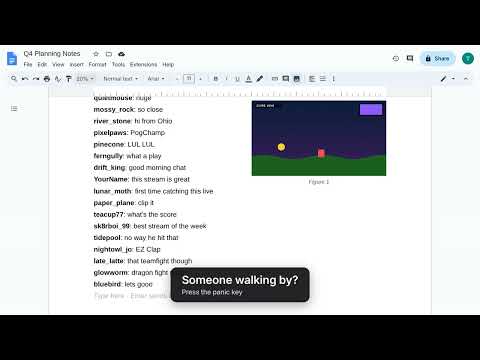
Watch Twitch in a plain document-style page: chat becomes text, the stream becomes an image, and one key hides it all.
Your boss walks by. You hit one key. Suddenly you're deep in "Q4 Planning Notes." Nobody suspects a thing. Stream Notes turns any Twitch channel into a calm, plain-looking document page. Chat becomes paragraphs of text, the stream shrinks into a picture inside the page, and you look like the most productive person in the room. 🕶️ THE BOSS KEY Press ` (backtick) and the stream vanishes behind a believable work document, and the sound mutes instantly. Press it again and you're right back where you left off. It even works when document view is off. 📝 HOW IT WORKS • Press Alt+Shift+D (or click the toolbar icon) on any Twitch channel • Chat flows in as document text, with usernames and emotes if you want them • The stream sits in the page like an inserted image. Drag to resize it, wrap text around it, or put it on top • Name your "document" anything you like. "Budget Review" is a classic ⌨️ SHORTCUTS FOR PROFESSIONALS • Alt+V: show or hide the stream • Alt+Z: go full width (risky) • Alt+M: mute or unmute • Alt+H: document only. Chat hides, the stream keeps playing • Alt+P: pause • Alt+Q: stream quality • Alt+O: hop to another channel you follow • Ctrl+Alt+M: open the "comment" box and type in Twitch chat as yourself. Peak multitasking 🎁 LITTLE EXTRAS • Collects your channel-points bonus chests automatically (you can turn this off) • Adjustable zoom, picture size and layout • A quick guided tour the first time you use it 🔒 PRIVATE BY DESIGN No accounts, no servers, no tracking. Your settings stay in your own browser, and Stream Notes only runs on twitch.tv. Stream Notes is an independent project and isn't affiliated with or endorsed by Twitch or Google. Please watch responsibly. We are not liable for any performance reviews.
5 out of 51 rating
Details
- Version1.3.0
- UpdatedOctober 17, 2026
- Offered byBiscuitables
- Size27.31KiB
- LanguagesEnglish
- Developer
Email
tllegos1@gmail.com - Non-traderThis developer has not identified itself as a trader. For consumers in the European Union, please note that consumer rights do not apply to contracts between you and this developer.
Privacy

This developer declares that your data is
- Not being sold to third parties, outside of the approved use cases
- Not being used or transferred for purposes that are unrelated to the item's core functionality
- Not being used or transferred to determine creditworthiness or for lending purposes