


Overview
Track characters, aliases, and chapter notes while reading web novels. Highlight terms, replace names, and build your glossary.
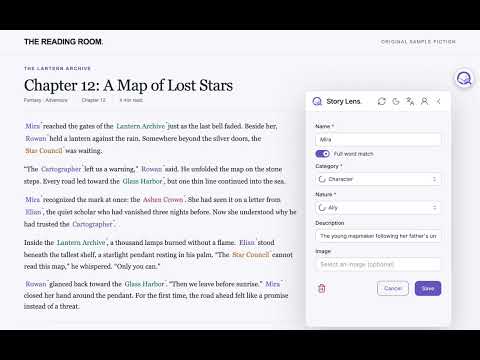
Keep the people, places, and terms in a long web novel straight as you read. StoryLens highlights names on the page and puts your reference glossary a click away. On supported novel sites, StoryLens detects the novel and chapter. Give characters, places, and techniques their own colors; open a highlight to see descriptions, aliases, and notes for the current chapter. Replace a term with the spelling or translation you prefer. Search and edit entries from the browser popup or the floating button on the page. Download a novel's reference data to keep reading and making edits offline; queued changes sync when you reconnect. Features • Automatic novel and chapter detection on supported sites • Colored highlights and in-page reference notes • Aliases and chapter-specific versions of entries • Text replacements for preferred names and translations • Search, editing, and offline access to downloaded references • English and Arabic interface • Story Lens Cloud: page summaries, keyword suggestions, chapter extraction, novel research, selector detection and character images using lenses • A free desktop alternative using your own Claude/Codex account • Lens balance and prices on AI actions; request more lenses on the website Getting started 1. Open a web novel chapter and launch StoryLens from the browser toolbar or the floating page button. 2. Choose the detected novel, then browse or add reference entries. 3. Set colors, descriptions, aliases, and replacements to suit your reading. 4. In Settings → AI, choose Story Lens Cloud or pair the free desktop companion. Cloud shows the lens price before each action. Privacy StoryLens uses the Story Lens service for accounts and a shared reference catalogue. Contributions are shared with other signed-in readers, so do not add private information. Cloud actions send relevant text and your prompts through the Story Lens API to OpenRouter and the configured model providers. Desktop actions use your paired companion and chosen provider. Prices use non-expiring lenses; payment is arranged directly with the operator through your WhatsApp or Telegram contact. If analytics is configured, the extension sends feature events and supported-site hostnames to Google Analytics; you can turn this off in Settings → General. See https://storylens.iscoded.com/en/privacy/ for details. Support Questions or feedback: hussain@iscoded.com Website: https://storylens.iscoded.com
0 out of 5No ratings
Details
- Version3.11.0
- UpdatedOctober 24, 2026
- Size1.57MiB
- Languages2 languages
- DeveloperWebsite
Email
hussain@iscoded.com - Non-traderThis developer has not identified itself as a trader. For consumers in the European Union, please note that consumer rights do not apply to contracts between you and this developer.
Privacy

StoryLens has disclosed the following information regarding the collection and usage of your data. More detailed information can be found in the developer's privacy policy.
StoryLens handles the following:
This developer declares that your data is
- Not being sold to third parties, outside of the approved use cases
- Not being used or transferred for purposes that are unrelated to the item's core functionality
- Not being used or transferred to determine creditworthiness or for lending purposes
Support
For help with questions, suggestions, or problems, visit the developer's support site