

StockMaster - AutoMeta for AdobeStock
3 ratings
)
Overview
Title + Keywords automation for Adobe Stock — by Youssef Kettou
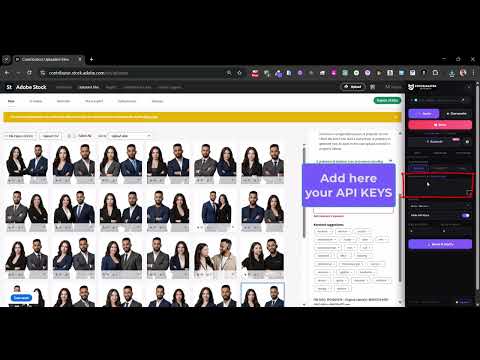
⚡ StockMaster – AutoMeta for Adobe Stock The smartest metadata assistant for Adobe Stock contributors. 🚀 What It Does StockMaster automatically generates professional titles and keywords for your Adobe Stock uploads using the latest AI models — Gemini, GPT-4o, or Groq. Just open your uploads page, click Auto, and watch your images get fully tagged one by one. No more manually writing titles. No more guessing keywords. StockMaster handles it all. ✨ Key Features 🤖 AI-Powered Metadata Generation Supports three AI providers — use whichever you have a key for: Google Gemini (Gemini 2.5 Flash, Pro, Flash-Lite — Automatic Model Selection) OpenAI GPT (GPT-4o, GPT-4o-mini) Groq (LLaMA 3, and more) ⚡ Auto Mode Automatically processes your entire upload queue image by image. Clicks, generates, fills, and saves — hands-free. ✦ Generate Mode Generate metadata for a single selected image on demand. 📊 SEO-Optimized Keywords Outputs up to 50 keywords per image — 70% SEO-focused, 30% common words — using Adobe's category and file type datasets. 🎯 Smart Settings ✨Set title min/max character length ✨Control keyword count and main subject word count ✨Enable concept keywords for consistent branding across uploads ✨Include image filename as creative context ✨SEO ranking sorting via imstocker API ✨Auto Submit and Auto Loop for full batch automation ✨Editorial mode (preserves brand names, trademarks, logos) ✨"Created by AI" checkbox automation ✨Category and File Type auto-selection 🎨 Sleek Dark Panel UI A collapsible dark side panel slides in on the right side of the Adobe Stock page — no popups, no clutter. Organized into 3 tabs: ► API — paste your API keys and select models ► Params — title length, keyword count, concept words ► Options — toggles for all automation behaviors ⏹ Stop Button & Live Progress Popup A "Generating Metadata" overlay shows the image being processed, live status updates, and a stop button so you can pause at any time. 🔐 License System First 50 images are free. A license key unlocks unlimited use. 🛠 How to Use Install the extension ► Go to contributor.stock.adobe.com/uploads ► The StockMaster panel opens automatically on the right ► Go to the API tab → paste your Gemini, GPT, or Groq API key → click 💾 Save ► Click ⚡ Auto to process all images automatically, or ✦ Generate for a single image 🔑 API Keys (Free to Get) ► Gemini: aistudio.google.com — free tier available ► Groq: console.groq.com — free tier available ► OpenAI: platform.openai.com — paid 🆓 Free & Licensed Use ► Free: Process up to 50 images ► Licensed: Unlimited — contact yketto@gmail.com or visit paypal.me/yusufketto
5 out of 53 ratings
Details
- Version1.7.0
- UpdatedMarch 25, 2026
- Offered byyoussefkettou
- Size130KiB
- LanguagesEnglish
- Developer
Email
yketto@gmail.com - Non-traderThis developer has not identified itself as a trader. For consumers in the European Union, please note that consumer rights do not apply to contracts between you and this developer.
Privacy

StockMaster - AutoMeta for AdobeStock has disclosed the following information regarding the collection and usage of your data. More detailed information can be found in the developer's privacy policy.
StockMaster - AutoMeta for AdobeStock handles the following:
This developer declares that your data is
- Not being sold to third parties, outside of the approved use cases
- Not being used or transferred for purposes that are unrelated to the item's core functionality
- Not being used or transferred to determine creditworthiness or for lending purposes
Support
For help with questions, suggestions, or problems, please open this page on your desktop browser