

AI Keywords & Metadata Autofill for Adobe Stock, Shutterstock, Etsy

Overview
Fills Etsy titles, 13 tags & descriptions, plus Adobe Stock, Shutterstock & Freepik keywords, inside the upload form. AI, one click.
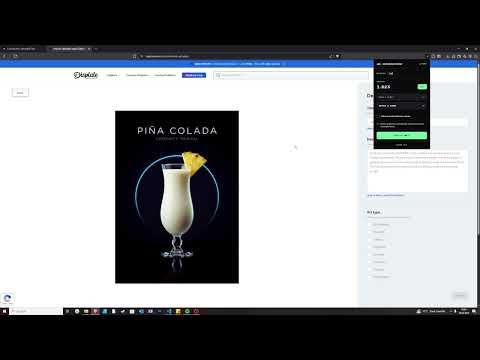
AutoKeyWorder generates metadata for images and videos and fills it into the upload form for you. Instead of generating text in one tool and pasting it into another site, it does both in the browser: it reads the file, writes the title, tags, description and category, and types them into the fields on the page you have open. You review the result and submit it yourself. FREE TO TRY Create an account and receive: • 50 free credits on signup • No credit card required • 5 free image analyses every day inside the extension, no expiry Priced for where you live. AutoKeyWorder adjusts plans to your country's purchasing power: contributors in Indonesia, India, Vietnam, the Philippines, Bangladesh, Pakistan and Nigeria pay up to 50% less. 50 free credits, no card needed to start. 1 image uses 1 credit. An Etsy listing uses 2 credits. A video uses 2 to 3 credits depending on the platform. HOW IT WORKS 1. Open the upload page or listing editor of a supported site. 2. Open the AutoKeyWorder extension. 3. Click "Process All". 4. The extension analyzes the selected images or videos and writes the metadata. 5. Where the site supports it, the fields on the page are filled in for you. 6. Review, edit if you like, and continue with your submission. Nothing is published or submitted by the extension. That step stays yours. WHAT GETS FILLED Depending on the site, generated information can include titles, keywords and tags, descriptions, categories, materials and other supported upload fields. On Etsy the extension works inside the listing editor, on new and existing listings, and fills the title, all 13 tags, the description, category and materials. Before writing, it checks what the marketplace's search box suggests for your product, so the tags are phrases buyers already type. On Adobe Stock, Shutterstock, Freepik and Redbubble it fills the title, keywords and category on the upload page. SUPPORTED SITES Etsy, Adobe Stock, Shutterstock, Freepik, Redbubble and more. Features vary by site. The current list, with what gets filled on each, is at https://autokeyworder.com/help/ VIDEO For video, nine frames are extracted from different points in the clip, so the analysis is not based on a single thumbnail. Subjects, actions, scene changes and camera movement are picked up from the frames. BATCH PROCESSING Click once and the whole upload page processes. While one file is being filled, up to ten more are analyzed in the background, so larger batches do not wait on you. AUTOMATIC CATEGORY SELECTION Where a site has a category tree, the extension picks a category from it. You can change it before you submit. NO CSV REQUIRED The normal workflow is: open the page, process, review, submit. No spreadsheet, no export, no clipboard. PRICING Credit based. Subscriptions and one-time packs can be combined. Subscriptions: • Starter: $6.99/month, 900 credits. First month $2.99. • Pro: $19.99/month, 3,000 credits. • Studio: $49.99/month, 10,000 credits. Credit packs (one-time, never expire): • 100 credits, $3.99 • 1,000 credits, $9.99 • 5,000 credits, $39.99 REFERRAL PROGRAM Invite others with your referral link. Referred users get a discount on their first eligible purchase. Qualifying referrals earn you additional credits. START FREE Install the extension, create an account, and you have 50 free credits plus 5 free image analyses a day. Open a supported upload page, click "Process All", and review the result before you submit. AutoKeyWorder is an independent software product. It is not affiliated with, endorsed by, sponsored by, or officially connected to any marketplace it supports. All product names and trademarks belong to their respective owners and are used only to describe where this extension works.
4.7 out of 523 ratings
Details
- Version1.5.6
- UpdatedOctober 21, 2026
- FeaturesOffers in-app purchases
- Size257KiB
- Languages36 languages
- DeveloperPhilipp SchlüterWebsite
Grabbestraße 5 Schlangen 33189 DEEmail
contact@autokeyworder.comPhone
+49 1517 0309608 - TraderThis developer has identified itself as a trader per the definition from the European Union and committed to only offer products or services that comply with EU laws.
Privacy

AI Keywords & Metadata Autofill for Adobe Stock, Shutterstock, Etsy has disclosed the following information regarding the collection and usage of your data. More detailed information can be found in the developer's privacy policy.
AI Keywords & Metadata Autofill for Adobe Stock, Shutterstock, Etsy handles the following:
This developer declares that your data is
- Not being sold to third parties, outside of the approved use cases
- Not being used or transferred for purposes that are unrelated to the item's core functionality
- Not being used or transferred to determine creditworthiness or for lending purposes
Support
For help with questions, suggestions, or problems, visit the developer's support site