

Steam Ledger – Market Profit Tracker
4 ratings
)
Overview
See your real Steam Market profit: P/L after fees, inventory value, quick selling. Not affiliated with Valve or Steam.
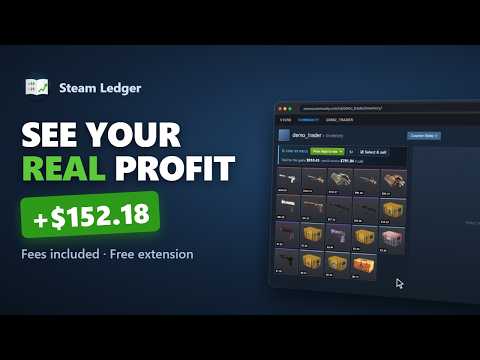
Sell an item for $10 and you get $8.70. So are you actually in profit at the end of the year? Steam Ledger reads your own Steam Market history, matches every sale with the purchase of that item, and shows what you made after fees. It works with CS2, Dota 2, TF2, Rust and every other game on the Steam Market. No spreadsheets and no guessing. • See your real profit or loss and the total fees you've paid • Know what your inventory is worth and the price at which an item breaks even • Sell in one click and undercut the lowest price on your listings • Track the biggest gainers and losers on the market ━━━━━━━━━━━━━━━━━━━━ WHAT YOU GET ━━━━━━━━━━━━━━━━━━━━ 📊 Profit dashboard • Realized profit/loss, return and the share of profitable sales • Monthly or yearly profit chart • Per-item stats: buys, sales, return, average holding time and fees paid • Total inventory value and net cash flow • Full transaction list with CSV export 📈 Market movers • Top gainers and losers across the whole Steam Market over 7, 15 and 30 days • Filter by game, category, price and weekly sales • 30-day sparkline and trading volume • Data comes from Steam's public sales history and is scanned slowly in the background to go easy on Steam 🎒 Inventory • Click any item to see what you paid, the price at which you break even and what you'd make if you sold now • Order book depth: the top 5 buy and sell levels right on the item card • Sort your inventory by market price • Total value of the game you're viewing and your profit/loss on items you haven't sold yet • One-click selling: at the lowest price, 1 cent under, or to the highest buy order • "Select & sell" and "Sell all": list items in bulk after a summary confirmation (up to 200 items per round) • The sell dialog shows how much you'll receive and your profit at the price you type 🏷️ Market and listings • Profit card on item pages: your purchase price, break-even price and profit at the current price • Badges in search results showing your average cost or past profit • An alert when your listing is undercut; match the lowest price or go 1 cent under in one click • Listings toolbar: search, sort and bulk select; bulk remove or bulk reprice after a summary confirmation • Manage all your listings from the dashboard: lower the price, set a new one, sell now or remove 🔁 Trade offers • Market value of both sides, the difference, and your profit compared to what the items you give cost you 💰 Accurate math • Uses Steam's own fee formula; the Steam and game fee rates are read from your account's wallet info • Sales are matched to purchases first-in, first-out (FIFO) • For accounts that changed currency, transactions are converted at the European Central Bank rate of the transaction day • Items from cases, drops or trades have no purchase record; enter a unit cost by hand and they're included in your profit 🌐 9 languages • English, Türkçe, Deutsch, Français, Español, Português, Polski, Русский, 中文 • Follows your browser language; you can change it in Settings ━━━━━━━━━━━━━━━━━━━━ PRIVACY ━━━━━━━━━━━━━━━━━━━━ • Your data is stored only in your own browser (chrome.storage). The developer has no access to it, and you don't need an account. • Steam requests go directly from your browser using your existing steamcommunity.com session. No password, API key or Steam Guard code is ever asked for. • The market movers scan uses anonymous, public Steam requests without your session. • There are two connections besides Steam, and no personal data is sent to either: api.frankfurter.dev for daily exchange rates when your history contains more than one currency, and a public JSON file on GitHub for the content of the support and sponsor card. • No tracking, no analytics. • The extension's own popup and dashboard may show one card labeled "Sponsored" or "Affiliate link" that you can hide with one click. The developer may earn a commission from purchases made through an affiliate link, at no extra cost to you. ━━━━━━━━━━━━━━━━━━━━ HOW TO START ━━━━━━━━━━━━━━━━━━━━ 1. Sign in to steamcommunity.com in Chrome. 2. Click the Steam Ledger icon and press "Sync". With a long history, the first read can take a few minutes. 3. Open the dashboard, or just browse your inventory and the market. Listing and selling actions only run when you click them. New listings may still need confirmation in the Steam Mobile app, as usual. ━━━━━━━━━━━━━━━━━━━━ Steam Ledger is an independent project. It is not affiliated with, endorsed by, or sponsored by Valve Corporation or Steam. Steam and the Steam logo are trademarks and/or registered trademarks of Valve Corporation in the U.S. and/or other countries.
5 out of 54 ratings
Details
- Version0.4.1
- UpdatedNovember 12, 2026
- Offered bymfkarabulut01
- Size210KiB
- Languages9 languages
- Developer
Email
mfkarabulut01@gmail.com - Non-traderThis developer has not identified itself as a trader. For consumers in the European Union, please note that consumer rights do not apply to contracts between you and this developer.
Privacy

Steam Ledger – Market Profit Tracker has disclosed the following information regarding the collection and usage of your data. More detailed information can be found in the developer's privacy policy.
Steam Ledger – Market Profit Tracker handles the following:
This developer declares that your data is
- Not being sold to third parties, outside of the approved use cases
- Not being used or transferred for purposes that are unrelated to the item's core functionality
- Not being used or transferred to determine creditworthiness or for lending purposes
Support
For help with questions, suggestions, or problems, visit the developer's support site