Logobild des Artikels für StatusPulse — Keep Teams & Slack Always Available

StatusPulse — Keep Teams & Slack Always Available

Medienelement 3 (Screenshot) für StatusPulse — Keep Teams & Slack Always Available
Videominiaturansicht des Artikels
Medienelement 2 (Screenshot) für StatusPulse — Keep Teams & Slack Always Available
Medienelement 3 (Screenshot) für StatusPulse — Keep Teams & Slack Always Available
Videominiaturansicht des Artikels
Medienelement 2 (Screenshot) für StatusPulse — Keep Teams & Slack Always Available
Medienelement 3 (Screenshot) für StatusPulse — Keep Teams & Slack Always Available

Übersicht

Keep your Microsoft Teams and Slack status green and Available — never Away or Idle. Runs on a schedule, 100% local.

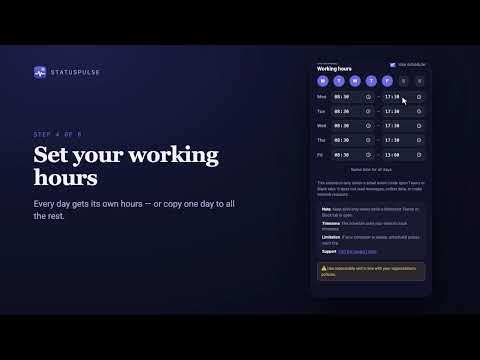
StatusPulse is a lightweight Chrome and Edge extension that keeps your Microsoft Teams and/or Slack presence status "Available" (green) instead of dropping to "Away" or "Idle" — while you're still actually working, just not touching the mouse or keyboard for a while. Enable either platform, or both at once. It works by periodically nudging each platform's own activity/idle detection with a small, harmless signal on a schedule you control. No bots, no fake clicks inside Teams or Slack themselves — just enough activity that the tab doesn't look abandoned. FEATURES • On/off toggle — pause or resume keeping your status active any time • Independent Microsoft Teams and Slack toggles — enable one or both • Live status cards showing how many Teams/Slack tabs are currently open, plus a one-click "Open Teams/Slack Web" button when none are • Configurable activity interval (every 1–30 minutes) so you control how often the presence pulse fires • Per-day working-hours schedule — each day gets its own on/off toggle and its own start/end time, plus a "same time for all days" shortcut • "Test now" button to confirm the pulse is working immediately, no waiting for the next scheduled run • Works with teams.microsoft.com and teams.live.com (work/school and personal Microsoft accounts) and app.slack.com / *.slack.com • Available in English, German, Bengali, French, and Dutch • Everything runs and stays on your device — no account, no server, no setup wizard PRIVACY StatusPulse does not collect any data, does not make network requests, and does not read the content of any page — Teams or Slack messages, calls, and files stay completely untouched. Your settings are stored locally in the browser via chrome.storage.local; nothing is ever synced or sent anywhere. Full privacy policy: https://gist.github.com/rifatwahid/3b7558398e6cd29793c61128a8a78613 DISCLAIMER StatusPulse is an independent, unofficial utility. It is not affiliated with, endorsed by, or sponsored by Microsoft or Slack Technologies. "Microsoft Teams" is a trademark of Microsoft Corporation. "Slack" is a trademark of Slack Technologies, LLC.

Details

  • Version
    1.1.1
  • Aktualisiert
    28. Oktober 2026
  • Angeboten von
    Rifat Wahid Alif
  • Größe
    39.39KiB
  • Sprachen
    5 Sprachen
  • Entwickler
    E-Mail
    rifat3280@gmail.com
  • Kein Händler
    Dieser Entwickler hat sich nicht als Händler deklariert. Für Verbraucher in der Europäischen Union gelten die Verbraucherrechte nicht für Verträge, die zwischen dir und diesem Entwickler geschlossen werden.

Datenschutz

Erweiterungen verwalten und Informationen zur Verwendung in deiner Organisation abrufen
Der Entwickler hat offengelegt, dass keine deiner Daten erhoben oder genutzt werden. Weitere Informationen findest du in der privacy policy des Entwicklers.

Dieser Entwickler erklärt, dass deine Daten

  • nicht an Dritte verkauft werden, außer in den genehmigten Anwendungsfällen
  • nicht für Zwecke genutzt oder übertragen werden, die nichts mit der Hauptfunktionalität des Artikels zu tun haben
  • nicht zur Ermittlung der Kreditwürdigkeit oder für Darlehenszwecke verwendet oder übertragen werden

Support

Wenn du Probleme, Fragen oder Vorschläge hast, rufe die Supportwebsite des Entwicklers auf

Ähnliche

Teams Availability Scheduler

5,0

Schedule and maintain your Microsoft Teams availability status

Keep Status On

5,0

Hilft, in Slack und Microsoft Teams gleichzeitig online zu bleiben – mit separater Tab-Steuerung und Wochenplänen.

Stay Green on Teams

0,0

Keeps your Microsoft Teams status Available during focused work, with an optional weekly schedule. Not affiliated with Microsoft.

Always On Teams

4,7

Prevents the system from sleeping and keeps Microsoft Teams active.

OnlineHours Connector

5,0

Connect Slack, ClickUp or Google Chat to OnlineHours with a private code, or open Microsoft Teams setup.

AtDesk — Focus Mode

0,0

Keeps your Slack & Teams status active during meetings and focused work. No account needed.

Slack Green - Background Mouse Jiggler for Slack and Teams Active Status

5,0

Stay green on Slack and Microsoft Teams. Teams for the web stays Available after you close its tab, and one dashboard runs both.

Mouse Juggler

5,0

Keeps Microsoft Teams Active. Icon turns green when active, orange when inactive.

AlwaysOn - Keep MS Teams Alive

0,0

Keep your Microsoft Teams status green/available even when the tab is not in focus

Teams Always On - 2026

0,0

Never go 'Away' in Microsoft Teams. Keep your status active automatically.

Always Online — Teams & Slack Status Keeper

5,0

Keep your Microsoft Teams & Slack status active and green. Smart presence with weekly schedule and meeting-aware pause.

Teams Caffeine

5,0

Keep your Microsoft Teams active and prevent timeout or away status.

Teams Availability Scheduler

5,0

Schedule and maintain your Microsoft Teams availability status

Keep Status On

5,0

Hilft, in Slack und Microsoft Teams gleichzeitig online zu bleiben – mit separater Tab-Steuerung und Wochenplänen.

Stay Green on Teams

0,0

Keeps your Microsoft Teams status Available during focused work, with an optional weekly schedule. Not affiliated with Microsoft.

Always On Teams

4,7

Prevents the system from sleeping and keeps Microsoft Teams active.

OnlineHours Connector

5,0

Connect Slack, ClickUp or Google Chat to OnlineHours with a private code, or open Microsoft Teams setup.

AtDesk — Focus Mode

0,0

Keeps your Slack & Teams status active during meetings and focused work. No account needed.

Slack Green - Background Mouse Jiggler for Slack and Teams Active Status

5,0

Stay green on Slack and Microsoft Teams. Teams for the web stays Available after you close its tab, and one dashboard runs both.

Mouse Juggler

5,0

Keeps Microsoft Teams Active. Icon turns green when active, orange when inactive.

Google-Apps