

Status Keeper

Overview
Keeps your web chat status from switching to Away by simulating light mouse activity in the open tab.
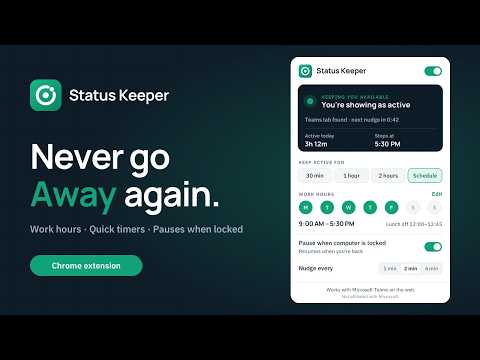
Status Keeper stops your status from flipping to Away when you step back from the keyboard for a few minutes, for example while reading a long document, on a phone call, or watching a training video. It only runs during the hours you choose. What it does: - Work hours: pick your days, start and end time, and a lunch break. Status Keeper starts and stops by itself. - Quick timers: keep your status active for 30 minutes, 1 hour or 2 hours, then it goes back to your schedule. - Pauses when your computer is locked, and resumes when you unlock it. - Choose how often it nudges: every 1, 2 or 4 minutes. - Shows what it is doing right now, when it stops, and how long it has been active today. - Light and dark mode. How it works: it sends a small, harmless mouse movement to the open chat tab at the interval you choose. It runs only on that page. Privacy: no account, no sign-in, no data collected. Your settings are stored only in your browser. Compatibility: works with Microsoft Teams in the browser. Status Keeper is an independent project. It is not affiliated with, endorsed by, or sponsored by Microsoft Corporation. Microsoft Teams is a trademark of Microsoft Corporation.
0 out of 5No ratings
Details
- Version1.2
- UpdatedNovember 7, 2026
- Offered byDjib-Payroll
- Size427KiB
- LanguagesEnglish (United States)
- DeveloperAbdallah Taha Mohamed
37 Guadalcanal St Brunswick, ME 04011-2735 USEmail
support@djib-payroll.comPhone
+1 207-409-7887 - TraderThis developer has identified itself as a trader per the definition from the European Union and committed to only offer products or services that comply with EU laws.
Privacy

This developer declares that your data is
- Not being sold to third parties, outside of the approved use cases
- Not being used or transferred for purposes that are unrelated to the item's core functionality
- Not being used or transferred to determine creditworthiness or for lending purposes
Support
For help with questions, suggestions, or problems, please open this page on your desktop browser