

StaticShot - Screenshot, Annotate & Share

Prezentare generală
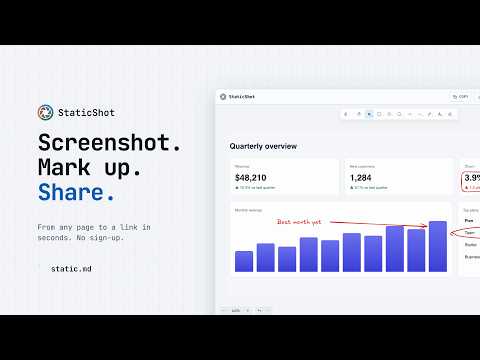
Capture any page, mark it up and share a link in seconds. Save as an image or a markdown note. No sign-up.
Capture any page, mark it up and share it. No sign-up, no watermark, no ads. HOW IT WORKS 1. Click the StaticShot icon, or press Alt+Shift+S (Option+Shift+S on a Mac). 2. Drag to select an area, or press Space for the whole view. 3. Mark it up with arrows, boxes, text and freehand. 4. Copy the image, download a PNG, upload it for a link, or save it as a markdown note. WHAT YOU GET • Arrows, rectangles, circles, lines, freehand and text • Move, resize or restyle anything you've drawn, with full undo and redo • Copy the finished image to your clipboard • Download a PNG to your computer • Upload to static.md and get a link you can send to anyone • Save as a markdown note on static.md, ready to edit and share PRIVATE BY DEFAULT StaticShot runs only when you click it or use the shortcut. It has no access to the sites you visit the rest of the time. Copy and Download stay on your computer, and nothing leaves your browser until you choose Upload or Save as note. Anything you upload or save opens for anyone with its link, so skip those for sensitive screens. NEW IN 2.1 • A cleaner editor that gives your screenshot the whole tab • Copy image button • Keyboard shortcut: Alt+Shift+S (Option+Shift+S on a Mac) • Upload opens a gallery page with a link to share • No more permission for the sites you visit • Very large captures no longer fail MORE FROM STATIC.MD Notes, whiteboards and image hosting in one place. Connect Claude, ChatGPT or another AI assistant so it can read and write your notes: https://static.md/agents Open source: https://github.com/static-md/chromium-extension
4,7 din 528 de evaluări
Detalii
- Versiune2.1.0
- Data ultimei actualizări10 noiembrie 2026
- Dimensiune15.63MiB
- LimbiEnglish
- DezvoltatorSite
E-mail
salut@static.md - Non-comerciantDezvoltatorul nu s-a identificat drept comerciant. Pentru consumatorii din Uniunea Europeană, reține că este posibil ca drepturile consumatorilor să nu se aplice contractelor încheiate între tine și acest dezvoltator.
Confidențialitate

StaticShot - Screenshot, Annotate & Share a divulgat informațiile următoare privind colectarea și folosirea datelor. Mai multe informații detaliate sunt disponibile în pagina dezvoltatorului: privacy policy.
StaticShot - Screenshot, Annotate & Share gestionează următoarele:
Acest editor declară că datele:
- nu sunt vândute terților în alte scopuri decât pentru situațiile de folosire aprobate.
- nu sunt folosite sau transferate în scopuri care nu au legătură cu funcțiile principale ale articolului;
- nu sunt folosite sau transferate pentru a stabili solvabilitatea sau în scopuri de împrumut.
Asistență
Pentru ajutor în legătură cu întrebări, sugestii sau probleme, deschide această pagină în browserul pentru computer