

StaticShot - Screenshot, Annotate & Share

Overview
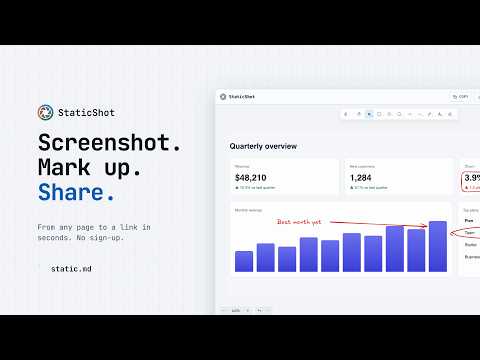
Capture any page, mark it up and share a link in seconds. Save as an image or a markdown note. No sign-up.
Capture any page, mark it up and share it. No sign-up, no watermark, no ads. HOW IT WORKS 1. Click the StaticShot icon, or press Alt+Shift+S (Option+Shift+S on a Mac). 2. Drag to select an area, or press Space for the whole view. 3. Mark it up with arrows, boxes, text and freehand. 4. Copy the image, download a PNG, upload it for a link, or save it as a markdown note. WHAT YOU GET • Arrows, rectangles, circles, lines, freehand and text • Move, resize or restyle anything you've drawn, with full undo and redo • Copy the finished image to your clipboard • Download a PNG to your computer • Upload to static.md and get a link you can send to anyone • Save as a markdown note on static.md, ready to edit and share PRIVATE BY DEFAULT StaticShot runs only when you click it or use the shortcut. It has no access to the sites you visit the rest of the time. Copy and Download stay on your computer, and nothing leaves your browser until you choose Upload or Save as note. Anything you upload or save opens for anyone with its link, so skip those for sensitive screens. NEW IN 2.1 • A cleaner editor that gives your screenshot the whole tab • Copy image button • Keyboard shortcut: Alt+Shift+S (Option+Shift+S on a Mac) • Upload opens a gallery page with a link to share • No more permission for the sites you visit • Very large captures no longer fail MORE FROM STATIC.MD Notes, whiteboards and image hosting in one place. Connect Claude, ChatGPT or another AI assistant so it can read and write your notes: https://static.md/agents Open source: https://github.com/static-md/chromium-extension
4.7 out of 528 ratings
Details
- Version2.1.0
- UpdatedNovember 10, 2026
- Size15.63MiB
- LanguagesEnglish
- DeveloperWebsite
Email
salut@static.md - Non-traderThis developer has not identified itself as a trader. For consumers in the European Union, please note that consumer rights do not apply to contracts between you and this developer.
Privacy

StaticShot - Screenshot, Annotate & Share has disclosed the following information regarding the collection and usage of your data. More detailed information can be found in the developer's privacy policy.
StaticShot - Screenshot, Annotate & Share handles the following:
This developer declares that your data is
- Not being sold to third parties, outside of the approved use cases
- Not being used or transferred for purposes that are unrelated to the item's core functionality
- Not being used or transferred to determine creditworthiness or for lending purposes
Support
For help with questions, suggestions, or problems, please open this page on your desktop browser