


總覽
Find and fix compliance issues in record time with automated checks and smart suggestions.
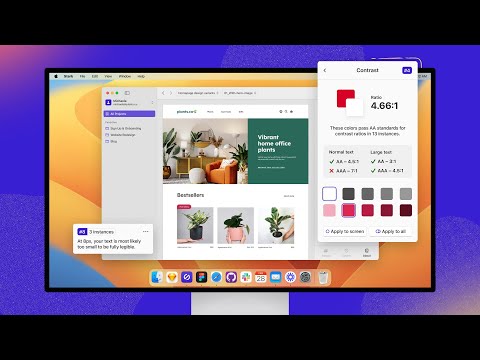
Tired of manually checking spreadsheets, messy handovers, and expensive retrofitting? The all-new Stark Suite is a powerful combination of integrated tools that help you streamline your accessibility workflow. Now, you can create and test accessible software in record time. Whether you’re building a website, online shop, mobile app, or SaaS product, Stark gives every designer, engineer, PM, and QA expert the manual and automated tools to make it accessible with ease. With tools like Contrast Checker, Focus Order, Alt-Text Annotations, Vision Simulator, and more all in one place, you can find accessibility issues in a design before it goes into production—or quickly analyze and fix what’s already in flight. Get started for free today! What’s New We’re thrilled to introduce the all-new Stark Suite, a powerful combination of fully redesigned plugins, even more browser extensions, and all-new tools to streamline you and your team’s accessibility workflow. New tools include: Alt-Text Annotations, Typography Analysis, Touch Targets and more. Contrast Checker with Color Suggestions Check your contrast ratios and get smart color suggestions to ensure your design always adheres to WCAG AA or AAA requirements. Vision Simulator Simulate what your design may look like for people with different types of vision, including 4 different forms of color blindness and 6 other forms of impaired vision. Landmarks and Focus Order Design for easy navigation with Landmarks and Focus Order, allowing anyone to experience your product with screen readers and other assistive technologies. Alt-Text Annotations Get actionable tips for writing alt text optimized for screen-reading tools and even SEO ranking with search engines like Google. We’ll even let you know when an image is decorative and doesn’t require alt text. Typography Analysis Analyze the topography in a design to check that your selected fonts are legible and readable for people with different vision types. Touch Targets Create touch targets large enough for everyone to complete tasks in your web and mobile interfaces with a tap. Live Preview Everything you change, fix or update in Stark reflects directly in your design for maximum efficiency. With Live Preview you can test accessible contrast updates, color suggestions and font-sizes directly in your browser using your live code. Let Stark help you streamline your workflow to get your team to long-term, sustained accessibility compliance faster. Learn more about us at https://getstark.co
3.8 分 (滿分 5 分)19 個評分
詳細資料
隱私權

這位開發者就你的資料做出下列聲明:
- 除經核准的用途外,不會將你的資料販售給第三方
- 不會基於與商品核心功能無關的目的,使用或轉移資料
- 不會為了確認信用度或基於貸款目的,使用或轉移資料
支援
如有疑問或建議,請使用電腦版瀏覽器開啟這個頁面