

Stark Accessibility Checker

Tổng quan
Find and fix compliance issues in record time with automated checks and smart suggestions.
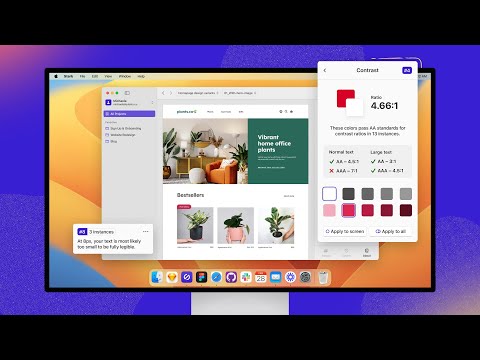
Tired of manually checking spreadsheets, messy handovers, and expensive retrofitting? The all-new Stark Suite is a powerful combination of integrated tools that help you streamline your accessibility workflow. Now, you can create and test accessible software in record time. Whether you’re building a website, online shop, mobile app, or SaaS product, Stark gives every designer, engineer, PM, and QA expert the manual and automated tools to make it accessible with ease. With tools like Contrast Checker, Focus Order, Alt-Text Annotations, Vision Simulator, and more all in one place, you can find accessibility issues in a design before it goes into production—or quickly analyze and fix what’s already in flight. Get started for free today! What’s New We’re thrilled to introduce the all-new Stark Suite, a powerful combination of fully redesigned plugins, even more browser extensions, and all-new tools to streamline you and your team’s accessibility workflow. New tools include: Alt-Text Annotations, Typography Analysis, Touch Targets and more. Contrast Checker with Color Suggestions Check your contrast ratios and get smart color suggestions to ensure your design always adheres to WCAG AA or AAA requirements. Vision Simulator Simulate what your design may look like for people with different types of vision, including 4 different forms of color blindness and 6 other forms of impaired vision. Landmarks and Focus Order Design for easy navigation with Landmarks and Focus Order, allowing anyone to experience your product with screen readers and other assistive technologies. Alt-Text Annotations Get actionable tips for writing alt text optimized for screen-reading tools and even SEO ranking with search engines like Google. We’ll even let you know when an image is decorative and doesn’t require alt text. Typography Analysis Analyze the topography in a design to check that your selected fonts are legible and readable for people with different vision types. Touch Targets Create touch targets large enough for everyone to complete tasks in your web and mobile interfaces with a tap. Live Preview Everything you change, fix or update in Stark reflects directly in your design for maximum efficiency. With Live Preview you can test accessible contrast updates, color suggestions and font-sizes directly in your browser using your live code. Let Stark help you streamline your workflow to get your team to long-term, sustained accessibility compliance faster. Learn more about us at https://getstark.co
3,8/520 lượt xếp hạng
Chi tiết
- Phiên bản2.31.2
- Đã cập nhật26 tháng 11, 2025
- Kích thước2.42MiB
- Ngôn ngữEnglish (United States)
- Nhà phát triểnStark Lab, IncTrang web
100 Overlook Center 2nd Floor Princeton, NJ 08540 USEmail
chrome@getstark.coĐiện thoại
+1 402-709-6501 - Người bán thương mạiTheo định nghĩa của Liên minh Châu Âu, nhà phát triển này đã tự nhận mình là người bán và cam kết chỉ cung cấp những sản phẩm hoặc dịch vụ tuân thủ luật pháp của Liên minh Châu Âu.
- D-U-N-S117043537
Quyền riêng tư
Nhà phát triển này tuyên bố rằng dữ liệu của bạn
- Không được bán cho bên thứ ba, ngoài những trường hợp sử dụng đã được phê duyệt
- Không được sử dụng hoặc chuyển nhượng cho các mục đích không liên quan đến chức năng chính của mặt hàng
- Không được sử dụng hoặc chuyển nhượng để xác định khả năng thanh toán nợ hoặc phục vụ mục đích cho vay
Hỗ trợ
Nếu bạn có câu hỏi, ý kiến đề xuất hoặc gặp vấn đề, vui lòng mở trang này bằng trình duyệt dành cho máy tính để được trợ giúp