

Stargame Studio Modern New Tab

Overview
A clean, glassmorphic new tab dashboard with templates, scaling, custom names, and quick links.
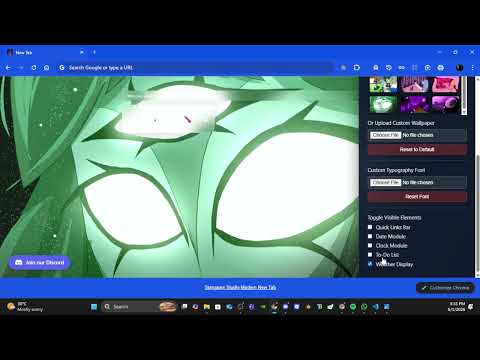
STARGAME STUDIO MODERN NEW TAB Transform your daily browsing experience into a beautifully clean, minimalist, and ultra-premium workspace. OVERVIEW Every time you open a new tab, you are often met with visual clutter, chaotic search engine fields, or uninspired factory defaults. Stargame Studio Modern New Tab completely replaces the noise with a stunning, high-performance glassmorphic desktop environment. Designed specifically for digital creators, developers, designers, and students who thrive in clean aesthetic settings, this extension seamlessly blends cutting-edge visual layouts with raw daily utility. Whether you want to build a high-contrast environment to stay focused during long programming sessions, dive into a cozy cyberpunk productivity hub, or keep a completely blank, distraction-free interface, this extension adapts precisely to your workflow. CORE VISUAL ENGINE & DESIGN ETHOS • THE GLASSMORPHIC ARCHITECTURE At the heart of the extension is a carefully curated glassmorphism layout. Widgets, to-do listings, and greeting cards float seamlessly over your background with adjustable blurred backdrops, soft drop shadows, and responsive frosted borders. The user interface dynamically adapts to whatever wallpaper you throw at it, maintaining perfect reading contrast and giving your browser a native, standalone desktop-application feel. • TOTAL VISUAL SCALING CONTROL No two monitors are built alike. Whether you are running a compact laptop display or a massive 4K widescreen desktop monitor, our responsive UI scaling engine ensures your dashboard looks identical across every screen. Using the custom configuration slider, you can upscale or downscale the entire dashboard interface fluidly from 50% to 150% size. Keep widgets tiny to maximize screen real estate, or size them up for a bold, command-center aesthetic. • DYNAMIC LOCAL BACKGROUNDS Take total control over your theme. Upload any high-definition image directly from your local drive to set your permanent backdrop. Our dynamic background system runs fully client-side, meaning high-resolution wallpapers are cached safely within your browser's allocated local storage and render instantaneously the exact split-second you launch a new tab. MODULAR WIDGET SYSTEM (YOU DESIGN THE LAYOUT) Every visual component on the screen is entirely modular. Don't use to-do lists? Turn them off. Want a pure clock sheet? Hide everything else. You can toggle individual elements on or off in a single click to create the exact layout you need: • THE DIGITAL TIMEKEEPER & CALENDAR A high-readability digital clock engine tracking hours, minutes, and AM/PM alongside a clean, modern date widget. Perfect for tracking deadlines at a glance without breaking your creative focus. • INTEGRATED ARCHITECTURE TO-DO SYSTEM Never lose track of your tasks again. The built-in to-do list allows you to effortlessly type out daily milestones, check off completed goals, and manage your priorities right inside your tab. It serves as a persistent scratchpad that remembers exactly where you left off, helping you transition smoothly between deep work sessions. • CUSTOM USER GREETING ENGINE Make your browser truly yours. The dashboard features a personalized greetings module that natively addresses you by your custom nickname or handle. Change your identity or studio tag directly inside the quick-config menu at any time. • FAST-ACCESS QUICK LINKS Instantly navigate to your most critical digital destinations. Keep your primary developer consoles, design platforms, or community servers exactly one click away, cleanly organized inside an aligned glass panel. THE PERFORMANCE & PRIVACY BLUEPRINT We believe your personal browser data belongs entirely to you. Many modern extensions track your behavior, log your search history, or call massive external servers that slow down page loads. Stargame Studio operates under a radical zero-tracking policy. • 100% LOCAL PROCESSING Every single line of configuration data—from your custom nickname and widget visibility toggles to your tasks and uploaded wallpapers—is processed exclusively inside your machine using secure storage APIs. • ZERO EXTERNAL DEPENDENCIES Because our extension uses pure, optimized vanilla code without loading bulky remote frameworks or external script files, new tabs render with blistering speed. There are no tracking scripts, no third-party data analytics, and zero tracking cookies. • LIGHTNING-FAST COLD LOADS We have engineered out the "Flash of Unstyled Content" completely. The styling layers and local storage retrievals are synced beautifully, ensuring that your background, layout presets, and custom scaling configurations reveal themselves smoothly and instantaneously upon tab initialization. No blinding white flashes—just instant access. HOW TO CONFIGURE YOUR WORKSPACE Getting your dashboard pixel-perfect takes less than thirty seconds: Open a new tab to load the Stargame Studio workspace. Click the configuration menu gear icon to open the customization drawer. Type in your custom nickname or studio identifier. Adjust the scaling slider to find the perfect size for your monitor display. Toggle the individual visibility switches for the clock, date, links, and to-do list until the layout matches your exact taste. Drop in your favorite background template or local image file. Close the drawer and enjoy your beautiful new digital environment. FREQUENTLY ASKED QUESTIONS Q: Does this extension track my browser activity or search history? A: Absolutely not. The extension does not read your browsing history, monitor your active tabs, or inject any external tracking components. Everything stays safe and isolated on your personal computer. Q: Why does the extension ask for "Unlimited Storage" permissions? A: When you upload massive, ultra-high-definition wallpapers (like 4K or 8K backgrounds), regular browser memory caps can sometimes forcefully wipe them out to save space. We use this permission to protect your setup, guaranteeing that your favorite images and your detailed to-do lists will never be randomly cleared by Chrome. Q: Can I use this completely offline? A: Yes! Because all code logic, icons, and layout algorithms are fully bundled inside the download package, the dashboard works perfectly even if you are entirely disconnected from the internet. Q: How do I backup or transfer my settings? A: Your settings are bound securely to your specific local Google Chrome browser profile. As long as you are logged into your profile, your setup stays intact. ABOUT STARGAME STUDIO Stargame Studio is an independent development crew focused on building beautiful, ultra-functional digital spaces. We design software, tools, and visual ecosystems with a profound appreciation for modern UI aesthetics, high responsiveness, and raw performance. Thank you for installing our creation and supporting independent development! VERSION 1.1 CHANGELOG & PATCH NOTES • Visual Optimization: Implemented an asynchronous storage opacity wrapper to eliminate the 0.1-second unstyled background flash on high-speed page refreshes. • Stability Fixes: Resolved a script-level reference wrapper anomaly to ensure continuous error-free widget layout caching. • Layout Refinement: Optimized text scaling boundaries inside the local to-do rendering loop for improved readability across ultra-wide monitors. • Asset Integration: Implemented native, high-contrast local icon matrices across the extension dashboard and toolbar layout.
0 out of 5No ratings
Details
- Version1.1
- UpdatedJune 2, 2026
- Offered bystargamestudioofficial
- Size23.86KiB
- LanguagesEnglish
- Developer
Email
stargamestudioofficial@gmail.com - Non-traderThis developer has not identified itself as a trader. For consumers in the European Union, please note that consumer rights do not apply to contracts between you and this developer.
Privacy

This developer declares that your data is
- Not being sold to third parties, outside of the approved use cases
- Not being used or transferred for purposes that are unrelated to the item's core functionality
- Not being used or transferred to determine creditworthiness or for lending purposes
Support
For help with questions, suggestions, or problems, please open this page on your desktop browser