

StampLens — timestamp converter

Overview
Select any timestamp or date on a page and see it in your time zone: Unix s/ms/µs/ns, ISO 8601, RFC 2822, log formats.
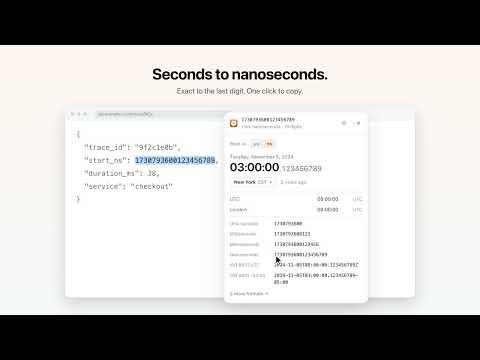
StampLens turns any timestamp on any page into a time you can read — in your time zone. Select a Unix timestamp, an ISO date or a log line, and a small card appears next to it: • the time in your default time zone, with the date and how long ago it was • the same moment in UTC and any other zones you add • every format, one click to copy: Unix seconds, milliseconds, microseconds, nanoseconds, ISO 8601 (UTC and local), RFC 2822, SQL It reads what logs and APIs actually write: • Unix timestamps in s, ms, µs and ns — chosen by length, switchable in one click (19-digit nanoseconds stay exact) • ISO 8601 / RFC 3339, RFC 2822 and HTTP dates, JavaScript Date strings, Unix `date` output • timestamps inside log lines — web server, system and application logs • MM/DD vs DD/MM — both readings offered when a date is ambiguous • Chinese dates such as 2024年11月5日 下午4点 • MongoDB ObjectIds, UUID v1/v7 and ULIDs (their creation time) No time zone in the text? StampLens says so, reads it in your default zone, and lets you switch with one click. Also included: • A toolbar converter: the current Unix time, and a box to paste anything into • Right-click → Convert, and a keyboard shortcut (Alt+Shift+E, ⌥⇧E on Mac) • Choose how the card appears: right away, a small button first, or only while Alt/Option is held • Light and dark appearance • Optional Keepware account: sign in with Google to use the same settings in every browser Private by design: StampLens looks only at the text you select, checks it on your computer and never sends it anywhere. No analytics, no ads. Free, from Keepware — small, focused software. https://www.keepware.dev
0 out of 5No ratings
Details
- Version0.1.0
- UpdatedNovember 9, 2026
- Offered byKeepware
- Size89.48KiB
- Languages2 languages
- Developer
Email
hello@keepware.dev - Non-traderThis developer has not identified itself as a trader. For consumers in the European Union, please note that consumer rights do not apply to contracts between you and this developer.
Privacy

StampLens — timestamp converter has disclosed the following information regarding the collection and usage of your data. More detailed information can be found in the developer's privacy policy.
StampLens — timestamp converter handles the following:
This developer declares that your data is
- Not being sold to third parties, outside of the approved use cases
- Not being used or transferred for purposes that are unrelated to the item's core functionality
- Not being used or transferred to determine creditworthiness or for lending purposes
Support
For help with questions, suggestions, or problems, please open this page on your desktop browser