


Overview
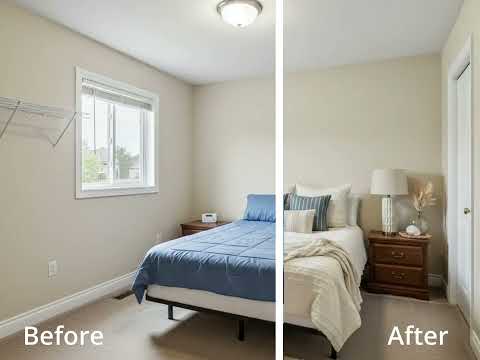
Right-click any listing photo to instantly stage it with StageVirtually.
Transform Empty Listings into Dream Homes with a Single Right-Click. Are you tired of staring at cold, empty, and uninspiring listing photos? Do you know that an empty property sits on the market longer and sells for less? The problem is, traditional home staging is a nightmare. It’s expensive (costing thousands of dollars), time-consuming (taking weeks to coordinate), and a logistical headache (managing furniture, movers, and contracts). Other virtual staging websites force you to break your workflow—you have to download a photo from your MLS or Zillow, go to another website, upload it, wait, and then download it again. What if you could stage any property, from any website, in seconds? Welcome to StageVirtually.com, the revolutionary Chrome extension that puts the power of professional virtual staging directly into your browser. We've eliminated the friction. We've removed the hassle. With our extension, your entire workflow changes. See a listing photo you want to enhance? Whether it’s on your own MLS, Zillow, Redfin, Realtor.com, or even a competitor's site—just right-click, and select "Instantly stage it with StageVirtual." It’s that simple. Your browser is now your design studio. ✨ WHY STAGEVIRTUALLY.COM IS A GAME-CHANGER FOR PROFESSIONALS Our tool is more than just a staging app; it's a complete marketing and sales accelerator built for the speed of modern real estate. UNMATCHED SPEED & CONVENIENCE: Stop wasting time with clunky software. The "right-click" integration means you never have to leave your listing page. Go from an empty room to a stunningly furnished "wow" photo in under a minute. WORKS ON ANY WEBSITE: This is the magic. Our extension works seamlessly across all major real estate portals, your local MLS, and even on your own brokerage or personal websites. If you can see the photo in Chrome, you can stage it. AI-POWERED VIRTUAL DECLUTTERING: Have a messy, tenanted, or cluttered property? Our advanced AI can "empty" the room for you. It intelligently removes existing furniture and clutter, giving you a blank canvas to re-imagine the space. This one feature can save you thousands on re-shoots or physical junk removal. VIRTUAL RENOVATIONS & REPAIRS: Don't just stage—transform. Our tool allows you to perform virtual renovations to show a property's true potential. Change flooring (from old carpet to modern hardwood) Repaint walls with contemporary colors Update kitchen countertops and backsplashes Fix digital cracks or scuffs on the walls MASSIVE, EVER-GROWING STYLE LIBRARY: Don't settle for one-size-fits-all. Our library is packed with thousands of high-end, photorealistic 3D models. Styles: Modern, Scandinavian, Farmhouse, Mid-Century Modern, Traditional, Industrial, Coastal, and more. Categories: Full living room sets, bedroom ensembles, dining areas, home office setups, outdoor patio furniture, and even gym equipment. PHOTOREALISTIC QUALITY: Our rendering engine produces results that are indistinguishable from reality. High-resolution, accurate lighting, and realistic shadows mean buyers won't be looking at "fake" furniture. They'll be looking at their future home. 🚀 HOW IT WORKS: YOUR 3-STEP PATH TO A PERFECT LISTING We believe powerful technology should be simple to use. BROWSE: Navigate to any real estate website (Zillow, Redfin, your MLS, etc.) and find a listing photo of an empty, cluttered, or outdated room. RIGHT-CLICK: Right-click directly on the image you want to stage. Select "Instantly stage it with StageVirtual" from the context menu that appears. DESIGN & DOWNLOAD: The image instantly opens in our powerful editor. Choose a style or let our AI suggest a layout. Drag and drop furniture, or use our "auto-stage" feature. Apply virtual renovations like new paint or flooring. Click "Render," and in seconds, download your new, beautiful, and compelling listing photo. That's it. You're ready to upload the new photo to your MLS, share it on social media, or send it directly to a client. 👥 WHO IS THIS FOR? This tool is built to give a direct competitive advantage to anyone in the property industry. FOR REAL ESTATE AGENTS & REALTORS: Win More Listings: Walk into a listing presentation, right-click the seller's current photos, and show them a staged "after" version on the spot. You've just proven your value and marketing prowess. Sell Homes Faster: Staged homes sell 88% faster and for 20% more than non-staged ones. Stop marketing empty boxes and start selling dream homes. Prospect Like a Pro: See a stale, empty "For Sale By Owner" listing? Right-click, stage it, and email the owner, "This is how I would market your home." You've just opened a door that was closed to everyone else. FOR PROPERTY MANAGERS & LANDLORDS: Fill Vacancies in Record Time: Stop showing cold, empty apartment units. A virtually staged unit attracts more high-quality applicants and helps them visualize their life in the space, leading to faster lease-ups and reduced turnover. FOR INTERIOR DESIGNERS & E-DESIGNERS: Create Instant Mockups: Show your clients your vision on their own photos without moving a single piece of real furniture. It’s the perfect tool for e-design consultations and instant client "wow" moments. FOR REAL ESTATE PHOTOGRAPHERS: Create a High-Value Add-On: Offer a massive upsell to your agent clients. Deliver both the original high-res shots and a complete set of virtually staged images. You can do this from your own office, adding a new, high-margin revenue stream to your business. FOR HOMEOWNERS (FSBO): Compete with the Pros: You don't need a $5,000 staging budget to compete with professionally listed homes. For a tiny fraction of the cost, you can make your property look like a model home and attract a flood of buyer interest. WHY STAGEVIRTUALLY.COM VS. THE OLD WAY? With StageVirtually.com (Our Extension): Cost: Low-cost (from ca $30 per home), subscription-based Speed: SECONDS to start, minutes to finish Workflow: Instant right-click on any site Flexibility: Change styles and furniture instantly Features: Staging, Decluttering, & Renovation With Traditional Staging: Cost: $2,000 - $7,000+ per home Speed: WEEKS of planning Workflow: Logistical nightmare Flexibility: Locked into one look Features: Staging only With Other Staging Websites: Cost: $20 - $50 per photo Speed: DAYS of waiting for turnaround Workflow: Broken: Download, upload, wait Flexibility: Slow revisions and extra fees Features: Staging only GET STARTED TODAY Your competitors are still scheduling movers and paying thousands for staging. You're just a right-click away. Stop marketing properties. Start marketing possibilities. Click the "Add to Chrome" button now to install the StageVirtually.com extension and revolutionize your real estate marketing today.
5 out of 52 ratings
Details
- Version0.1.0
- UpdatedNovember 3, 2025
- Size30.19KiB
- LanguagesEnglish
- DeveloperWebsite
Email
stagevirtually@gmail.com - Non-traderThis developer has not identified itself as a trader. For consumers in the European Union, please note that consumer rights do not apply to contracts between you and this developer.
Privacy

This developer declares that your data is
- Not being sold to third parties, outside of the approved use cases
- Not being used or transferred for purposes that are unrelated to the item's core functionality
- Not being used or transferred to determine creditworthiness or for lending purposes
Support
For help with questions, suggestions, or problems, visit the developer's support site