

StageTimer Pro
1 rating
)
Overview
Professional stage timer for presentations and events
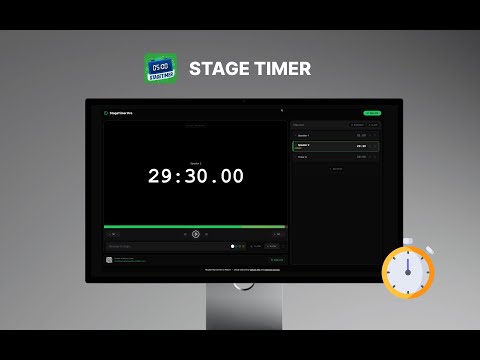
Best stage timer for your event StageTimer Pro is a professional chrome extension digital timer and event management application designed for stage presentations and live productions. Interface and Timer Controls Stage Preview: The central display features a large, high-contrast digital clock (e.g., 05:07.00) on a black background for clear visibility. Playback Dashboard: Includes buttons to play, pause, and skip timers, alongside "+1M" and "-1M" buttons for quick manual time adjustments. Visual Progress: A horizontal green progress bar tracks the duration of the current timer. Message: send message to presenter in screen Timer Management Time List: A dedicated sidebar allows for the creation and sequencing of multiple timers, such as individual slots for "Speaker 2" or specific segments. Status Indicators: Shows the real-time status of each listed timer, including specific durations and whether a timer is currently "PAUSED". Stage Communication On-Screen Messaging: Includes a "Message to stage..." input field that allows operators to send text notes directly to the display. Attention Tools: Features "FLASH" and "SHOW" buttons, with color-coding options (white, green, blue, brown) to emphasize alerts for the speaker. Distribution and Branding Remote Access: Provides a "Stage Display Link" with a "Copy Link" button and a QR code for sharing the timer view with other devices. Visual Identity: The software is represented by a logo featuring a stylized digital clock showing "05:00" set against an abstract blue background with a "STAGETIMER" banner. Creators: The application was designed and built by Olabode Felix and Adebimpe Omolaso.
5 out of 51 rating
Details
- Version0.1.0
- UpdatedDecember 21, 2025
- Size140KiB
- LanguagesEnglish
- Developer2410 STUDIO
Flat 6, 3 bull street, West Bromwich West Bromwich B70 6EU GBEmail
akinyemiolabodefelix@gmail.comPhone
+44 7769 488887 - TraderThis developer has identified itself as a trader per the definition from the European Union and committed to only offer products or services that comply with EU laws.
- D-U-N-S231244878
Privacy

This developer declares that your data is
- Not being sold to third parties, outside of the approved use cases
- Not being used or transferred for purposes that are unrelated to the item's core functionality
- Not being used or transferred to determine creditworthiness or for lending purposes