

Stack & Paste

Overview
Easiest way to stack text snippets and paste them all at once to Notion, Google Docs, etc. No setup required.
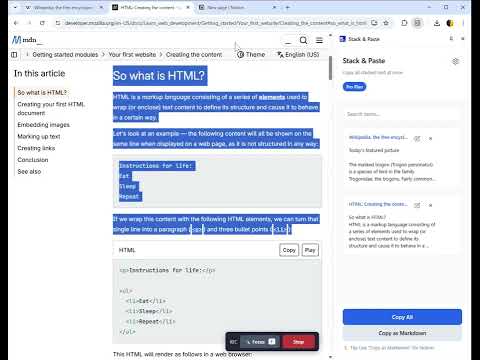
Stack & Paste - The Frictionless Way to Collect and Organize Web Content Stop endless tab switching and copy-pasting one by one. Stack & Paste is the ultimate side-panel companion that lets you "stack" text and images as you browse, organize them, and paste them all at once into Notion, Google Docs, or any other editor. 🚀 How it works: Highlight any text or image on a webpage. Shift + Right-Click (or use the context menu) to instantly stack it. Open the Side Panel to view, edit, and reorder your stacked items. Click "Copy as Markdown" (best for Notion) or "Copy All" (best for Google Docs) to paste everything seamlessly. 🔒 100% Privacy & No Login Required: We value your privacy. All your stacked data is stored securely in your browser's local storage (chrome.storage.local). Your text and images never leave your device. No account setup, no subscriptions, and no tracking. ✨ Free Version Features: Unlimited stacking of text and images (images are saved as URLs to save storage). Fast saving with Shift + Right-Click. Copy as Markdown or Rich Text (HTML). 100% Local Privacy. 💎 Pro Version Features (One-Time Payment): Unlock the full potential of Stack & Paste with a lifetime license! Drag & Drop: Reorder your stacked items freely. Inline Editing: Edit your stacked text directly within the side panel before pasting. Search: Quickly find specific stacked items. Upgrade once, own it forever. Get your lifetime license via Lemon Squeezy and supercharge your workflow today! 💡 Tip for Notion Users: Use the "Copy as Markdown" button for the best formatting experience when pasting into Notion. Support & Contact: If you have any questions or need help, contact us at: support@stackandpaste.com Privacy Policy: https://stackandpaste.com/privacy.html
0 out of 5No ratings
Details
- Version1.0.0
- UpdatedMarch 12, 2026
- FeaturesOffers in-app purchases
- Offered bySeiya Doi
- Size41.15KiB
- LanguagesEnglish
- Developer
Email
sd41594979@gmail.com - Non-traderThis developer has not identified itself as a trader. For consumers in the European Union, please note that consumer rights do not apply to contracts between you and this developer.
Privacy

This developer declares that your data is
- Not being sold to third parties, outside of the approved use cases
- Not being used or transferred for purposes that are unrelated to the item's core functionality
- Not being used or transferred to determine creditworthiness or for lending purposes
Support
For help with questions, suggestions, or problems, visit the developer's support site