

Squint Discover

Overview
Highlight what matters. Snip what doesn't. Discover what's trending. Earth's most efficient browsing experience.
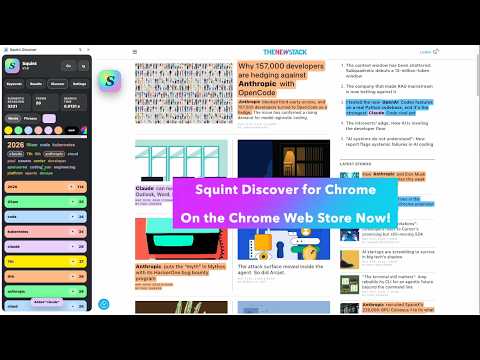
Squint Discover for Chrome — Your Superpower for Every Web Page Discover what's trending. Highlight what matters. Snip what doesn't. Take control as you browse. Squint Discover is the patented, powerful Chrome extension that gives you three superpowers on every web page you visit. Built for news and sports readers, researchers, educators and anyone who wants to own their browsing experience. ✨ Discover — Squint analyzes every page and surfaces the most significant terms in a live, auto-updating word cloud, revealing what a page is really about at a glance. Click the cloud to instantly add a keyword. Right-click the cloud to choose your color. Click the colorful Discover bars and tap 'Find in Page' to instantly jump to your content. Amazing! 🔍 Highlight — Add your own keywords and choose colors. Squint instantly highlights every occurrence on every web page. Or copy entire passages from the page and add them as a keyword — Squint remembers your keywords and highlights them everywhere they appear, on any page you visit. Updates automatically as you browse. Go ahead, use dozens of keywords — Squint handles them all instantly. Track your team across every sports site. Follow a player, a coach, a story. Never miss it. Magic! ⬛ Snip — Black out any content with one click. Anything you are not ready to see. Block sports scores, spoiler alerts, and politicians. Especially politicians! Everything works together through a compact floating Button Strip and a full-featured Chrome Side Panel, running entirely within the browser with no data collection, no accounts, and no external transmission of any kind. Squint works on any website in any language as you browse. Awarded US Patent #10599741 Earth's most efficient browsing. Made for the way YOU read The news junkie tracking three breaking stories at once. The sports fan following their team across every site. The researcher buried in patents and papers. The student studying for an exam. The professional scanning industry news. Squint Discover finds what matters to YOU — instantly, on every page. How It Works Squint is an extension for Chrome — it runs entirely inside your browser and requires no separate installation, no account, and no external software of any kind. After installation, Squint opens as a compact, unobtrusive Button Strip. Single-tap to open/close the button strip. Double-tap to turn Squint on/off. Or just use the instant On/Off button. To access the full-featured Side Panel: in the Extension Toolbar, tap the extension icon and pin 'Squint Discover'. Then tap the 'Squint Discover' icon and choose 'Open Side Panel'. The Side Panel offers the full Squint experience — Keywords, Results, Discover, and Settings. The floating strip gives you instant On/Off and Rescan controls from anywhere on the page. Drag it where you want it, then single-tap the Squint button to open or close the strip. — Scans thousands of page elements in milliseconds — Auto-updates on every page as you browse — Works on news sites, social media, research papers, anywhere — Supports any language on any website — Dark mode, light mode, and auto-theme — Your keywords and settings persist as you browse — Patented technology, trusted and proven — Coffee & Research modes: Coffee highlights in context for easy reading, Research shows precise matches for detail work Privacy is Number One Squint runs entirely in your browser. No data ever leaves your device. No accounts. No tracking. No ads. No worries! Also available for iOS on the Apple App Store — love Squint on all your devices! Built by Big Fish Design LLC. All rights reserved. Questions or feedback? Visit us at facebook.com/SquintBrowser or email bigfishsquintatx@gmail.com Made with ♥ in Austin, TX USA — Y'all!
0 out of 5No ratings
Details
- Version1.0.0
- UpdatedMay 13, 2026
- Offered byBig Fish Design LLC
- Size91.35KiB
- LanguagesEnglish (United States)
- DeveloperBig Fish Design LLC
8804 Appaloosa Run Austin, TX 78737-4013 USEmail
bigfishsquintatx@gmail.comPhone
+1 512-750-5096 - TraderThis developer has identified itself as a trader per the definition from the European Union and committed to only offer products or services that comply with EU laws.
- D-U-N-S071428897
Privacy

This developer declares that your data is
- Not being sold to third parties, outside of the approved use cases
- Not being used or transferred for purposes that are unrelated to the item's core functionality
- Not being used or transferred to determine creditworthiness or for lending purposes
Support
For help with questions, suggestions, or problems, please open this page on your desktop browser