


Overview
Query Google Sheets, CSV or TXT files with SQL. Join, filter, group, sort. 100% local: your data never leaves your browser.
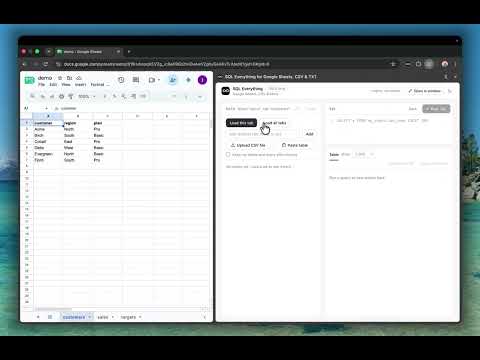
Query Google Sheets, CSV or TXT files with SQL, right inside Chrome. Query your Google Sheets like you query your favorite database. SQL Everything turns your Google Sheets tabs and your CSV or TXT files into database tables. Write standard SQL to filter, group, aggregate and join your data, with no formulas, no exports and no setup. Everything runs on your computer, so your data stays private. YOUR DATA, YOUR WAY • Google Sheets: load one tab or all tabs of any sheet you can open. • CSV files: upload them from your computer, or drag and drop. • Pasted tables: copy cells from a web page, Excel, Numbers or Google Sheets, or a Markdown table or plain text, and paste them in. • TXT and TSV files: comma or tab separated text works too. Use one source or mix them. For example, join a CSV file with a Google Sheet in a single query. WHY SQL EVERYTHING Long spreadsheet formulas are hard to read and hard to check. The built-in QUERY function cannot join tabs, and nested VLOOKUP formulas get messy fast. SQL is shorter, clearer and easier to review. WHAT YOU CAN DO • Query any Google Sheet or file with SQL: SELECT, WHERE, GROUP BY, ORDER BY, window functions and more, powered by the DuckDB engine. • Join tabs together, even tabs from different spreadsheets, in one query. • Upload CSV, TSV or TXT files from your computer, and query them alone or join them with your sheets. • Paste a table you copied from a web page, Excel, Numbers or Google Sheets. The separator (tab, comma, semicolon, pipe or spaces) is detected for you. Check the preview, choose if the first row is the header, turn values like "1,234", "$5" and "(500)" into real numbers, and add the table with one click. • Load one tab or all tabs of a spreadsheet with a single click, add any other tab by its name or gid, or add several files at once. • Refresh one table, or all tables at once, when your sheet changes, to work with the latest data. • Pick up where you left off: your tables and last query come back when you reopen the panel. • Long text in a cell is shortened. One click on a small icon shows the full text, and one more click hides it again. • Sort any result column with one click on its header: ascending, descending or back to the original order. Sorting covers the whole result, not only the rows on screen. • Browse your data in a side tree: spreadsheets, tabs, columns and column types. • Write queries in an editor with line numbers and syntax colors. Run with Ctrl+Enter or Cmd+Enter. • Save queries for each spreadsheet and reuse them later. • Download results as a CSV file, or copy them and paste them straight into Google Sheets. • Need more room? Open the workspace in its own window. There you can pick any Google Sheet that is open in Chrome, or paste a sheet link. • Switch between light and dark theme. HOW IT WORKS 1. Open a Google Sheet and click the extension icon. Or click the icon and use a file from your computer. 2. Press "Load this tab" or "Load all tabs", or press "Upload CSV file" or "Paste table". 3. Write a query, for example: SELECT region, SUM(units * price) AS revenue FROM my_budget.sales GROUP BY region ORDER BY revenue DESC 4. Press Run and see the result as a table. Each spreadsheet is a schema and each tab is a table. A tab named "Sales 2024" in a spreadsheet named "My Budget" is queried as My_Budget.Sales_2024. A file named "My Customers.csv" becomes files.My_Customers. A pasted table becomes pasted.pasted_1, and you can rename it. Click any table or column in the side tree to insert its name into your query. 100% LOCAL AND PRIVATE • Your data goes from Google to your browser, using your own Google login. It is never sent to any other server. • CSV and TXT files you add, and tables you paste, are read by your browser and stay on your computer. Nothing is uploaded. • Queries run on your computer. The database engine (DuckDB) is bundled inside the extension. • Your loaded tables and last query are kept in this browser, so they are still there when you reopen the panel. You can turn this off, and Clear deletes them. • No account, no sign-up and no tracking. • The extension only reads your sheets and files. It never changes them. WHO IT IS FOR Anyone who works with data in Google Sheets or CSV files and knows SQL, or wants to learn it. GOOD TO KNOW • For Google Sheets, you must be signed in to Google with access to the sheet. Files need no login. • Supported files: .csv, .tsv and .txt. • Works on Chrome 116 or newer. • The first row of each tab or file is used as the column names. • A table that comes back when you reopen the panel is a copy from the time you loaded it. Use the refresh icon for the latest sheet data. • The result table shows the first 1,000 rows by default. Use the "Show" menu to see up to all rows. Large results load in batches as you scroll, so "All rows" stays fast. CSV download and copy always include every row, in the order shown on screen. • Names that start with a digit, or that are SQL reserved words, need double quotes. For example: my_budget."2024". • Uploaded files and pasted tables have no refresh button. Upload the file or paste the table again to replace it. • One SQL statement per run. SQL Everything is an independent tool. It is not affiliated with or endorsed by Google. Google Sheets is a trademark of Google LLC.
0 out of 5No ratings
Details
- Version0.1.0
- UpdatedOctober 30, 2026
- Size15.08MiB
- Languages52 languages
- DeveloperWebsite
Email
lu.digital.projects@gmail.com - Non-traderThis developer has not identified itself as a trader. For consumers in the European Union, please note that consumer rights do not apply to contracts between you and this developer.
Privacy

This developer declares that your data is
- Not being sold to third parties, outside of the approved use cases
- Not being used or transferred for purposes that are unrelated to the item's core functionality
- Not being used or transferred to determine creditworthiness or for lending purposes