Item logo image for Spreadsheet Memo

Spreadsheet Memo

spreadsheetmemo.com
4.2(

8 ratings

)
244 users
Item media 4 (screenshot) for Spreadsheet Memo
Item video thumbnail
Item media 2 (screenshot) for Spreadsheet Memo
Item media 3 (screenshot) for Spreadsheet Memo
Item media 4 (screenshot) for Spreadsheet Memo
Item video thumbnail
Item media 2 (screenshot) for Spreadsheet Memo
Item media 3 (screenshot) for Spreadsheet Memo
Item media 4 (screenshot) for Spreadsheet Memo

Overview

The SpreadsheetMemo (https://spreadsheetmemo.com) is a flashcard-based learning web application (combined with the power of Google…

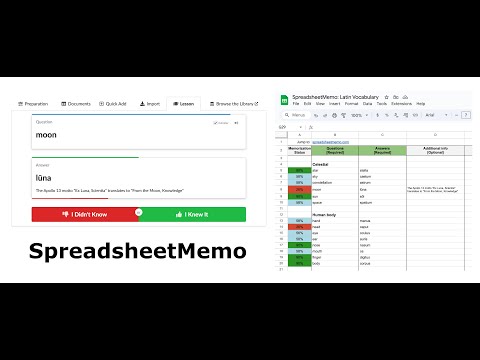
The SpreadsheetMemo (https://spreadsheetmemo.com) is a flashcard-based learning web application (combined with the power of Google Sheets to store your content) that allows you to quickly memorize things. Flashcards can bear vocabulary, major historical dates, chemical element names, math/physics equations or even types of dinosaurs. Simply put, any subject matter that can be learned via a question-and-answer format. Similar to Anki or Super Memo. You can use it for your study, as a preparation tool, knowledge check for one of your exams or to practice new vocabulary. Sky is the limit! See more: YouTube: https://www.youtube.com/watch?v=UReSmwT4O9E (everything you need to know about the SpreadsheetMemo app in one video - pretty old, but still valid :) Facebook: https://www.facebook.com/SpreadsheetMemo (news, helpful tips and updates notifications) X: https://x.com/SpreadsheetMemo The main features and the main goals of the SpreadsheetMemo are: It helps you to memorize things: and it works! Every lesson is composed with two rounds. The goal of the first (initial round) is to check your brain memory's performance (you reveal the answer and subjectively define its difficulty by choosing one of the following: "I knew it" or "I didn't know"). The second round (final round) is to make sure that you have remembered the new or troubling things. The progress of the current round is presented by the progress bars located near the Question/Answer cards. Ability to use the Google Sheet documents to store your data: with all the benefits of Google documents like sharing, editing, printing, etc. Compatible with mobile devices: you can use it on your computer but also on all kinds of your mobile devices. You're not bound to one device. So, whenever you've got some spare time, start the new lesson. You just need a web browser! Multiple documents: you can use as many different document as you want. All according to your needs! You can even use the Named Ranges feature offered by Google Sheets. This is very useful way for slicing your SpreadsheetMemo documents to a smaller parts and describe those parts with friendly names. You can create multiple sheets to help organize your spreadsheet: Embrace the full potential of the Google Sheets document format and organize your content with the use of sheets (e.g. if you're using the SpreadsheetMemo to practice your vocabulary, you can divide your vocabulary lists to: phrasal verbs, idioms, nouns, verbs, etc.). You can even use this ability to perform collaborative learning. Just share your SpreadsheetMemo document with your friends; each can use its own sheet, but the whole content of the document will be shared! You can benefit from each other's experiences and created items. Enjoy this multi-sheet ability and think of how to use it effectively to make your own learning process even better! Responsive: no unnecessary pages loading - clean, quick and simple. You can add links and images to your content: sometimes the words are just not enough. You can add an image or a link to the internet resources to enrich your content. It could be especially useful when you prefer some additional visualization for being able to remember things quicker and better. You can enrich your content by using Wiki Markup - supported types are: Text formatting, Indent text, Lists, Sections, External links, Images and YouTube videos. You can add mathematical equations or formulas using the TeX or AsciiMath notation. Your documents stays with you: by using the standard Google Sheet documents you're able to review and edit their content even without the SpreadsheetMemo app. Secure and safe: all of your documents belongs only to you, no personal info is shared or collected, all connections are made with secure https protocol. No ads or hidden costs: it's all for free! Your privacy is very important and you have the right to remain anonymous. The SpreadsheetMemo is build on the foundations provided by Google (https://developers.google.com/apps-script/) and uses all the benefits of this platform, such as: - integration with Google services (e.g. Google Sheets) - single sign-on (you don't need to remember yet another login/password. Let the Google manage and provide access to other apps, like the one to the SpreadsheetMemo app) - built-in security, stability, scalability and efficiency This app uses the Google Authorization. Thus, when first launched, the SpreadsheetMemo will need your authorization to run. You can read more about it here: https://developers.google.com/apps-script/guides/services/authorization You don't need to know all about this - the most important info is that your email, login, password or any other personal info will NOT be passed to the SpreadsheetMemo. They will always remain your property. Your approval of permissions will let the SpreadsheetMemo operate properly and with full capabilities. And I'm fully aware that all the permissions might look pretty scary at first glance. And that is exactly why I've wrote all of this - trying my best to make you feel safe and making sure that you are well informed. So, let me explain those permissions: · View and manage your spreadsheets in Google Drive · View and manage the files in your Google Drive For being able to find the SpreadsheetMemo documents. This app operates only on SpreadsheetMemo documents, it has no access or even isn't aware of the existence of any other of your Goggle Drive files. And If you don't like this app (something that, I hope, is unlikely going to happen :) ) you can always revoke its accesses (uninstall it). There are two ways to do this: - Just follow the instruction from https://developers.google.com/apps-script/guides/services/authorization#revoking_access_rights - or you can use the Uninstall option provided in the mail that you will receive from Google. It will be sent right after the first launch of the SpreadsheetMemo app. Look for the mail: "More information about SpreadsheetMemo with uninstall instructions." in your inbox. Any documents that you've created will stay in your Google Drive, nothing will be lost. Wrapping things up: remember that all of your documents belongs only to you, you can uninstall this app any time you want, no personal info is shared or collected, your identity (such as email) is and will remain your own property. From the SpreadsheetMemo point of view, you're anonymous. You can find some additional info about the SpreadsheetMemo at the https://www.facebook.com/SpreadsheetMemo page - including news, helpful tips and updates notifications. Jump to the https://spreadsheetmemo.com and start memorizing!

Details

  • Version
    4
  • Updated
    October 7, 2025
  • Size
    7.53KiB
  • Languages
    English
  • Developer
    Website
    Email
    antlightcode@gmail.com
  • Non-trader
    This developer has not identified itself as a trader. For consumers in the European Union, please note that consumer rights do not apply to contracts between you and this developer.

Privacy

The developer has not provided any information about the collection or usage of your data.

Support

Google apps