


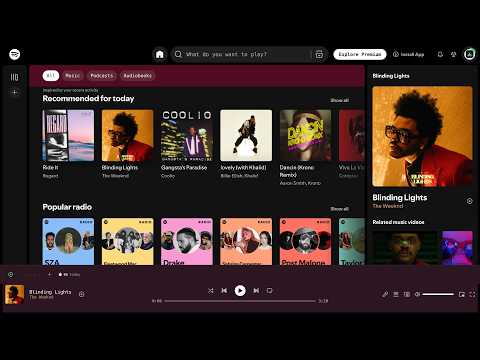
Overview
Adds playback tools, themes, and personal organization to Spotify Web Player. No account, no server, all local.
Spotify Sidekick Spotify Sidekick adds useful tools, themes, and personal features to the Spotify Web Player. Everything runs locally in your browser and no account needed, no data sent anywhere. PLAYBACK TOOLS - Sleep Timer: Automatically pauses music after a set amount of time. A small countdown badge shows how long is left. - Custom Hotkeys: Set your own keyboard shortcuts for play, pause, skip, and more. They won't fire while you're typing in Spotify's search bar. - Session Timer: Tracks how long you've actually been listening each day (only counts when music is playing). - Multi-Tab Sync: Keeps things in sync if you have Spotify open in more than one tab. THEMES AND APPEARANCE - Built-in Themes: Choose from Midnight, Sunset, Forest, Mono, or Custom to change the look of the Spotify web player. - Auto-Theme: Automatically switches between a lighter and darker theme based on the time of day. - Custom CSS: Add your own style rules if you want full control over how Spotify looks. - Cursor Color: Change the color of your mouse cursor while on Spotify. NOW PLAYING - Fullscreen View: Shows a big, clean overlay with album art, track name, and artist for a focused listening experience. - Now Playing Bar Size: Choose between compact, normal, or large sizes for the player bar at the bottom. - Focus Mode: Hides Spotify's side panels so you can focus on just the music. PERSONAL TOOLS - Play Later: Save up to 10 tracks to a personal list so you can come back to them easily. - Weekly Recap: Tracks your listening habits each week and shows you your most played artists and songs once the week is over. - Weekly Recap: At the end of every 7 days, get a summary of your listening habits including your most played artists, most played songs, and total time spent listening that week. SEARCH AND ACCESSIBILITY - Context Search: Right-click any track to search for it on Genius or YouTube directly from Spotify's menu.
5 out of 52 ratings
Details
- Version1.0.1
- UpdatedJune 22, 2026
- Size60.02KiB
- LanguagesEnglish
- DeveloperWebsite
Email
neutrinothink@gmail.com - Non-traderThis developer has not identified itself as a trader. For consumers in the European Union, please note that consumer rights do not apply to contracts between you and this developer.
Privacy

This developer declares that your data is
- Not being sold to third parties, outside of the approved use cases
- Not being used or transferred for purposes that are unrelated to the item's core functionality
- Not being used or transferred to determine creditworthiness or for lending purposes