

SplitDiff: Compare Two Web Pages Side by Side

Overview
Free and private: compare two versions of a web page side by side, with synced scrolling, highlighted changes and a change report.
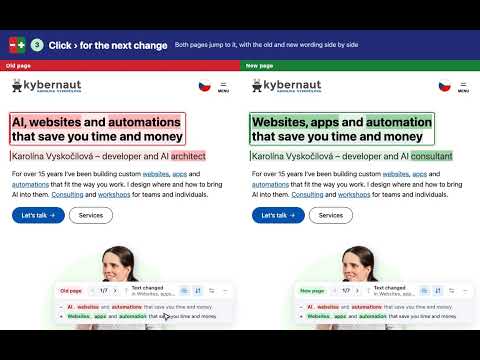
Free, private, no account. SplitDiff shows every change between two versions of a web page, side by side: production against staging or a preview, before and after a redesign, or a page and its translation. Hand your client a clear report of what changed in minutes, not an afternoon of scrolling. • Synced scrolling that matches sections by their headings, so both pages stay aligned even when content was added or removed • Removed text highlighted in red on the old page, added text in green on the new one • A compact review panel: step through every change with ‹ ›, or with keyboard shortcuts, and compare the old and new wording with the changed words marked • A change list in Chrome's side panel, filtered by kind: text, numbers, links, added, removed, images • Follow links: click a link on one page and the other tab opens the matching page • Changed link addresses, even when the link text is the same • Changed images, icons and alt text • Translation check: finds sections missing from one language and numbers that differ, or compare all text word by word • Export a report of all changes as Markdown, plain text or JSON, or copy it as JSON to paste into an AI chat, a ticket or a script • Use Chrome's split view, or simply pick any two tabs; several comparisons can run at once Privacy: everything runs in your browser. SplitDiff makes no network requests, has no account and no tracking, and asks for access only to the two sites you compare. Its panel is sealed off from the pages, so one compared page can't read the other. Permissions: site access is asked when you start a comparison, only for the two sites you compare, and you can revoke it any time in Chrome's extension settings. "Tabs" lets you pick the two pages and notices when a compared tab navigates or closes. "Scripting" runs the comparison in those two tabs. "Storage" keeps the current comparison and your settings on your computer. "Side panel" shows the list of changes. Made by Karolína Vyskočilová, kybernaut.cz. Missing a feature? Write to me at kybernaut.cz/kontakt What's new ---- ## 0.3.24 (2026-11-25) - Comparing two tabs from a third tab now switches to the new page once the comparison is ready. Before, nothing showed where the result went. ## 0.3.23 (2026-11-22) - Initial Chrome Web Store release
0 out of 5No ratings
Details
- Version0.3.23
- UpdatedNovember 26, 2026
- Size91.46KiB
- LanguagesEnglish
- DeveloperKarolína VyskočilováWebsite
Za Pohořelcem 672/15 Praha 6 169 00 CZEmail
karolina@kybernaut.czPhone
+420 737 878 726 - TraderThis developer has identified itself as a trader per the definition from the European Union and committed to only offer products or services that comply with EU laws.
- D-U-N-S367044218
Privacy

SplitDiff: Compare Two Web Pages Side by Side has disclosed the following information regarding the collection and usage of your data. More detailed information can be found in the developer's privacy policy.
SplitDiff: Compare Two Web Pages Side by Side handles the following:
This developer declares that your data is
- Not being sold to third parties, outside of the approved use cases
- Not being used or transferred for purposes that are unrelated to the item's core functionality
- Not being used or transferred to determine creditworthiness or for lending purposes
Support
For help with questions, suggestions, or problems, visit the developer's support site