


Overview
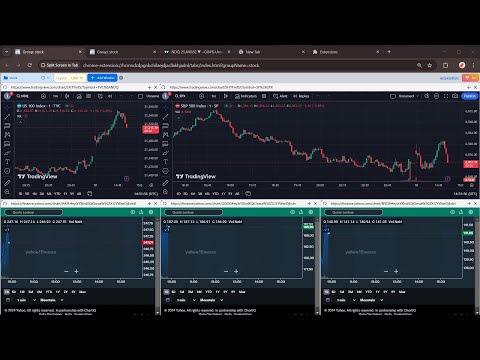
Split View in One Tab! Multitask with ChatGPT, Claude, Gemini, TradingView and more!
Why install? 🌟 Seamless ChatGPT experience 🌟 Take notes while browsing 🌟 Compare documents without switching between tabs 🌟 Gather information from multiple sources while creating content 🌟 Monitor multiple stocks or cryptocurrencies simultaneously 🌟 More... Features 🌟 Side Panel: Open ChatGPT for a seamless AI experience (writing, email replies, image generation, etc.). 🌟 Layout: Horizontal, Vertical, and Custom Drag & Resize layouts. 🌟 Group: Store websites and open them quickly in a tab, like for multiple social media postings. 🌟 Context Menu: Right-click to open the Side Panel, Group, or Template. 🌟 Shortcut: "Ctrl+Shift+S" to open the Side Panel. (Changeable in FAQs.) 🌟 Import Tabs: Quickly import opened tabs 🌟 Open link in Side Panel: right click the link and select the context menu. 🌟 Auto Refresh: Set the time to auto refresh (etc, stock group). FAQs 🤔Is It Free? -- Free Tier already Covers Most Needs.😊💖 -- Upgrade to Pro for more Custom Groups. Go Pro and help us build even more features!💪✨ 🤔Change Shortcut⌨️ -- Use the shortcut button on the top toolbar to manage more. -- Mac shortcut: Command+Shift+S 🤔Security Testing🛡️ -- Here is a link to test that iframe won't be globally cross-origin when using this extension: https://tools.wow2fun.com/splitScreen Normally, you will see 'chatgpt.com' refuse to connect, which indicates enhanced security enforced by the browser. 🤔Need More Help? -- Click the "Visit support hub" below or email me. 📝If you’re happy with our service, please consider leaving us a review below!⭐ Your feedback helps us improve and supports our growth🌱. Thank you!🤝
4.1 out of 58 ratings
Details
- Version2.3.2
- UpdatedAugust 17, 2026
- FeaturesOffers in-app purchases
- Size1.77MiB
- Languages18 languages
- Developer
- Non-traderThis developer has not identified itself as a trader. For consumers in the European Union, please note that consumer rights do not apply to contracts between you and this developer.
Privacy

Split View Pro has disclosed the following information regarding the collection and usage of your data. More detailed information can be found in the developer's privacy policy.
Split View Pro handles the following:
This developer declares that your data is
- Not being sold to third parties, outside of the approved use cases
- Not being used or transferred for purposes that are unrelated to the item's core functionality
- Not being used or transferred to determine creditworthiness or for lending purposes
Support
For help with questions, suggestions, or problems, please open this page on your desktop browser