


개요
Split Long Text for Chat GPT
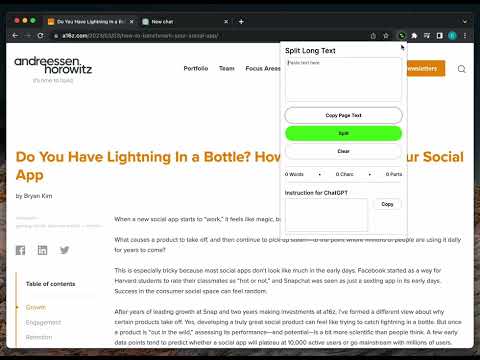
Easily split a long text, and paste each part in your chat with GPT. *** Introducing Split Long Text for Chat GPT – a must-have Chrome extension for all Chat GPT users. If you ever wanted to easily feed long text, over 4000 characters, to your chat with GPT, this extension is the perfect solution to save time and effort. No more struggling to manually divide your text; Split Long Text will do it for you in just a few simple steps. How to use Split Long Text for Chat GPT: 1. Install and open the Split Long Text Chrome extension. 2. Click on the "Copy Page" button to start the process. 3. The extension will automatically divide the long text into manageable parts. 4. Copy each part one by one, and paste it seamlessly into your chat with GPT. Experience the ease and convenience of interacting with your AI model without the character limit constraints. With Split Long Text, you can focus on what matters most – getting valuable insights from your AI-powered conversations. Key Features: • Hassle-free splitting of long text exceeding 4000 characters. • User-friendly interface for quick and easy copying and pasting. • Time-saving solution for an efficient Chat GPT experience. Please note that Split Long Text for Chat GPT is not provided or endorsed by OpenAI. It is an independent extension designed to enhance your Chat GPT user experience. Don't miss out on the opportunity to simplify your Chat GPT interactions. Install the Split Long Text for Chat GPT Chrome extension now and revolutionize the way you engage with your AI model. Click the "Add to Chrome" button and unlock a smoother, more streamlined Chat GPT experience today!
5점 만점에 3.5점평점 16개
세부정보
- 버전1.0
- 업데이트됨2023년 3월 26일
- 제공Split Long Text
- 크기75.96KiB
- 언어English
- 개발자
이메일
splitlongtext@gmail.com - 비판매자판매자로 식별되지 않은 개발자입니다. 유럽 연합에 거주하는 소비자의 경우, 이 개발자와 체결한 계약에 대해서는 소비자 권리가 적용되지 않을 수 있음을 유의해야 합니다.
개인정보 보호

개발자가 사용자 데이터에 관해 다음과 같이 선언했습니다
- 승인된 사용 사례를 제외하고 서드 파티에 판매하지 않음
- 항목의 핵심 기능과 관련 없는 목적으로 사용하거나 전송하지 않음
- 신용도 판단 또는 대출 목적으로 사용하거나 전송하지 않음
지원
질문, 제안 또는 문제와 관련하여 도움이 필요하시면 개발자의 지원 사이트를 방문하세요.