

Spex – Excel Shortcuts for Google Sheets™
1 rating
)
Overview
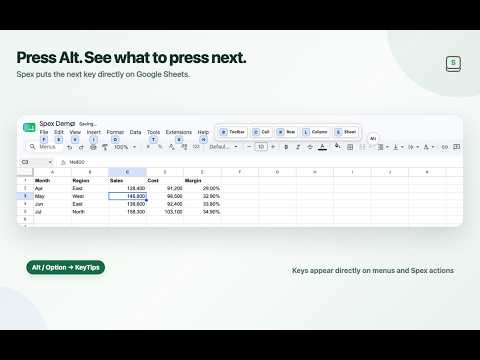
Use Excel-style shortcuts in Google Sheets™ with on-screen KeyTips and unified access to Sheets-native commands.
# Spex Use Excel-style shortcuts in Google Sheets™ without giving up the Google Sheets interface you already use. Spex adds a keyboard-first interaction layer to Google Sheets. Press Alt / Option to start, follow the on-screen KeyTips, and reach commands through staged key sequences instead of repeatedly moving between the keyboard and mouse. ## Highlights - Excel-compatible staged shortcuts for familiar spreadsheet commands - On-screen KeyTips that show the next available key, so you do not have to memorize every sequence up front - A Sheets-native keymap that follows the current Google Sheets menus and contextual controls - Shortcut Reference and settings for finding and adjusting your keyboard workflow - Keyboard access to common row, column, sheet, formatting, and navigation operations - Optional dark mode for the Google Sheets workspace Spex is designed to stay quiet while you work. Help and guidance appear when you explicitly start a Spex interaction or open its reference and onboarding surfaces; normal typing, cell editing, formula editing, and IME input take priority. ## Privacy Spex is focused on keyboard interaction rather than spreadsheet-content analysis. The current version does not include AI spreadsheet analysis, Spex-owned analytics, or telemetry. Spex settings, onboarding state, and limited diagnostic metadata are stored locally by the extension. The diagnostic data model does not include cell values, formulas, spreadsheet URLs, or selection contents. See the Privacy section on the official Spex website for the current data-handling details. Google Sheets is a trademark of Google LLC. Spex is not affiliated with or endorsed by Google.
5 out of 51 rating
Details
- Version0.2.4
- UpdatedOctober 17, 2026
- Offered bykikutadev
- Size239KiB
- Languages2 languages
- Developer
Email
chrome-webstore@kikuta.dev - Non-traderThis developer has not identified itself as a trader. For consumers in the European Union, please note that consumer rights do not apply to contracts between you and this developer.
Privacy

Spex – Excel Shortcuts for Google Sheets™ has disclosed the following information regarding the collection and usage of your data. More detailed information can be found in the developer's privacy policy.
Spex – Excel Shortcuts for Google Sheets™ handles the following:
This developer declares that your data is
- Not being sold to third parties, outside of the approved use cases
- Not being used or transferred for purposes that are unrelated to the item's core functionality
- Not being used or transferred to determine creditworthiness or for lending purposes
Support
For help with questions, suggestions, or problems, please open this page on your desktop browser