

Spend Slow
Overview
Interrupt impulse purchases with mindful friction gates. Save money, shop intentionally.
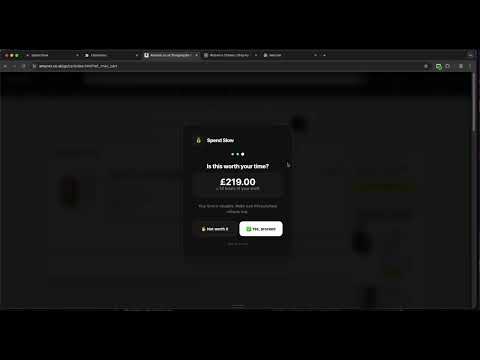
🛒 Stop Impulse Buying. Start Spending Slow. Spend Slow is a mindful shopping companion that helps you pause and reflect before making purchases online. When you visit the checkout page on popular shopping sites, Spend Slow gently asks you three simple questions: ✨ Do you NEED this, or do you WANT this? ✨ Would you still want this in 7 days? ✨ Is this worth X hours of your work? HOW IT WORKS: • Appears automatically on checkout pages • Shows you how many hours you'd have to work to afford the purchase • Tracks your savings and builds a streak when you resist impulse buys • Our extension works on many popular online shopping platforms. FEATURES: 💰 See your monthly savings ⏰ Track hours of work saved 🔥 Build a streak for resisting impulse purchases ⚙️ Set your hourly wage and preferred currency 🌙 Beautiful dark theme design Your data stays private - everything is stored locally on your device. Take control of your spending. One pause at a time.
0 out of 5No ratings
Details
- Version1.1.0
- UpdatedFebruary 3, 2026
- Offered bybobbay
- Size38.89KiB
- LanguagesEnglish (United Kingdom)
- Developer
Email
support@bobbay.com - Non-traderThis developer has not identified itself as a trader. For consumers in the European Union, please note that consumer rights do not apply to contracts between you and this developer.
Privacy

This developer declares that your data is
- Not being sold to third parties, outside of the approved use cases
- Not being used or transferred for purposes that are unrelated to the item's core functionality
- Not being used or transferred to determine creditworthiness or for lending purposes
Support
For help with questions, suggestions, or problems, visit the developer's support site