


Overview
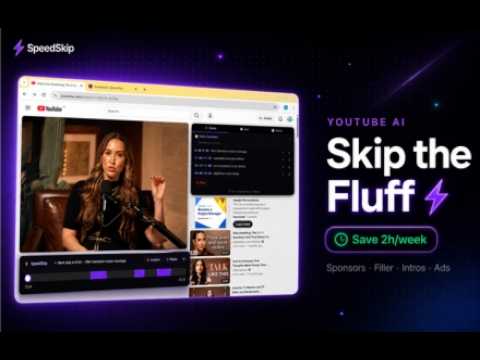
Auto-skip sponsors & filler on YouTube using AI. Chat with any video, get summaries and notes. Save hours every week.
Stop wasting time on YouTube. SpeedSkip uses advanced AI to automatically detect and skip the parts of any video you don't want to watch — sponsors, filler, intros, outros, tangents, and more — so you get straight to the content that actually matters. No more clicking. No more scrubbing. Just watch. ━━━━━━━━━━━━━━━━━━━━━━━━━━━━━━━━━━━━━━━━━━━━━━━━━━━ 🚀 WHAT SPEEDSKIP DOES ━━━━━━━━━━━━━━━━━━━━━━━━━━━━━━━━━━━━━━━━━━━━━━━━━━━ SpeedSkip reads the full transcript of any YouTube video, sends it to an AI model, and gets back a precise list of time ranges to skip. It then automatically jumps over those segments during playback — silently, instantly, and accurately. The result: you watch a 30-minute video in 18 minutes. A 1-hour podcast in 35 minutes. A 2-hour tutorial in under an hour. Without missing a single important moment. ━━━━━━━━━━━━━━━━━━━━━━━━━━━━━━━━━━━━━━━━━━━━━━━━━━━ 🎛️ POWERFUL FILTER MODES — YOU CHOOSE WHAT TO SKIP ━━━━━━━━━━━━━━━━━━━━━━━━━━━━━━━━━━━━━━━━━━━━━━━━━━━ SpeedSkip gives you full control with 20+ intelligent filter modes. Mix and match as many as you want: 🚫 SPONSOR SKIP Automatically detects and skips every sponsored segment, affiliate promotion, and paid partnership. More accurate than SponsorBlock because it uses AI to understand context — not just community timestamps. Catches mid-roll, pre-roll, and post-roll ads. Works on videos that haven't been manually tagged by anyone. 🤖 AI PICK (Recommended) Our most popular mode. The AI identifies everything low-value: intros, outros, subscription asks, filler transitions, repetitive recaps, and off-topic tangents — while protecting every second of real content. Fully automatic, no configuration needed. ⚡ DEEP FOCUS Maximum information density. Removes greetings, small talk, agreement tokens, filler words, and anything that isn't actively advancing knowledge. Perfect for lectures, tutorials, interviews, and educational content where every second counts. 🎯 ESSENCE Distils the video down to its absolute core. The AI identifies the central topic, then aggressively removes everything that isn't directly about it. Targets 40–65% removal. Great for long-form content and podcast episodes. 📊 COMPRESS (Custom %) You set exactly how much of the video to keep — 80%, 60%, 40%, or anything in between. The AI finds enough content to skip to hit your target percentage precisely. Perfect when you want control over how much time you save. 🔬 SUBJECT FOCUS Tell SpeedSkip what you're interested in, and it keeps only the parts of the video directly about that topic. Skip everything else. Great for research, when you're watching a long interview to find one specific discussion, or when a video covers many topics but you only care about one. 🏆 HIGHLIGHTS Keeps only the top 10–20% of the video — the moments that pass the "surprise", "quotable", "revelation", or "turning point" test. The absolute best moments, nothing else. 📚 TUTORIAL MODE For how-to videos and walkthroughs. Keeps every instruction, command, measurement, and demonstration. Skips motivation, backstory, theory that doesn't change how to do the task, and anything that isn't a concrete actionable step. 😂 FUNNY MOMENTS Detects jokes, punchlines, sarcasm, deadpan delivery, banter, and callback humour. Creates a highlight reel of the funniest parts of any video. 🎭 DRAMA Keeps confrontations, shocking revelations, emotional outbursts, confessions, and high-stakes moments. Skips the calm parts in between. 💬 QUOTES Extracts only the standalone, shareable, quotable moments. Statements that work without context — wisdom, hot takes, principles, and memorable one-liners. 📈 FACTS ONLY Keeps segments with specific, verifiable information: numbers, named studies, statistics, technical mechanisms, data points. Skips all opinions, anecdotes, and speculation. 🎮 GAMING HIGHLIGHTS Clutch plays, kill streaks, victory moments, and high-energy reactions only. Skips inventory management, strategy planning, and anything without excitement. ⚽ SPORTS KEY MOMENTS Goals, crucial plays, penalty calls, overtime, and victory announcements. Skips warm-ups, halftime talk, and post-match analysis. 🧠 SCIENCE & RESEARCH Evidence-based content only: experiments, named studies, causal mechanisms, and statistical findings. Skips analogies, anecdotes, and speculation. 💪 MOTIVATIONAL Success stories, overcoming adversity, direct calls to action, and high-energy declarations. Skips theory, caveats, and anything without urgency. 🎤 INTERVIEW MODE Guest answers only. Skips long host questions, filler agreements ("yeah", "absolutely"), and anything that isn't the interviewee delivering value. ⚔️ DEBATE MODE Keeps only the moments of genuine intellectual disagreement and direct conflict. Skips agreement, diplomacy, and off-topic discussion. 🔥 CONTROVERSY Bold, divisive content that will get a reaction. Claims that contradict mainstream consensus, strong criticism of named people or companies, and taboo topics addressed bluntly. 👨👩👧 SAFE VIEW (Family Mode) Automatically skips profanity, adult humour, graphic content, substance references, and anything inappropriate for viewers under 13. Perfect for watching with kids. ━━━━━━━━━━━━━━━━━━━━━━━━━━━━━━━━━━━━━━━━━━━━━━━━━━━ 💬 AI VIDEO CHAT — ASK ANYTHING ABOUT ANY VIDEO ━━━━━━━━━━━━━━━━━━━━━━━━━━━━━━━━━━━━━━━━━━━━━━━━━━━ SpeedSkip includes a full AI chat panel built directly into YouTube. After analyzing a video, you can have a conversation with it: • "What's the main argument of this video?" • "Summarise the key points in 5 bullets" • "Why was the segment at 12:30 skipped?" • "What did they say about [specific topic]?" • "Give me the 3 most important takeaways" • "What's the speaker's opinion on X?" • "Find the part where they explain Y" The AI answers based on the full transcript — not a guess, not a hallucination. Every answer is grounded in what was actually said in the video. Clickable timestamps in chat responses jump you directly to the relevant moment in the video. Copy any answer with one click. ━━━━━━━━━━━━━━━━━━━━━━━━━━━━━━━━━━━━━━━━━━━━━━━━━━━ 📝 AUTO-GENERATED VIDEO NOTES ━━━━━━━━━━━━━━━━━━━━━━━━━━━━━━━━━━━━━━━━━━━━━━━━━━━ Every analysis automatically generates structured notes for the video: • Specific title based on the real content (not a generic placeholder) • Outline of major sections covered • 6–12 key points with exact terminology from the video • 3–5 actionable takeaways you should remember Notes are saved per video and persist between sessions. Edit them, add your own thoughts, and use them as a knowledge base. Perfect for students, researchers, professionals, and anyone who wants to retain what they watch. ━━━━━━━━━━━━━━━━━━━━━━━━━━━━━━━━━━━━━━━━━━━━━━━━━━━ ⏭️ SMART AD SKIP ━━━━━━━━━━━━━━━━━━━━━━━━━━━━━━━━━━━━━━━━━━━━━━━━━━━ SpeedSkip can also auto-click the "Skip Ad" button the moment it appears — no more waiting 5 seconds to skip a 30-second pre-roll. Enable it in settings with one toggle. Works on all skippable YouTube ads. ━━━━━━━━━━━━━━━━━━━━━━━━━━━━━━━━━━━━━━━━━━━━━━━━━━━ 🎚️ SKIP ZONE EDITOR ━━━━━━━━━━━━━━━━━━━━━━━━━━━━━━━━━━━━━━━━━━━━━━━━━━━ Not happy with an AI decision? Full manual control: • See all skip zones listed with timestamps and reasons • Edit start/end times of any zone • Delete individual zones you want to keep • Add your own custom skip zones • Save zones per video — they reload automatically next time you visit ━━━━━━━━━━━━━━━━━━━━━━━━━━━━━━━━━━━━━━━━━━━━━━━━━━━ 🔄 AUTO-ANALYZE ━━━━━━━━━━━━━━━━━━━━━━━━━━━━━━━━━━━━━━━━━━━━━━━━━━━ Enable Auto-Analyze and SpeedSkip works completely hands-free. Every time you open a YouTube video, it automatically fetches the transcript, runs the AI analysis in the background, and starts skipping — before you've even pressed play. Zero clicks required. Cached results mean videos you've already analyzed reload instantly without any API calls. ━━━━━━━━━━━━━━━━━━━━━━━━━━━━━━━━━━━━━━━━━━━━━━━━━━━ 📊 STATS & TIME SAVED TRACKER ━━━━━━━━━━━━━━━━━━━━━━━━━━━━━━━━━━━━━━━━━━━━━━━━━━━ SpeedSkip tracks exactly how much time you've saved: • Time saved on the current video (shown live during playback) • Total time saved across all videos this week • Total time saved all-time • Total number of videos analyzed See your productivity impact in real numbers. Most users save 2–4 hours per week within the first month. ━━━━━━━━━━━━━━━━━━━━━━━━━━━━━━━━━━━━━━━━━━━━━━━━━━━ ⌨️ KEYBOARD SHORTCUTS ━━━━━━━━━━━━━━━━━━━━━━━━━━━━━━━━━━━━━━━━━━━━━━━━━━━ Power users can control everything without touching the mouse: • S — Open/close SpeedSkip panel • A — Switch to AI Chat tab • N — Switch to Notes tab • Z — Switch to Skip Zones tab • M — Toggle Mini Mode • Alt+S — Pause/resume skipping ━━━━━━━━━━━━━━━━━━━━━━━━━━━━━━━━━━━━━━━━━━━━━━━━━━━ 🎨 CUSTOMIZATION ━━━━━━━━━━━━━━━━━━━━━━━━━━━━━━━━━━━━━━━━━━━━━━━━━━━ SpeedSkip adapts to how you watch: • Dark mode / Light mode panel themes • Dock below the video or float anywhere on screen • Mini mode — collapse to a compact header when you don't need it • Speed control — change playback speed directly from the panel • Pause skipping — temporarily disable zones without losing them • Import/export skip zones as JSON for sharing or backup ━━━━━━━━━━━━━━━━━━━━━━━━━━━━━━━━━━━━━━━━━━━━━━━━━━━ 🔒 PRIVACY & SECURITY ━━━━━━━━━━━━━━━━━━━━━━━━━━━━━━━━━━━━━━━━━━━━━━━━━━━ • SpeedSkip only accesses YouTube pages and our own servers • No browsing history is collected or stored • Transcripts are processed server-side and never stored permanently • Your account data stays on our servers and is never sold • No third-party trackers inside the extension • Full privacy policy at speedskip.com/privacy ━━━━━━━━━━━━━━━━━━━━━━━━━━━━━━━━━━━━━━━━━━━━━━━━━━━ 🆓 FREE TRIAL — NO CREDIT CARD REQUIRED ━━━━━━━━━━━━━━━━━━━━━━━━━━━━━━━━━━━━━━━━━━━━━━━━━━━ Try SpeedSkip free for 7 days — 2 video analyses per day, all filter modes included. No credit card. No commitment. Upgrade anytime to unlock more daily analyses and AI Chat. Plans start at $8.99/month. Cancel anytime. ━━━━━━━━━━━━━━━━━━━━━━━━━━━━━━━━━━━━━━━━━━━━━━━━━━━ 👥 WHO IS SPEEDSKIP FOR? ━━━━━━━━━━━━━━━━━━━━━━━━━━━━━━━━━━━━━━━━━━━━━━━━━━━ 📚 Students — Watch lecture recordings and educational content in half the time without missing key information. Take AI-generated notes automatically. 💼 Professionals — Get the signal from long interviews, conference talks, and industry podcasts without sitting through the fluff. 🔬 Researchers — Extract only the relevant parts of videos about your topic. Skip everything else automatically. 🎓 Lifelong Learners — Watch more content in less time. Retain more with structured AI notes. Never sit through a sponsor read again. 📈 Content Creators — Quickly research what competitors are saying. Extract key insights from multiple videos in minutes. 🧑💻 Developers & Tech Enthusiasts — Skip conference talk intros and get straight to the technical content. Keep only the code demos. 👨👩👧 Parents — Enable Safe View to automatically skip inappropriate content when watching with children. 🎮 Gamers — Extract highlight reels from long gaming sessions and streams automatically. ━━━━━━━━━━━━━━━━━━━━━━━━━━━━━━━━━━━━━━━━━━━━━━━━━━━ ❓ FREQUENTLY ASKED QUESTIONS ━━━━━━━━━━━━━━━━━━━━━━━━━━━━━━━━━━━━━━━━━━━━━━━━━━━ Q: Does it work on all YouTube videos? A: Any video with captions available (auto-generated or manual). This covers the vast majority of English-language content. Other languages are supported depending on transcript availability. Q: Is it better than SponsorBlock? A: Different approach. SponsorBlock uses community-submitted timestamps — it only works on popular videos that someone manually tagged. SpeedSkip uses AI to analyze the transcript directly, so it works on any video including new uploads, niche content, and videos with zero community data. Q: Will it accidentally skip important content? A: The AI is trained to be conservative about content that could be valuable. You can always review the skip zones list, edit or delete any zone you disagree with, or temporarily pause skipping with Alt+S. Q: Does it slow down YouTube? A: No. Analysis happens in the background before or during the start of the video. Playback performance is completely unaffected. Q: What AI model does it use? A: SpeedSkip uses our optimized server-side AI pipeline. You don't need an API key for anything — it's all handled through your SpeedSkip account. Q: Does it work with YouTube Premium? A: Yes. SpeedSkip works alongside YouTube Premium — you get both ad-free viewing and AI content filtering. Q: Can I use it on live streams? A: Live streams don't have transcripts available until after the stream ends, so analysis works on replays, not live. ━━━━━━━━━━━━━━━━━━━━━━━━━━━━━━━━━━━━━━━━━━━━━━━━━━━ 🛠️ WORKS WITH ━━━━━━━━━━━━━━━━━━━━━━━━━━━━━━━━━━━━━━━━━━━━━━━━━━━ ✅ Google Chrome ✅ Microsoft Edge ✅ Brave Browser ✅ Any Chromium-based browser
5 out of 52 ratings
Details
- Version1.0.0
- UpdatedAugust 3, 2026
- FeaturesOffers in-app purchases
- Size106KiB
- LanguagesEnglish (United States)
- DevelopercraftforWebsite
71-75 Shelton Street London WC2H 9JQ GBEmail
admin@craftfor.comPhone
+353 83 391 8321 - TraderThis developer has identified itself as a trader per the definition from the European Union and committed to only offer products or services that comply with EU laws.
- D-U-N-S234193515
Privacy

SpeedSkip YouTube AI Skip — Chat, Summary & Notes has disclosed the following information regarding the collection and usage of your data. More detailed information can be found in the developer's privacy policy.
SpeedSkip YouTube AI Skip — Chat, Summary & Notes handles the following:
This developer declares that your data is
- Not being sold to third parties, outside of the approved use cases
- Not being used or transferred for purposes that are unrelated to the item's core functionality
- Not being used or transferred to determine creditworthiness or for lending purposes