
![Logobild des Artikels für Speed Dial [FVD] - New Tab Page, 3D, Sync...](https://lh3.googleusercontent.com/w3K2CDl4n-0LZVksR5dwGR4Su5USBhNXQQc1-1isyFxaaGGsja7_8_NntP_Gy5bu6gzLS3Kv0pHRM13ZmohkLTAOn4w=s60)
Speed Dial [FVD] - New Tab Page, 3D, Sync...
![Medienelement 5 (Screenshot) für Speed Dial [FVD] - New Tab Page, 3D, Sync...](data:image/gif;base64,R0lGODlhAQABAIAAAP///////yH5BAEKAAEALAAAAAABAAEAAAICTAEAOw==)
Übersicht
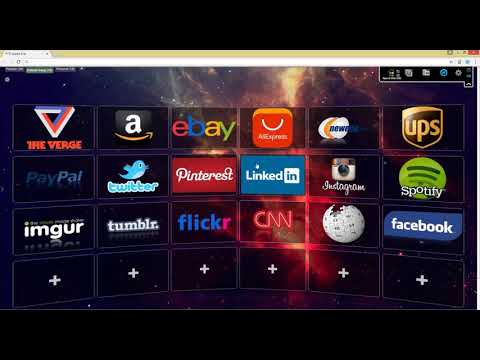
New Tab Page Replacement with 3D Speed Dial and predefined images, sync and organize your bookmarks, groups, and most visited
★★ Over Hundreds of Thousand of People love FVD Speed Dial ★★ Replace new tab page with most popular speed dial (visual bookmarks) with incredible design, groups, sync, and other useful features. This extension takes over your new tab and the search features within the extension will be provided by Microsoft Bing. (You can disable search in the settings). ★★ Main Features of the new tab page ★★ ✔ Speed Dial (visual bookmarks) This mode allows you to create your own Speed Dials (aka bookmarks). When you open your new tab, you will see all your predefined speed dials. Most-Visited The Most-Visited category lists the sites that you visit most often. Each Dial contains a group with the full list of URLs you’ve visited. You can add any Dial from the Most-Visited category to your Speed Dial and access your most popular websites from your new tab page. Groups FVD Speed Dial allows grouping sites by different topics. For example, for car-related sites, you can create a group called Cars, for gaming sites – Games, etc. 🔄 Synchronization You can synchronize your speed dials between different computers and have them open in the new tab. For instance, you can work with those sites from home and work. Searching If you have hundreds of sites, it's not so easy to locate the one you need. That’s when the feature that allows searching by speed dials comes to enhance your new tab page. All you need to know is at least one of the words. This search is built into the top of the new tab page and accessible in one link. Use it as your awesome new tab page replacement! User Data Policy This extension may use History to create Bookmark tiles (Speed Dial) for you. The extension sends requests to the server to synchronize your bookmark tiles (speed dials), tasks, and other settings. You can disable Synchronization and Speed Dial in the extension settings. This extension has a built-in monetization (ads) to support our development features and needs to use user data: search bar provided by Microsoft Bing or Yahoo, sponsored bookmark tiles (for example Amazon bookmark), and Premium Accounts. You can disable all of that in the settings or right during onboarding. By continuing with the installation of this product you acknowledge that FVD Speed Dial may include monetized dials (marked with our Ad badge) that contain affiliate codes. Clicking on these sponsored dials may bring you to websites where FVD Speed Dial receives monetary compensation for user actions taken on those websites. Permissions Disclosure This extension requests certain Chrome permissions to support its core features: Management Permission – used to show the optional Apps panel (list, launch, and uninstall Chrome apps) and to detect the EverSync companion extension for syncing and premium features. Other Permissions – such as Tabs, History, Context Menus, and Storage are used only for Speed Dial functionality like new tab replacement, organizing bookmarks, and syncing across devices. No data about other installed extensions or user activity is collected, transmitted, or shared outside of your browser. These permissions are required solely to deliver the features described above. Contact us: https://support.nimbusweb.co/portal/en/newticket Privacy Policy: https://everhelper.pro/privacy.php Terms of Use: https://everhelper.pro/terms-and-contitions.php
4,7 von 5117.727 Bewertungen
Details
- Version81.8.3
- Aktualisiert8. Oktober 2025
- Größe4.25MiB
- Sprachen8 Sprachen
- EntwicklerAPPTITUDE LLCWebsite
1467 Corsica Crest Ct Las Vegas, NV 89123 USE-Mail
developer@apptitudeglobal.comTelefon
+1 702-329-1937 - HändlerDieser Entwickler hat sich gemäß der Definition der Europäischen Union als Händler deklariert und sich verpflichtet, nur Produkte oder Dienstleistungen anzubieten, die den Gesetzen der EU entsprechen.
- D-U-N-S-Nummer097437658
Datenschutz

Speed Dial [FVD] - New Tab Page, 3D, Sync... hat folgende Informationen hinsichtlich der Erhebung und Nutzung deiner Daten offengelegt. Weitere Details findest du im privacy policy des Entwicklers.
Speed Dial [FVD] - New Tab Page, 3D, Sync... verarbeitet Folgendes:
Dieser Entwickler erklärt, dass deine Daten
- nicht an Dritte verkauft werden, außer in den genehmigten Anwendungsfällen
- nicht für Zwecke genutzt oder übertragen werden, die nichts mit der Hauptfunktionalität des Artikels zu tun haben
- nicht zur Ermittlung der Kreditwürdigkeit oder für Darlehenszwecke verwendet oder übertragen werden
Support
Wenn du Probleme, Fragen oder Vorschläge hast, rufe die Supportwebsite des Entwicklers auf