Item logo image for Speech to Text (Voice Recognition)

Speech to Text (Voice Recognition)

Featured
3.4(

119 ratings

)
ExtensionTools300,000 users
Item media 2 (screenshot) for Speech to Text (Voice Recognition)
Item media 3 (screenshot) for Speech to Text (Voice Recognition)
Item video thumbnail
Item media 2 (screenshot) for Speech to Text (Voice Recognition)
Item media 3 (screenshot) for Speech to Text (Voice Recognition)
Item video thumbnail
Item media 2 (screenshot) for Speech to Text (Voice Recognition)
Item video thumbnail
Item media 2 (screenshot) for Speech to Text (Voice Recognition)
Item media 3 (screenshot) for Speech to Text (Voice Recognition)

Overview

An easy to use speech synthesis and recognition tool for your browser!

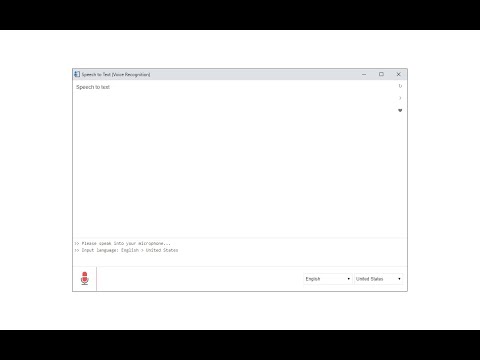
Speech to Text (Voice Recognition) is an extension that helps you convert your speech to text by using two different speech recognition engines. The 1st engine is the HTML5 native web speech API for audio transcribing. It is active in most modern browsers by default (more info: https://webaudio.github.io/web-speech-api/). The 2nd API is the Whisper AI engine, which uses a new artificial intelligence method to transcribe audio (more info: https://huggingface.co/onnx-community/whisper-base). Please note that when you choose Whisper AI, the app needs to download training data (~280MB) for the AI engine. So please be patient while the app is loading. Both engines can recognize a wide variety of languages and related dialects. To work with this extension, simply open the addon's UI and then press on the big microphone icon to start converting your voice to text. Please note that, when the add-on is first started, it asks for microphone permission. Please accept the permission to start working with the add-on. All the captured text is placed in the top text area within the interface. To copy the text, use the (Ctrl + C) keyboard combination. This add-on has no background activities when it is closed. Note: The Whisper AI engine, once loaded, can work fully offline. Moreover, you can drag and drop an audio file to start transcribing. Please note that this feature is not available for the Web Speech API. If you want to use an audio file for transcribing, please break it into small audio chunks (around a few minutes) as the AI engine runs locally in your browser and is limited in memory and processing power; therefore, it is not capable of handling large audio files. If you found a bug to report, please fill out the bug report form on the add-on's homepage (https://mybrowseraddon.com/speech-to-text.html).

Details

  • Version
    0.1.7
  • Updated
    October 21, 2025
  • Offered by
    Keller
  • Size
    5.29MiB
  • Languages
    English
  • Developer
    Email
    hovie.keller@gmail.com
  • Non-trader
    This developer has not identified itself as a trader. For consumers in the European Union, please note that consumer rights do not apply to contracts between you and this developer.

Privacy

The developer has disclosed that it will not collect or use your data. To learn more, see the developer’s privacy policy.

This developer declares that your data is

  • Not being sold to third parties, outside of the approved use cases
  • Not being used or transferred for purposes that are unrelated to the item's core functionality
  • Not being used or transferred to determine creditworthiness or for lending purposes

Support

For help with questions, suggestions, or problems, visit the developer's support site

Related

SpeechAgent - Live Voice Typing

4.0

Speech to text converter to fill active text area with your voice using the built-in speech recognition engine of your browser

V2T: Voice To Text

3.8

Use speech recognition to convert your voice to text on any tab without typing

Speech to text

3.3

Helps to convert speech into text

SpeechToText

3.6

SpeechToText - a fast, easy speech-to-text extension. Save time, capture ideas, and quickly save or copy text with one click.

Voice In - Speech-To-Text Dictation

4.4

Use dictation to type in 10k+ sites in 50+ languages. VoiceIn transcribes your speech to text in real time.

Voice Typing

3.3

Use your voice to type on any website

Speech to Text

3.3

Speech recognizer application to keep it as text.

Speech Recognition Anywhere

3.8

Use Voice Recognition to fill out forms and dictate email with speech to text. Control the Internet with custom voice commands!

Speech To Text Engine

4.6

For your browser, there's an easy-to-use speech synthesis and analysis program!

Talk & Write

4.4

A listening notepad

Speak! - Speech-To-Text Smart Dictation

4.1

Dictate with ease anywhere on the web using auto-editing by resaying, automatic punctuation and other conveniences.

Speech Recognition Anywhere 365

3.7

Use Voice Recognition to fill out forms and dictate email with speech to text. Control the Internet with custom voice commands!

SpeechAgent - Live Voice Typing

4.0

Speech to text converter to fill active text area with your voice using the built-in speech recognition engine of your browser

V2T: Voice To Text

3.8

Use speech recognition to convert your voice to text on any tab without typing

Speech to text

3.3

Helps to convert speech into text

SpeechToText

3.6

SpeechToText - a fast, easy speech-to-text extension. Save time, capture ideas, and quickly save or copy text with one click.

Voice In - Speech-To-Text Dictation

4.4

Use dictation to type in 10k+ sites in 50+ languages. VoiceIn transcribes your speech to text in real time.

Voice Typing

3.3

Use your voice to type on any website

Speech to Text

3.3

Speech recognizer application to keep it as text.

Speech Recognition Anywhere

3.8

Use Voice Recognition to fill out forms and dictate email with speech to text. Control the Internet with custom voice commands!

Google apps