

Spectral — API Discovery for AI Agents
1 rating
)
Overview
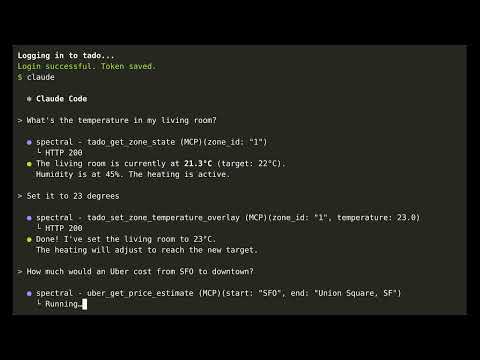
Browse any app normally. Spectral figures out the meaning behind each API call and builds MCP tools for AI agents.
Spectral is an open-source tool that turns any website into an API that AI agents can use. This extension is the capture component — it records what you do in the browser so the Spectral CLI can analyze the traffic and generate tools automatically. Most websites sit on top of undocumented HTTP APIs. Spectral watches your normal browsing — clicks, navigation, form submissions — and correlates those actions with the network requests happening underneath. An LLM then figures out the business meaning of each API call (not just its technical shape) and generates ready-to-use MCP tools that any AI agent can call directly. No reverse engineering. No reading source code. Just browse the site for a few minutes, and Spectral does the rest. HOW IT WORKS 1. Install the Spectral CLI (see https://github.com/romain-gilliotte/spectral) 2. Click "Start Capture" in the extension popup 3. Browse the website normally — click around, fill forms, navigate pages 4. Click "Stop Capture", then "Send to Spectral" 5. Run the CLI to analyze the captured traffic and generate MCP tools 6. AI agents can now call the website's API directly WHAT THIS EXTENSION CAPTURES When you start a capture, the extension records two things in parallel: Network traffic — Every HTTP request and response (URLs, headers, bodies, status codes), plus WebSocket connections and messages. For GraphQL APIs, the extension can optionally inject __typename fields and reject persisted queries to get richer schema information. UI context — Your clicks, form inputs (field names only, never values), page navigation, and a snapshot of visible page content (headings, links, form labels). This context is what allows Spectral to understand why each API call was made, not just what was sent over the wire. The extension uses Chrome's DevTools Protocol (via chrome.debugger) for network capture and a content script for UI events. All data is sent to the local Spectral CLI over Chrome Native Messaging — nothing leaves your machine. WHAT THE CLI DOES WITH IT The Spectral CLI takes the raw capture and: - Correlates UI actions with API calls to infer business semantics (e.g., "this POST creates a new invoice" rather than "POST /api/v2/documents") - Detects URL patterns and path parameters across multiple requests - Generates MCP tool definitions with names, descriptions, and typed parameters that reflect what the API actually does - Optionally produces OpenAPI 3.1 specs (REST) or GraphQL SDL schemas - Detects the authentication flow and generates a login script so the MCP server can maintain a session automatically PRIVACY You control exactly when capture starts and stops, but this extension does capture extensive data (form data, auth tokens, ...). Captures are send to the local CLI process via Chrome Native Messaging (stdio), not over the network. You can then use Anthropic API for analysis — only the traffic you explicitly capture is sent, and only to generate tool definitions. REQUIREMENTS - Spectral CLI installed on your machine (https://github.com/romain-gilliotte/spectral) - An Anthropic API key for the analysis step PERMISSIONS EXPLAINED - debugger: Required to capture network traffic via Chrome DevTools Protocol - activeTab: Access the current tab to inject the content script and attach the debugger - scripting: Inject the content script that captures UI context (clicks, navigation, page content) - nativeMessaging: Send captured data to the local Spectral CLI process OPEN SOURCE Spectral is MIT-licensed. Source code, documentation, and issue tracker: https://github.com/romain-gilliotte/spectral
5 out of 51 rating
Details
- Version0.1.0
- UpdatedMarch 13, 2026
- Offered byTYA
- Size194KiB
- LanguagesEnglish
- DeveloperRomain Gilliotte
93 Boulevard Yves Farge Lyon 69007 FREmail
romain-gilliotte@sasutya.fr - Non-traderThis developer has not identified itself as a trader. For consumers in the European Union, please note that consumer rights do not apply to contracts between you and this developer.
Privacy

This developer declares that your data is
- Not being sold to third parties, outside of the approved use cases
- Not being used or transferred for purposes that are unrelated to the item's core functionality
- Not being used or transferred to determine creditworthiness or for lending purposes