


Overview
On-device accessibility for any tab: dyslexia, low vision, color blindness, focus, motor, hearing and speech.
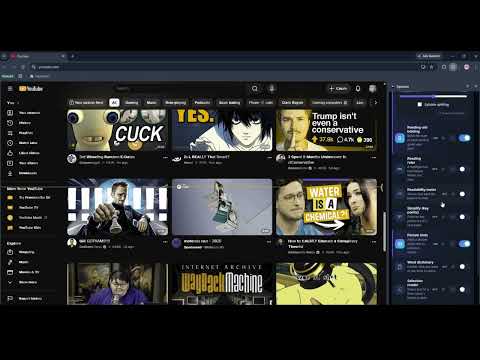
Spectra is an all-in-one accessibility toolkit that adapts any web page to how you read, see, hear, and focus. It opens in the browser side panel and stays out of your way until you need it. Every accessibility feature runs entirely on your own device, so nothing you browse is ever sent to a server. Open the side panel and your tools are grouped by who they help, so you can find what you need in seconds. New here? Tap your need and Spectra switches on the right tools for you. COLOR BLINDNESS • Color adjustments that pull confusable colors apart: remove, boost, or swap a color channel, or grayscale. • Simulate any color-vision type to preview how a page looks. • Hover to identify the exact color under your cursor. DYSLEXIA & READING • Switch any site to a dyslexia-friendly font: bundled OpenDyslexic, Atkinson Hyperlegible, or Lexend (no downloads, works offline). • Letter, word, and line spacing, with site menus left untouched so layouts never break. • Bionic-style bold lead-ins, syllable splitting, a reading ruler, and a clean Reader View. • Read aloud using your browser's built-in voices, with live word highlighting. • Select any text for an instant "Read aloud + Define" bubble. LOW VISION • Page zoom, magnifier lens, big cursor, and a find-my-pointer crosshair. • High-contrast themes, night light, and an Irlen-style color tint. • Bigger, clearer controls throughout. FOCUS & ADHD • Focus mode dims everything but what you're reading. • Spotlight, reading ruler, reduce-motion, hide images, remove pop-ups, and a seizure-safe mode. MOTOR • Dwell click for hands-free selection, auto-scroll, keyboard navigation, and a form helper. DEAF & HARD OF HEARING • Volume boost beyond 100% for quiet videos, bigger captions, and visual sound alerts. SPEECH • Speak board: type a phrase and Spectra speaks it for you. EVERYWHERE • Save your own one-tap setups, pin favorites, search every tool, and use a command palette. • Optional soft sound feedback and a guided tour. PRIVACY FIRST • 100% on-device. No analytics, no ads, no tracking, no selling data. • Works offline. Bundled fonts and data, no remote code. • The only network use is the optional Pro checkout (handled by ExtensionPay / Stripe). Spectra's own interface is built to WCAG 2.1 AA: full keyboard control, visible focus, large-text and high-contrast modes. Free to use. An optional Pro upgrade unlocks the advanced tools (color tools, focus mode, Reader View, magnifier, dictionary, simplify, picture hints, keyboard navigation, form helper, per-site profiles, and synced settings).
0 out of 5No ratings
Details
- Version1.2.1
- UpdatedJuly 9, 2026
- Size563KiB
- LanguagesEnglish
- DeveloperYu Xiang WuWebsite
224 Pump Hill Rise Southwest Calgary, AB T2V 4C8 CAEmail
celexlytech@gmail.comPhone
+86 183 0125 2573 - TraderThis developer has identified itself as a trader per the definition from the European Union and committed to only offer products or services that comply with EU laws.
Privacy

This developer declares that your data is
- Not being sold to third parties, outside of the approved use cases
- Not being used or transferred for purposes that are unrelated to the item's core functionality
- Not being used or transferred to determine creditworthiness or for lending purposes