

Specto – Design Inspector

Overview
Inspect any website like Figma: CSS, redlines, measure, live edit, responsive views, grids, color picker, comments and DESIGN.md.
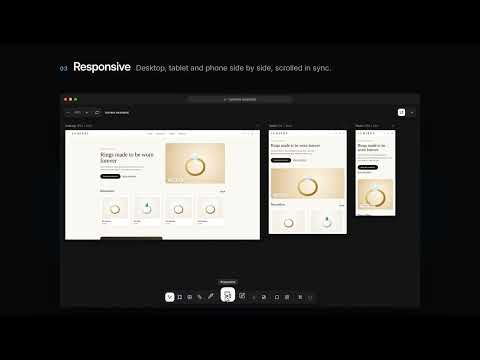
Specto is a free design inspector for Chrome. Inspect any website the way you inspect a Figma file: hover to see the real CSS, measure spacing with redlines, edit elements live, check every screen size side by side and hand off clean specs, all on the live page. Built for UI/UX designers, front-end developers, QA testers and agencies who work between the design file and the browser. ━━━━━━━━━━━━━━━━━━━━ WHAT YOU CAN DO ━━━━━━━━━━━━━━━━━━━━ • CSS inspector: hover any element to see its box model, flex and grid layout, colours, typography, font size, weight and line height. Press Space to pin cards and compare elements. • Contrast checker: WCAG contrast ratio on every text element with an AA, AAA or Fail badge. • Image and media details: format, file size, natural size and pixel density for images, SVGs and videos. • Measure tool and redlines: Figma-style spacing lines between any two elements, plus an edge-to-edge pixel ruler that snaps to elements. • Live edit: change text, font weight, size, letter spacing, fill, stroke, radius, opacity and padding, replace images, and drag elements into place with snap guides. Undo anytime. • Responsive viewer: see desktop, tablet and phone sizes side by side, add custom viewport sizes, and scroll them all together with sync scrolling. • Layout grid: overlay columns and rows like Figma (Stretch, Start, Center, End) with your own colour and opacity. • Rulers and guides: pixel rulers with draggable guides that stay in place as you scroll. • Color picker: an eyedropper loupe that copies the HEX of any pixel on the page. • Comments and annotations: pin design review comments on any area, or annotate elements with categories and live CSS. Copy a report for Slack, Jira or email. • DESIGN.md generator: turn any website into a DESIGN.md with its colours, typography, spacing, radius, shadows and components, plus a SKILL.md for AI coding agents such as Claude Code, Cursor and Antigravity. ━━━━━━━━━━━━━━━━━━━━ HOW TO USE ━━━━━━━━━━━━━━━━━━━━ 1. Click the Specto icon or press Alt + Shift + S on any website. 2. Pick a tool from the dock, or use the keyboard: V Inspect, M Measure, E Edit, C Comment, A Annotate, R Rulers, G Grid, I Color picker. 3. Press Esc to step back, then turn Specto off. ━━━━━━━━━━━━━━━━━━━━ PRIVATE BY DESIGN ━━━━━━━━━━━━━━━━━━━━ • Runs only on the tab where you click it. • No account, no sign-up, no tracking. • Comments, annotations, guides and settings are saved in your own browser. Nothing is sent anywhere. ━━━━━━━━━━━━━━━━━━━━ Free, with no trial and no limits. Use Specto for design QA, developer handoff, pixel-perfect reviews, responsive testing and auditing any website's design system.
0 out of 5No ratings
Details
- Version2.6.2
- UpdatedNovember 3, 2026
- Offered byHardix Patel
- Size97.18KiB
- LanguagesEnglish
- Developer
Email
hello.specto@gmail.com - Non-traderThis developer has not identified itself as a trader. For consumers in the European Union, please note that consumer rights do not apply to contracts between you and this developer.
Privacy

This developer declares that your data is
- Not being sold to third parties, outside of the approved use cases
- Not being used or transferred for purposes that are unrelated to the item's core functionality
- Not being used or transferred to determine creditworthiness or for lending purposes