

Riddr - Text to Speech reader for Chrome

Համատեսք
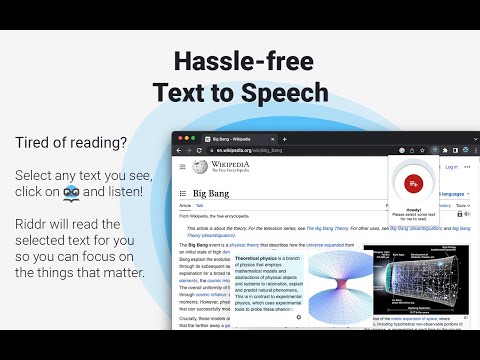
Tired of reading? Riddr is a FREE TTS extension that can read your news, favorite blogs, emails, and PDFs in 50+ languages.
Riddr, pronounced as /ˈ𝗿𝗶ː𝗱ə/ (reader), is a Google Chrome extension that converts any selected text to speech. Powered by the legendary 𝗦𝗽𝗲𝗮𝗸𝗜𝘁! TTS engine and state-of-the-art artificial intelligence technologies, Riddr offers the most authentic human-like voices on the market for 𝗙𝗥𝗘𝗘. Combined with its easy to use interface you’re one click away from converting your favorite e-books, online news, documents and any other form of text into speech in more than 50 languages, so you can listen instead of reading. 💡 𝗛𝗢𝗪 𝗧𝗢 𝗨𝗦𝗘 𝗜𝗧 1. Select the text you want to read. 2. Click the Riddr icon or use a custom keyboard shortcut. 3. Listen and enjoy. 🌎 𝗠𝗨𝗟𝗧𝗜-𝗟𝗔𝗡𝗚𝗨𝗔𝗚𝗘 𝗦𝗨𝗣𝗣𝗢𝗥𝗧 Built into Riddr's core is 𝗦𝗽𝗲𝗮𝗸𝗜𝘁!, a TTS engine that offers 50+ languages with built-in automatic language detection (https://riddr.com/faq/supported-languages), allowing seamless switching between multiple languages. Riddr also has deep integration with your favorite browser, which will allow you to interact with native, remote, or third-party TTS engines that are already available on your PC or Mac. On top of this, Riddr’s modular design and open source code allows developers around the world to expand the built-in TTS engines. For more information follow this link: https://riddr.com/developers. 🏕 𝗪𝗢𝗥𝗞𝗦 𝗘𝗩𝗘𝗥𝗬𝗪𝗛𝗘𝗥𝗘 Riddr can read text from everywhere on the web. Read your emails, Google Drive or PDF documents before you send them. You can use Riddr to read your favorite news websites, blogs like Medium or perhaps e-books, on a daily basis, unlimited, for free. If you can see it, Riddr probably can read it, so how you use it is up to your imagination. 🔌 𝗢𝗙𝗙𝗟𝗜𝗡𝗘 𝗠𝗢𝗗𝗘 Read all the time, even if you have connectivity issues or you’re in a remote rural area. Riddr’s offline mode makes it the ideal language learning tool for schools and teachers in developing countries. ⌨ 𝗖𝗨𝗦𝗧𝗢𝗠𝗜𝗭𝗔𝗕𝗟𝗘 𝗦𝗛𝗢𝗥𝗧𝗖𝗨𝗧𝗦 One of Riddr’s unique features, besides predefined control shortcuts such as Read (𝗔𝗹𝘁+𝗥), Pause (𝗔𝗹𝘁+𝗣), and Stop (𝗔𝗹𝘁+𝗦), is the ability to have multiple keyboard shortcuts linked to different TTS Engines / voices in different languages, which makes Riddr not only easy to use but also very fun. New shortcuts can be added and configured very easily via the options panel. 🛠 𝗠𝗢𝗦𝗧 𝗖𝗢𝗡𝗙𝗜𝗚𝗨𝗥𝗔𝗕𝗟𝗘 𝗧𝗧𝗦 𝗘𝗫𝗧𝗘𝗡𝗦𝗜𝗢𝗡 The easy to use options panel gives you huge control over your Riddr extension and gives you the ability to add your personal touch to it. Here are some of the available options: - Customise your volume level, speaking rate & voice pitch; - Predefine your preferred language; - Transcribe a list of words and specify their pronunciation (ideal for teachers and student safety); - Enable Auto-Selection Mode, which automatically extracts and reads readable text from websites; - Automatic Read Mode allows website owners to specify which content should be read upon page entry, enhancing accessibility. 👨💻 𝗗𝗘𝗩𝗘𝗟𝗢𝗣𝗘𝗥𝗦 If you’re interested in joining the project by developing a custom TTS engine or translating Riddr into your language, step up and join us: https://github.com/riddr/RiddR/tree/master/_locales If you like the extension, please don’t forget to rate it. 😍 For any questions or requests, feel free to check out our website or contact our support at support@riddr.com
3,6/5118 գնահատական
Մանրամասներ
- Տարբերակ25.05
- Թարմացված է19 մայիսի, 2025 թ.
- Չափս353KiB
- Լեզուներ55 լեզու
- ԾրագրավորողԿայք
Էլփոստի հասցե
support@riddr.com - Վաճառող չէԱյս ծրագրավորողը չի ներկայացել որպես վաճառող։ ԵՄ տարածքում բնակվող սպառողներին խնդրում ենք նկատի ունենալ, որ ձեր և այս ծրագրավորողի միջև գործարքների վրա չեն տարածվում սպառողների իրավունքների պաշտպանության օրենքները։
Գաղտնիություն

Այս ծրագրավորողը պնդում է, որ ձեր տվյալները՝
- Օգտատերերի տվյալները չեն վաճառվում երրորդ կողմերի՝ բացառությամբ թույլատրված դեպքերի
- Չի օգտագործվում կամ փոխանցվում պրոդուկտի հիմնական գործառույթների հետ կապ չունեցող նպատակներով
- Չի օգտագործվում կամ փոխանցվում վարկունակությունը որոշելու կամ վարկավորման նպատակով
Աջակցում
Հարցերի, առաջարկների և խնդիրների հետ կապված օգնության համար բացեք այս էջը ձեր համակարգչային դիտարկիչում