

Speak & Translate

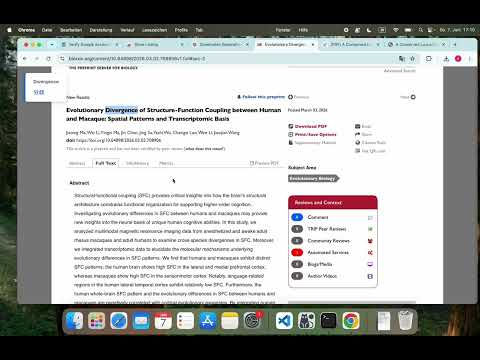
Overview
Select text to translate and hear pronunciation via Alt+T or right-click. Customize shortcuts at chrome://extensions/shortcuts.
Speak & Translate is a lightweight tool designed for efficient reading and language learning. Simply highlight any text on a webpage or PDF to instantly get its translation and hear the correct English pronunciation. Key Features: - Select to Translate & Speak: Highlight text and use the right-click menu or keyboard shortcut to trigger high-quality TTS pronunciation and Google Translation. - Elegant UI: A clean, modern toast notification appears in the top-left corner, displaying the original word and its translation without cluttering your page. - PDF Support: Works seamlessly with Chrome's native PDF viewer via the right-click menu. - Customizable Shortcuts: The default shortcut is Alt + T (Mac: Control + T). You can easily customize this by typing chrome://extensions/shortcuts in your address bar. - Smart Fallback: If the UI cannot be injected into a specific page, it gracefully falls back to system-level notifications.
0 out of 5No ratings
Details
- Version1.2
- UpdatedJune 9, 2026
- Size821KiB
- LanguagesEnglish
- Developer
Email
audreystucke@gmail.com - Non-traderThis developer has not identified itself as a trader. For consumers in the European Union, please note that consumer rights do not apply to contracts between you and this developer.
Privacy

This developer declares that your data is
- Not being sold to third parties, outside of the approved use cases
- Not being used or transferred for purposes that are unrelated to the item's core functionality
- Not being used or transferred to determine creditworthiness or for lending purposes