


개요
다시 말하기를 통한 자동 편집, 자동 구두점 및 기타 편의 기능을 사용하여 웹 어디에서나 쉽게 받아쓰세요.
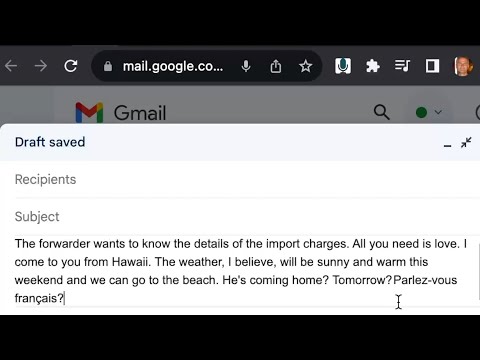
Enjoy next generation intuitive dictation using advanced features like auto-editing by resaying, real-time auto-correction, and automatic punctuation! With the Speak! for Chrome extension, you can dictate even long texts with ease. You'll be able to effortlessly edit your text with almost no need to use your keyboard, mouse, touchscreen or special keywords. You can switch between languages by saying "to [language name]" or between your preffered default and secondary languages using the context menu. You can set up your preferred languages as well as keyboard shortcuts in the settings to make dictation even more convenient! Available as a web-site plugin too. Auto-Editing To correct a misheard or mispronounced word or phrase, or to rephrase something, simply say it again as desired, and Speak! will automatically locate and replace the appropriate text fragment, adjusting punctuation as needed. It could be as simple as correcting the mishearing of "attached please find" in the text "Catch the police find my application" and replacing the phrase "needs to know" with "wants to know" in the sentence "She needs to know the details of the charges" or something more complex as rephrasing "All you need is love." as "Love is all we need." Auto-editing can also be used to enclose in quotes/paretheses or capitalize an already dictated phrase, to add or remove punctuation marks, to join or split sentences, etc. Real-time Auto-Correction Speak! automatically smooths many common slips of the tongue in real time. Auto-Punctuation Punctuation is automatically applied as you dictate or edit your text through dictation. Auto-Adjustment When you insert a phrase by dictating, the surrounding text is adjusted automatically, and if necessary punctuated again. Editing voice commands undo — undoes the last inserted transcript or auto-edit. redo — redoes the last inserted transcript or auto-edit. undo replacement or undo correction — undoes the last auto-edit and appends the transcript as new text. Formatting voice commands The following voice commands enable you to format either a current text selection or the subsequent words in your utterance. For instance, when you say "in quotes Indiana Jones", the resulting text will appear as “Indiana Jones”. in quotes — puts the next phrase or word in quotes. in parentheses — puts the next phrase or word in parentheses. capitalized — capitalizes the previous word or phrase word. all caps or uppercase — converts the following word or phrase to uppercase. Reporting an issue or suggestion Select the relevant text fragment and say "report". A form will pop up where you can describe the issue and choose the utterances that led to the issue to include in the report. Emoticons You can dictate more than 50 different emoticons (emoji) with Speak! Simply say happy face for 😊, grinning face for 😁, etc. Shortcuts Use keyboard shortcuts to make starting and stopping dictation quicker and easier. You can set your own shortcuts in the settings. For more information and tips on how to best take advantage of Speak's advanced features visit our site: https://kredor.com/products/speak.
5점 만점에 4.1점평점 64개
세부정보
개인정보 보호

개발자가 사용자 데이터에 관해 다음과 같이 선언했습니다
- 승인된 사용 사례를 제외하고 서드 파티에 판매하지 않음
- 항목의 핵심 기능과 관련 없는 목적으로 사용하거나 전송하지 않음
- 신용도 판단 또는 대출 목적으로 사용하거나 전송하지 않음
지원
질문, 제안 또는 문제와 관련하여 도움이 필요하면 데스크톱 브라우저에서 이 페이지를 여세요.