

SoundUp: Free Read Aloud with Cartesia Voices

Overview
Free read aloud for any article with your Cartesia voices. No subscription on top of your Cartesia plan.
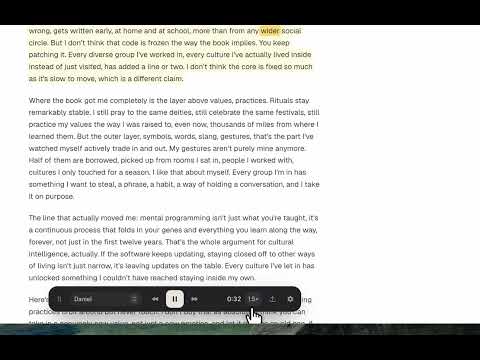
SoundUp turns the page you are reading into audio, spoken by the Cartesia voices you already have. It costs nothing on top of your Cartesia account: no subscription, no sign-up, no SoundUp server in between. WHAT IT DOES Reads the page you are on. Click the SoundUp icon on an article, blog post, newsletter, documentation page or long thread, and a small player appears over the page. Press play and it reads the article text, skipping menus, sidebars and comments. Follows along as it reads. The passage being spoken is tinted and the current word is marked on the page itself, so you can look up at any moment and know exactly where you are. Pick from five highlight colours, or turn highlighting off. Two ways to listen. Streaming starts speaking within moments of pressing play. Ahead of time generates the whole article first, then shows its real length and a bar you can scrub through. Either way, every number on the player is measured from the audio, never estimated. Your voices, your speed. Use any voice in your Cartesia library, including voices you have cloned or designed there. Choose the model, set the speed, and skip forward or back by fifteen seconds or by passage. Keep it. Download the article as a WAV file. The word timings are saved inside it, so when you open the file in SoundUp later the read-along highlighting still works. Stays out of the way. The player is a compact card you can drag anywhere on the page. Tables are announced rather than read cell by cell. It respects your reduced-motion setting and works from the keyboard. WHY INSTALL IT You already pay Cartesia for speech. Most read-aloud extensions charge a monthly fee for voices that are often worse than the ones in your Cartesia account. SoundUp lets you use those voices on the web you actually read, for the price of the audio you generate and nothing more. It does not spy on you. There is no SoundUp server, no account, no analytics and no telemetry. Your API key and settings stay in Chrome on your device. Page text is sent to Cartesia only when you press play, and only from pages where you opened the player. SoundUp asks for no permission to read pages you have not clicked on. It tells the truth. If Chrome will not let an extension run on a page, such as its own settings pages, the Web Store or the built-in PDF viewer, the icon shows a badge instead of failing silently. If Cartesia rejects a request, the player shows Cartesia's own message and what to do next. GETTING STARTED 1. Install SoundUp and click its icon on any article. 2. Open settings on the card and paste your Cartesia API key. 3. Pick a voice and press play. QUESTIONS Do I need a Cartesia account? Yes. SoundUp speaks through Cartesia, so you need an account and an API key from cartesia.ai. What does it cost? SoundUp is free. Cartesia bills you for the speech you generate on whatever plan you have with them. Does it work on PDFs or paywalled pages? It reads whatever the page shows you. Chrome does not allow extensions in its built-in PDF viewer, on its own pages, or on the Web Store; SoundUp shows a badge there. Does it work offline? No. Speech is generated by Cartesia, so you need a connection while listening. Downloaded WAV files play anywhere.
0 out of 5No ratings
Details
- Version0.2.0
- UpdatedSeptember 17, 2026
- Offered bysudoaugustin
- Size358KiB
- LanguagesEnglish
- Developer
Email
sudoaugustin@gmail.com - Non-traderThis developer has not identified itself as a trader. For consumers in the European Union, please note that consumer rights do not apply to contracts between you and this developer.
Privacy

SoundUp: Free Read Aloud with Cartesia Voices has disclosed the following information regarding the collection and usage of your data. More detailed information can be found in the developer's privacy policy.
SoundUp: Free Read Aloud with Cartesia Voices handles the following:
This developer declares that your data is
- Not being sold to third parties, outside of the approved use cases
- Not being used or transferred for purposes that are unrelated to the item's core functionality
- Not being used or transferred to determine creditworthiness or for lending purposes
Support
For help with questions, suggestions, or problems, please open this page on your desktop browser