

SoundCloud Player Tools, Stem Extractor & Likes Explorer

Overview
Speed, loops, sampler pads, FX, EQ, recorder and on-device stem separation for SoundCloud, plus a private Likes Explorer.
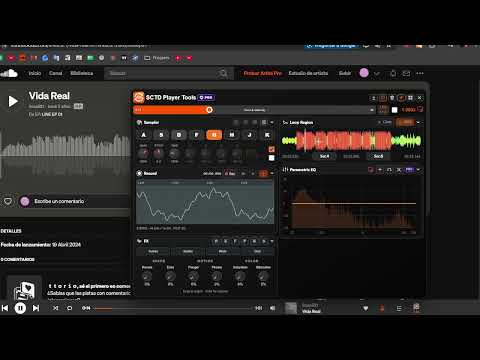
Turn SoundCloud into your music workspace. Control playback speed, repeat A–B loops, play sampler pads, shape your sound with audio effects and EQ, record performances, and separate vocals, drums, bass and instruments with AI stem separation. SoundCloud Player Tools brings creative audio controls directly into the player, plus a private Likes Explorer to rediscover your music collection. **• PLAYBACK SPEED & PITCH CONTROL** Slow down difficult passages or speed up your favorite tracks. Adjust playback from 0.1x to 3x, save speed presets, and enable Keep Tone to change tempo without changing pitch. Perfect for music practice, learning by ear and exploring new sounds. **• A–B LOOPER** Choose a section and repeat it while you listen, practice or experiment. Set loop points from the player panel or drag markers on a compatible waveform. Turn selected loops into samples or export them as WAV. **• SAMPLER PADS & PIANO MODE** Slice a loop across 8 sampler pads and play them from your keyboard. Adjust sample pitch, duration and gain, or use piano mode to play your sample across different notes. Shape the sound with ADSR controls and save presets for later. **• AUDIO EFFECTS & PARAMETRIC EQ** Explore reverb, delay, flanger, phaser, bitcrusher and saturation. Fine-tune frequencies with the parametric equalizer and use bypass to compare your settings with the original. **• AI STEM EXTRACTOR** Separate audio into vocals, drums, bass and other instruments directly on your device. Send a SoundCloud loop of up to 30 seconds to the extractor, or import your own audio and select up to 2 minutes. Solo, mute and adjust each stem, export individual WAV files, and save separations locally to reopen later. Use the drums stem to create playable slices. Audio is processed locally and is not uploaded for separation. First use downloads an approximately 166 MB AI model, which is cached for future sessions. Stem separation is experimental; processing time and results depend on your device and the source audio. **• WAV RECORDER** Capture the playing track or loop together with sampler pads, piano voices, effects and EQ. Preview your performance and save recordings of up to 5 minutes as WAV. **• PRIVATE SOUNDCLOUD LIKES EXPLORER** Find tracks you liked months or years ago without endless scrolling. Build a local index of your Likes, search by title or artist, browse in gallery or list view, and jump back to tracks on SoundCloud. Your Likes index stays in your browser. Start playing a track on SoundCloud, then open the speedometer beside the player controls. You can also launch Stem Extractor from the extension popup to work with your own audio files.
0 out of 5No ratings
Details
- Version2026.10.7
- UpdatedOctober 8, 2026
- Size6.72MiB
- Languages5 languages
- Developer
Email
vittokpo@gmail.com - Non-traderThis developer has not identified itself as a trader. For consumers in the European Union, please note that consumer rights do not apply to contracts between you and this developer.
Privacy

This developer declares that your data is
- Not being sold to third parties, outside of the approved use cases
- Not being used or transferred for purposes that are unrelated to the item's core functionality
- Not being used or transferred to determine creditworthiness or for lending purposes
Support
For help with questions, suggestions, or problems, visit the developer's support site