


Overview
Make any Chrome tab up to 600% louder without distortion, with a bass booster, 5-band equalizer and per-tab volume.
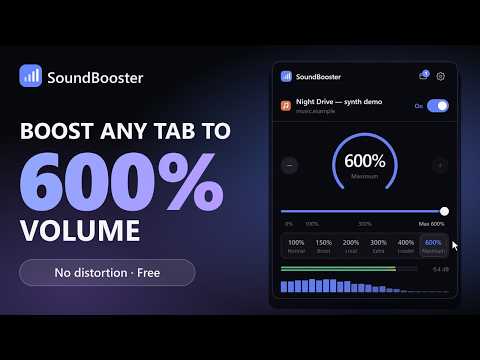
Audio too quiet, even at 100%? SoundBooster is a free sound booster for Chrome. It makes any tab up to 600% louder — without distortion and without changing your computer's volume. Use it on videos, streams, music, podcasts, lectures and web calls, and shape the sound while it plays. LOUD AND CLEAN • Raise the level up to 600% with a slider or −/+ buttons • Presets: 100% Normal, 150%, 200% Loud, 300% Extra, 400% Louder, 600% Maximum • A look-ahead limiter lowers peaks smoothly instead of clipping them, so even the maximum stays clear, with no crackle • At 100% the audio is untouched • Live output meter and optional spectrum visualizer EVERY TAB, SEPARATELY • Turn up several tabs at once, each with its own level and tone • Switch one off without affecting the others • Remember a level for each website TONE CONTROLS • Bass booster and treble control • 5-band audio equalizer • Stereo width: narrow to mono for one earbud, or widen for movies and games • Profiles: Balanced, Headphones, Movies, Music, Gaming, Podcasts, Quiet dialogue, Bass-heavy CONVENIENT • Keyboard shortcuts: Alt+Shift+↑/↓ to change the level, Alt+Shift+M to mute, Alt+Shift+0 to reset (changeable in Chrome's shortcut settings) • Light and dark mode PRIVATE BY DESIGN • Audio is processed on your computer with the Web Audio API. It's never recorded or uploaded. • No browsing history, no analytics, no account needed. • View, export or delete everything the extension stores from its settings page. HOW IT WORKS Chrome doesn't let extensions change another page's volume directly, so SoundBooster uses Chrome's capture feature to receive the audio, processes it and plays it back. While it's on, Chrome shows a small indicator on that page. Switch it off to return to normal. Note: Chrome doesn't allow capturing its own pages (chrome://, the New Tab page) or the Chrome Web Store, and some protected (DRM) streams can't be processed. Desktop apps aren't part of the browser, so use their web versions.
5 out of 52 ratings
Details
- Version1.0.0
- UpdatedSeptember 28, 2026
- Size39.65KiB
- LanguagesEnglish
- DeveloperWebsite
Email
daniyaalhsb@gmail.com - Non-traderThis developer has not identified itself as a trader. For consumers in the European Union, please note that consumer rights do not apply to contracts between you and this developer.
Privacy

This developer declares that your data is
- Not being sold to third parties, outside of the approved use cases
- Not being used or transferred for purposes that are unrelated to the item's core functionality
- Not being used or transferred to determine creditworthiness or for lending purposes
Support
For help with questions, suggestions, or problems, visit the developer's support site