

Sordnest: YouTube Subscription Organizer

Overview
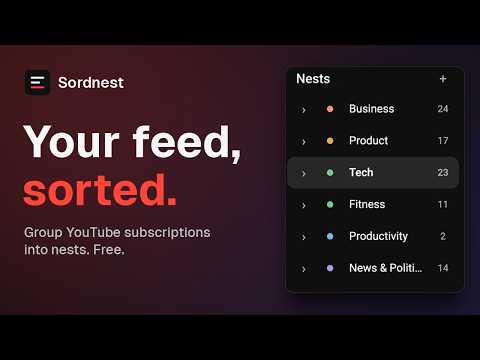
Put your YouTube subscriptions into nests. Filter your feed by topic in one click, and let on-device AI sort your channels.
Your YouTube subscriptions, finally organized. You subscribed to every one of those channels for a reason. But YouTube throws them all into one endless feed: football next to finance, stand-up next to the tutorial you meant to finish. Sordnest puts your subscriptions on nests, so the video you came for is always one click away. NESTS, RIGHT INSIDE YOUTUBE - A Nests section sits in YouTube's left sidebar, just above your Subscriptions. - Group channels by topic: Business, Tech, Fitness, Cooking, whatever fits how you watch. - Hover any channel in your Subscriptions list to put it on a shelf on the spot. - A channel can sit on more than one shelf. ONE CLICK, ONE TOPIC - Pick a nest and your Subscriptions feed shows only those channels. - Switch nests from the chips at the top of the feed, or from the toolbar. - In the mood to learn? Tech. Work mode? Business. Your feed matches your mood. AUTO-SORT YOUR CHANNELS IN SECONDS - Hit Auto-sord (pun intended) and Sordnest suggests a shelf for every unsorted channel. - Where nothing fits, it proposes new nests for you. - Review the suggestions and accept them one at a time or all at once. Nothing changes until you say so, and every change can be undone. - Sorting runs on your device using Chrome's built-in AI where available, with keyword matching as a fallback. A CALM, SIMPLE DASHBOARD - See every nest, and how many channels are on it, at a glance. - An Unsorted queue shows the channels that still need a home. - File a channel with one click, or remove it from a nest just as fast. - Light, dark, or match your system. THE LITTLE THINGS - Hide Shorts and hide watched videos on your homepage, subscriptions and search. - Optional new-video alerts for the nests you care about. - Export and import a backup of your nests. PRIVATE BY DESIGN - No account, no sign-up, no API key. - Everything is stored in your browser. No servers, no analytics. - Your subscription list never leaves your device. - Sordnest only uses your existing YouTube session to read your subscription list. GET STARTED IN A MINUTE 1. Install Sordnest and open YouTube while signed in. 2. Sordnest syncs your subscriptions automatically. 3. Create a few nests, or let Auto-sord do the work. Free, and built for anyone with more subscriptions than they can keep track of.
0 out of 5No ratings
Details
- Version2.1.0
- UpdatedOctober 26, 2026
- Offered byRahul Patwardhan
- Size246KiB
- LanguagesEnglish
- Developer
Email
rahulpatwardhan12@gmail.com - Non-traderThis developer has not identified itself as a trader. For consumers in the European Union, please note that consumer rights do not apply to contracts between you and this developer.
Privacy

Sordnest: YouTube Subscription Organizer has disclosed the following information regarding the collection and usage of your data. More detailed information can be found in the developer's privacy policy.
Sordnest: YouTube Subscription Organizer handles the following:
This developer declares that your data is
- Not being sold to third parties, outside of the approved use cases
- Not being used or transferred for purposes that are unrelated to the item's core functionality
- Not being used or transferred to determine creditworthiness or for lending purposes