

Sodhganga Thesis Downloader
8 ratings
)
Overview
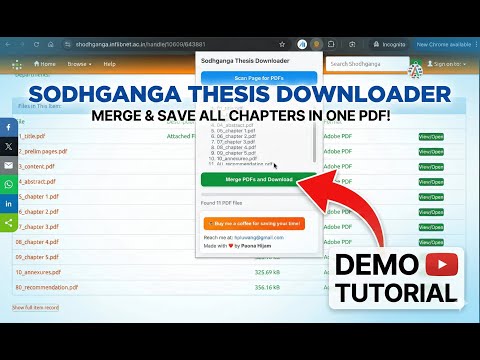
Download and merge PDF files from Sodhganga thesis view page.
Sodhganga Thesis Downloader is a lightweight Chrome extension designed to help researchers, students, and scholars easily download theses from the Sodhganga repository. When viewing a thesis page on Sodhganga, the extension automatically detects all available chapter PDFs, merges them into a single consolidated PDF, and downloads it to your system - saving you time and effort. Key Features: 📄 Automatically scans Sodhganga thesis pages for chapter PDFs 🔗 Merges all chapters into one clean, single PDF ⬇️ Downloads the merged file instantly 🏷️ Generates a meaningful filename using thesis metadata 🚀 Simple, fast, and easy to use How it works: ✧ Open a thesis page on sodhganga.inflibnet.ac.in ✧ Click Scan Page for PDFs ✧ Click Merge PDFs and Download ✧ Get the complete thesis as one PDF This extension runs entirely in your browser and does not collect or store any personal data. -- Built by a researcher, for researchers.
5 out of 58 ratings
Details
- Version1.2
- UpdatedJanuary 31, 2026
- Offered byhpluwang
- Size960KiB
- LanguagesEnglish (United States)
- Developer
Email
hpluwang@gmail.com - Non-traderThis developer has not identified itself as a trader. For consumers in the European Union, please note that consumer rights do not apply to contracts between you and this developer.
Privacy

This developer declares that your data is
- Not being sold to third parties, outside of the approved use cases
- Not being used or transferred for purposes that are unrelated to the item's core functionality
- Not being used or transferred to determine creditworthiness or for lending purposes
Support
For help with questions, suggestions, or problems, please open this page on your desktop browser