

SocialMe — Build your brand on LinkedIn, X & Facebook

Overview
Turn rough thoughts into comments, message replies and connection notes. Choose your voice, edit the draft and send it yourself.
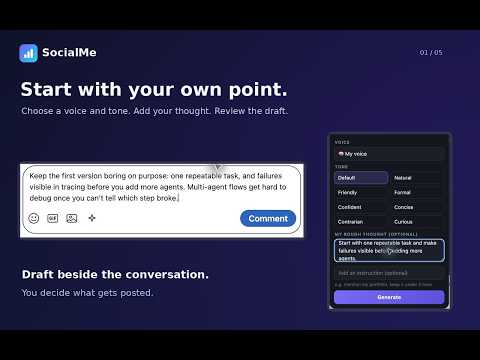
SocialMe helps you turn a rough thought into a comment, a message reply or a LinkedIn connection note. Open a conversation on LinkedIn, X or Facebook, click the small sparkle beside the editor, and add the point you want to make. Choose a voice and tone, then generate a draft. Read it, change anything that feels off, and send it when you're happy with it. The best starting point is your own writing. Add a few comments you've actually written, the topics you know, and the phrases you would never use. You can adjust how formal the writing feels, how often it asks questions, and how short you want replies to be. If a draft feels too polished or too generic, review the suggested voice adjustment before saving it. For more control, open the full panel. Change the approach, length or language, try another version, or keep your original wording. If there's already text in the composer, SocialMe asks before replacing it. A few other things that make it useful day to day: - Reply to messages with the amount of conversation history you choose. - Draft a connection note within the invitation editor's character limit. - Save a thread with a short note and a date to follow up. - Start a small engagement session and keep track of conversations you've reviewed. - Pause the assistant on a platform whenever you want. SocialMe is free and open source. AI drafting needs your own provider API key or a compatible local model. Any provider charges are separate. Settings, keys, drafts and saved threads stay in your browser. When you generate a draft, the relevant conversation text, your writing preferences and selected examples go directly to the provider you've chosen. There is no SocialMe backend or analytics service. Automatic sending is off by default. You can review and edit drafts before posting. Activity limits help you manage usage, but aren't a guarantee against platform restrictions. SocialMe is independently developed and isn't affiliated with LinkedIn, X or Meta.
0 out of 5No ratings
Details
- Version0.8.3
- UpdatedNovember 17, 2026
- Offered byShahzad Afridi
- Size254KiB
- LanguagesEnglish
- Developer
Email
shahzadahmadafridi@gmail.com - Non-traderThis developer has not identified itself as a trader. For consumers in the European Union, please note that consumer rights do not apply to contracts between you and this developer.
Privacy

SocialMe — Build your brand on LinkedIn, X & Facebook has disclosed the following information regarding the collection and usage of your data. More detailed information can be found in the developer's privacy policy.
SocialMe — Build your brand on LinkedIn, X & Facebook handles the following:
This developer declares that your data is
- Not being sold to third parties, outside of the approved use cases
- Not being used or transferred for purposes that are unrelated to the item's core functionality
- Not being used or transferred to determine creditworthiness or for lending purposes