

SocialEcho - TikTok&YouTube&Instagram Analytics, Scripts, Translate & Reply

Overview
Analyze TikTok, YouTube & Instagram. Use team replies on all three; transcripts and comment translation on TikTok & YouTube.
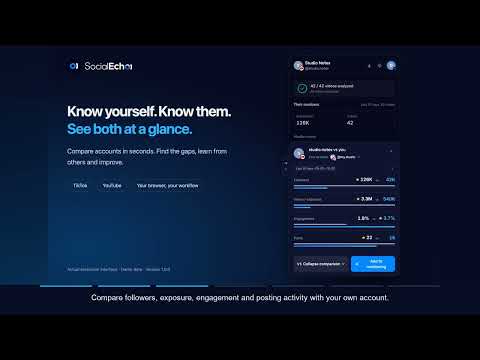
SocialEcho brings TikTok analytics, YouTube analytics and Instagram analytics into the pages you browse. Research creators, compare account performance, track posts and export analysis reports without repeatedly copying numbers into a spreadsheet. On TikTok and YouTube, you can also read existing video captions, study script structure with AI and translate comments. SEARCH RESULTS, HASHTAGS AND CONTENT DISCOVERY — NEW IN 1.0.11 Research a niche before choosing an account to follow. Search for a product, brand or topic, compare the posts already on the page, and turn a promising result into a creator shortlist or content brief. This workflow supports social media managers, creators, ecommerce teams and agencies researching competitors or planning content. • Analyze TikTok search results, including video and photo tabs, hashtag pages and Explore; YouTube search results, including Shorts, and Home; plus accessible Instagram keyword and hashtag pages. Enable Home analysis yourself when you want to study recommendations. • Read available metrics directly on cards, then open Overview for sample totals, median views, high-performing posts, creator summaries, content keywords and posting patterns. Switch to List for individual posts. YouTube Shorts keep their data overlay during hover previews. • Compare sample multiples to see how a post performs against the loaded sample's median. Inspect creator avatars, high-performing post counts, available followers and views-to-followers ratios. Small samples are flagged; YouTube Home does not use its recommendation sample to label posts viral. • Sort by available views, likes, daily views or publication time, and filter by view threshold, date, author or keyword. Click duration and posting-time charts to narrow the results. Click a ranked title to locate and highlight the original card without opening another tab. • Automatically load an initial batch of up to 100 items, then request more batches within a 1,000-item limit. Page access and platform results determine what can load. Statistics describe the loaded sample, not total search volume, keyword difficulty or every result on the platform. TIKTOK PHOTO SEARCH AND POST METRICS Compare image posts alongside your content research. Photo search supports single images and carousels, with image counts and the platform's available views, likes, comments, shares, saves and author data. Apply the existing filters and export the selected results; image posts do not receive an invented video duration. Daily views are an average since publication, not a measurement of yesterday's growth. An image-post view count comes from the platform and is not a count of unique viewers. Missing data remains unavailable. Promotional content stays in the sample with a distinct label where platform evidence exists; a TikTok Shop link or app-only playback notice alone does not prove paid advertising. PROFILE ANALYTICS AND CONTENT RESEARCH • Explore available post metrics, medians, averages, posting patterns and content keywords. Filter loaded posts to study recent content or compare stronger and weaker performers within the sample. • Review content in context: a single popular video may not represent an account's usual results. Use the distribution of loaded posts alongside individual metrics when researching a creator or preparing a campaign brief. • TikTok analytics help you examine video performance and posting habits. On YouTube channel pages, available public watch-page data can supplement views, likes, comments, publication dates and video durations. • Instagram analytics cover photos, carousels, videos and Reels, including content-type mix and available performance data. Some play counts require visiting the profile's Reels tab and browsing further. • Where supported, commercial-content labels on TikTok and Instagram show observed promotional evidence and help filter your research. An absent label does not establish that a post has never been promoted. • Statistics reflect loaded content and the data the platform makes available. Load more posts to broaden the sample; SocialEcho does not automatically retrieve an account's entire history or turn unavailable values into zero. POSTING WINDOWS AND ACCOUNT COMPARISON • Find posting windows based on the publication times and views of loaded posts. Open a suggested window to inspect the content behind it. With insufficient data, the panel asks for more posts instead of presenting an unsupported recommendation. • Use these windows as research input for your content calendar. They describe the observed sample and do not guarantee future reach. You can open SocialEcho's publishing page to arrange a schedule yourself. • Sign in, select a team and compare the current profile with up to two available team accounts, including connected accounts or monitored competitors. Review current followers and the available recent performance indicators, with metric definitions shown in the panel. • Add relevant creators to your selected team's competitor monitoring after confirmation, then manage them in the SocialEcho web app. Account comparison and monitoring depend on team permissions and available service data. POST MONITORING AND PLAYBACK TRENDS • Monitor posts from TikTok, YouTube and Instagram through the analysis panel. Choose the team and confirm the post before submitting it; an optional note helps organize later research. • Consult available collected playback history in the trend panel. Switch between cumulative plays and daily additions to understand how performance changes after publication. • The first collected sample establishes a baseline. It is not treated as a full day of growth, and missing dates are not filled with zero. Any estimated portion is distinguished from observed history. • Available metrics vary by platform and post. Instagram shows the counts it can obtain, such as plays, likes, comments and reposts; it omits the save-count field when no count is available. Collection timing and historical coverage depend on the monitoring service and accessible data. DOWNLOAD ANALYSIS IMAGES AND RESEARCH FILES • Export profile analysis and individual-post analysis as PNG images on all three platforms. Share the displayed metrics and available trends in a content review, creator brief or team update, with SocialEcho attribution included. • YouTube post-analysis downloads become available when video data is ready, even if captions are still loading or unavailable. Instagram also supports downloading the post-analysis image. • Export filtered profile results as CSV, or download a research ZIP containing the data table, Markdown research notes and metric explanations. The pack can include original-language TXT/SRT captions from TikTok or YouTube videos whose transcripts you previously opened and cached on this computer. • Export files are generated in your browser and saved locally. Retrieving monitoring history or using account features can still contact SocialEcho. Image export downloads an analysis report, not the original video, photo or carousel media. VIDEO TRANSCRIPTS AND SUBTITLE EXPORT — TIKTOK AND YOUTUBE • Read a video's existing captions as a timestamped transcript. Click a line to return to that moment in the video, making it easier to examine an opening, explanation or call to action. • Copy the transcript or download timestamped TXT, plain TXT or SRT subtitles. Translate available captions and export bilingual TXT to support multilingual content research. • Caption availability depends on the video and platform. SocialEcho does not perform speech-to-text transcription for videos without captions. Instagram video transcripts are not supported. AI VIDEO BREAKDOWN — TIKTOK AND YOUTUBE • Study how a captioned video is organized. AI identifies the video type, such as tutorial, review, story or promotional content, then divides the script into timed sections with a takeaway for each section. • Review the hook, sequence of ideas, demonstration or closing action as appropriate to the video type. Follow a timestamp back to the video to check the analysis against the source. • Copy a remake prompt containing the structure as a starting point for an original script in your own AI tool. This helps organize a creative brief; it does not publish a recreated video. • Breakdown uses available captions from the first 10 minutes. It requires SocialEcho sign-in, a selected team and sufficient credits. Relevant captions, a cleaned title and video context are sent to SocialEcho and its model service for the requested processing. AI output may be inaccurate and should be reviewed. COMMENT ANALYSIS AND CSV EXPORT — TIKTOK, YOUTUBE AND INSTAGRAM Open comment analysis on a supported post and start reading. Sort the loaded comments by likes or time, or use the language filter to focus on an audience. This helps you review product questions, content requests and recurring feedback when preparing a content brief or customer-response plan. • Explore eight rule-based intent categories and frequent words. Select a category or word to filter the sample; locate comments on the original page when they remain available. Available TikTok reply previews provide additional context. The analysis represents comments already read, not every comment on the post. • Export all read comments or the current filtered results to CSV. Include available translations, language and intent labels, likes, reply counts and available author/pinned markers. UTC timestamps and spreadsheet-friendly escaping help organize research; exports above 5,000 rows are split into files. • Add available comment CSVs and overview notes to a research ZIP. The current browser session can retain comments for up to 20 videos; the package does not fetch every video's comments automatically. • Translation inside the analysis panel uses the browser's local model only. If a language pair or model is unavailable, the original text remains. This panel has no cloud translation fallback, and AI comment insights are not enabled in this release. COMMENT TRANSLATION AND TEAM QUICK REPLIES The following translation controls apply to comments on the platform page; the Comments tab follows the local-only rule above. • On TikTok and YouTube, translate individual comments or use Translate all while keeping the original text for reference. With automatic translation active, newly loaded comments are translated as you scroll; you can stop it at any time. • Translation uses available platform or browser-local capabilities first. Browser translation may require a language pack. When local translation is unavailable, signed-in users can use AI translation with the required credits; the relevant text is sent for processing. • On all three platforms, search or filter your team's reply templates, insert one into the current reply box and adapt it to the conversation. On Instagram, open the comments and focus the reply field first. • Reply assistance can translate your own draft. Review the resulting text and send it yourself. Draft translation is separate from translation controls on the native comment list, which are not offered for Instagram. • SocialEcho does not automatically send comments, publish posts, like content or follow accounts. Interface: English, Simplified Chinese, Traditional Chinese, Spanish and Portuguese; light and dark themes. BEFORE YOU START Do I need a SocialEcho account? Team comparison, competitor monitoring, post monitoring and team reply templates require sign-in and the relevant permissions or data. AI breakdown and AI translation also require credits. Availability and charges depend on your plan and the current in-product information; not every feature is free. Why is a metric or transcript missing? A platform may withhold a metric, display a rounded count or provide no captions. Loaded public data and connected-account reports may use different definitions. SocialEcho preserves those limits and does not bypass private accounts, sign-in requirements or platform access controls. Does every platform have the same features? No. All three support profile/post research, analysis-image export and team replies, with monitoring subject to access. Video transcripts, AI video breakdown and native-page comment translation are available only for TikTok and YouTube; the separate comment-analysis panel also supports compatible Instagram posts. SocialEcho is an independent product, not an official TikTok, YouTube or Instagram extension. Read the privacy policy for details about local data, account services and text processed for AI features. Website: https://www.socialecho.net/ Privacy policy: https://www.socialecho.net/privacy/ Support: support@socialecho.net
5 out of 51 rating
Details
- Version1.0.12
- UpdatedOctober 28, 2026
- Size676KiB
- Languages6 languages
- DeveloperWebsite
Email
support@socialecho.net - Non-traderThis developer has not identified itself as a trader. For consumers in the European Union, please note that consumer rights do not apply to contracts between you and this developer.
Privacy

SocialEcho - TikTok&YouTube&Instagram Analytics, Scripts, Translate & Reply has disclosed the following information regarding the collection and usage of your data. More detailed information can be found in the developer's privacy policy.
SocialEcho - TikTok&YouTube&Instagram Analytics, Scripts, Translate & Reply handles the following:
This developer declares that your data is
- Not being sold to third parties, outside of the approved use cases
- Not being used or transferred for purposes that are unrelated to the item's core functionality
- Not being used or transferred to determine creditworthiness or for lending purposes
Support
For help with questions, suggestions, or problems, visit the developer's support site