


Overzicht
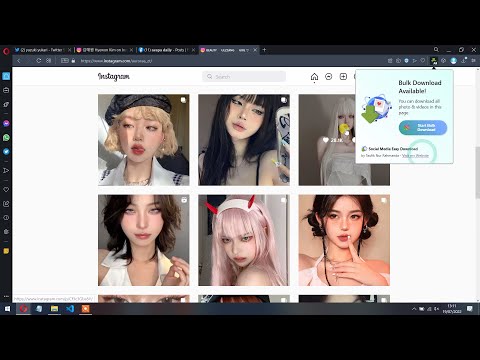
Batch download high quality photos, videos, reels, stories from Instagram, X, Facebook, and more!
You can download all photos, videos, reels, and stories from Instagram, Facebook, Pinterest, and Twitter. This extension will detect media on opened social media pages and opened tabs, and then you can download, preview, or batch download multiple photos and videos from multiple posts of your choosing in the highest definition and higher quality. How to Use? 1. Download HQ Photos & Videos from Facebook, Instagram, and Twitter Open any post page containing photo or video, then you can click the button which appeared on the top right of the post, or by clicking the extension icon on the right side of the address bar. After that, the popup containing preview of detected photos & videos will appear. From there you can click "Download Selected", "Open in New Tab", or "Download All". 2. Batch Download Photos & Videos from any Instagram Page Open any Instagram profile page, and then click on the extension icon. You'll see "Batch Download" button. After clicking that button, click on any post and the bulk download will start. To stop the operation, just click the extension icon and click "Stop Batch Download". 3. Download Facebook Story Open a Facebook profile or page, click on the profile picture, then click View Story. After the story view opened, reload the page. After the page reloaded, you will see the download button appeared on the top right of the media, or click on the extension icon to view all detected media from the Facebook story. Demo Video: https://youtu.be/6rmq7gcCjqU Hope you enjoy!
2,9 van 59 beoordelingen
Details
- Versie1.0.9
- Geüpdatet12 maart 2024
- Aangeboden doorTaufikNur Production
- Grootte252KiB
- TalenEnglish
- Ontwikkelaar
E-mail
flias.test@gmail.com - Geen handelaarDeze ontwikkelaar heeft zichzelf niet geïdentificeerd als handelaar. Voor consumenten in de Europese Unie geldt dat consumentenrechten niet van toepassing zijn op contracten tussen jou en deze ontwikkelaar.
Privacy

Deze ontwikkelaar verklaart dat je gegevens:
- Niet worden verkocht aan derden, behalve voor de goedgekeurde toepassingen
- Niet worden gebruikt of overgedragen voor doeleinden die niet zijn gerelateerd aan de kernfunctionaliteit van het item
- Niet worden gebruikt of overgedragen om de kredietwaardigheid te bepalen of voor doeleinden met betrekking tot leningen