

Social Flow — Social Media Warm-Up Tool
1 rating
)
Overview
Warm up TikTok, YouTube, Instagram & Facebook accounts — automate natural scrolling, watching & liking in your browser.
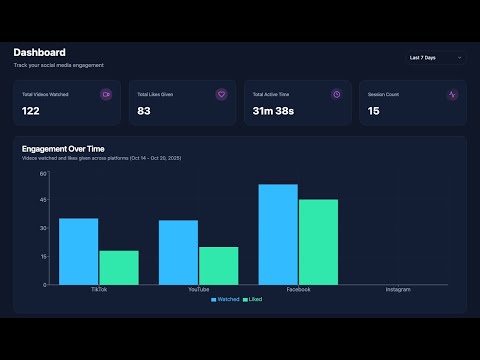
Social Flow automates the account warm-up process for TikTok, YouTube Shorts, Instagram Reels, and Facebook Reels — helping new or inactive accounts build natural engagement history and avoid shadow-bans. New social media accounts that jump straight into posting get flagged by algorithms and lose reach. The fix? Warm up your account first by scrolling, watching, and liking content like a real user. Social Flow handles this for you — running entirely inside your own browser with human-like behavior patterns. Whether you're a founder building in public, a content creator launching a new channel, or a social media manager onboarding client accounts, Social Flow saves you hours of mindless scrolling every week. How Account Warm-Up Works 1. Install Social Flow and open it from your browser toolbar 2. Pick your platform — TikTok, YouTube Shorts, Instagram Reels, or Facebook Reels 3. Set your session — choose duration, break intervals, watch targets, and like targets 4. Choose a personality mode and click Start 5. Social Flow scrolls, watches, and likes using randomized human-like timing 6. Review your session results on the built-in dashboard Personality Modes — Natural Behavior Patterns Social Flow uses four distinct browsing personalities to mimic how real people behave on social media: • Binge Watcher — Watches most videos fully with occasional likes, simulating a deep-scroll session • Casual Scroller — Skips through content quickly with moderate engagement, like a user killing time • Engaged User — Selective watching with frequent likes, mimicking an active community member • Random — Rotates personality after each break to simulate natural mood shifts throughout the session Session Controls • Session duration from 5 minutes to 24 hours • Configurable break intervals with automatic pause and resume • Set target video watch count and like count per session • Per-platform configuration — different settings for each social network • Smart timer that ends sessions automatically when targets are met Session Dashboard Track your warm-up progress across all platforms: • Total videos watched and likes given per session • Watch time tracking in seconds • Platform and personality mode logging • Full session history with completion status • Real-time progress monitoring during active sessions Built for Creators, Founders & Social Media Managers Social Flow is designed for anyone who needs their social accounts active and algorithmically trusted before posting content: • Indie hackers and SaaS founders warming up accounts before launching • Content creators starting new channels on TikTok or YouTube • Social media managers onboarding new client accounts • Marketers preparing accounts for ad campaigns or organic content pushes Privacy-First — Runs Entirely on Your Device Social Flow operates 100% locally in your Chrome browser. We never access your social media passwords, content, or private data. Only your session configuration and history are stored to sync your settings across devices. No external servers process your activity. No bots. No scripts running outside your browser. Your accounts stay under your control. Read our full Privacy Policy: https://social-flow.dev/privacy-policy Responsible Use • Use Social Flow within each platform's terms of service • Social Flow is a passive consumption warm-up tool — it does not post, comment, follow, unfollow, or send messages • We are not affiliated with Meta, Facebook, Instagram, TikTok, or YouTube • Platform policies may change — we cannot guarantee specific results Offered by: Headspace Software LLC Website: https://social-flow.dev Support: support@social-flow.dev
5 out of 51 rating
Details
- Version1.1.7
- UpdatedMay 27, 2026
- FeaturesOffers in-app purchases
- Offered byheadspacesoftware-extensions
- Size415KiB
- LanguagesEnglish
- DeveloperHeadspace Software Development Service
Blk6 Lot28 Sitio Epheta Brgy. San Isidro Antipolo, Rizal 1870 PHEmail
headspacesoftware@gmail.comPhone
+63 917 877 0596 - TraderThis developer has identified itself as a trader per the definition from the European Union and committed to only offer products or services that comply with EU laws.
Privacy

This developer declares that your data is
- Not being sold to third parties, outside of the approved use cases
- Not being used or transferred for purposes that are unrelated to the item's core functionality
- Not being used or transferred to determine creditworthiness or for lending purposes
Support
For help with questions, suggestions, or problems, visit the developer's support site