

Social Flow — TikTok, Shorts & Reels Account Warm-Up

Overview
Warm up new TikTok, YouTube Shorts, Instagram & Facebook Reels accounts in your browser. Built for clippers running many accounts.
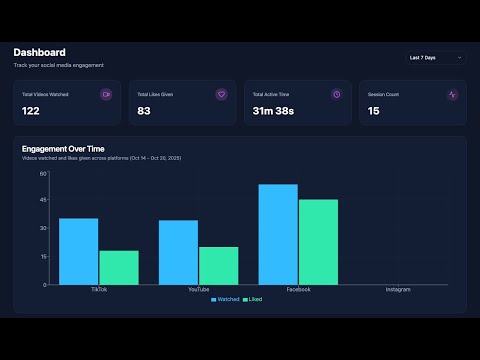
Social Flow runs warm-up sessions on TikTok, YouTube Shorts, Instagram Reels and Facebook Reels: it scrolls, watches and likes in your own browser at a human pace you set. Built for clippers and anyone running more short-form accounts than they have time to scroll by hand. New accounts usually need some ordinary activity before they start posting. Social Flow does that daily scrolling, watching and liking for you, inside your own Chrome or Edge browser, with randomized timing and behavior you configure. Whether you're a clipper warming up accounts before their first clip, an agency getting client accounts into daily use, or a creator starting a new channel, Social Flow saves you hours of scrolling every week. How Account Warm-Up Works 1. Install Social Flow and sign in from your browser toolbar 2. Open TikTok, YouTube Shorts, Instagram Reels or Facebook Reels 3. Set your session: duration, break interval, how many videos to watch and how many to like 4. Choose a behavior personality and click Start 5. Social Flow scrolls, watches and likes at randomized intervals 6. See a summary when the session ends, and your full history on the Social Flow dashboard Behavior Personalities Pick how a session behaves. The percentages shown in the extension are the ones it uses. • Binge Watcher: watches most videos through (70%) and rarely likes (15%) • Casual Browser: skips more often (40% watched through) with moderate likes (35%) • Engaged User: watches selectively (55%) and likes often (60%) • Random: picks one of the three for each session, and picks again after every break Session Controls • Session duration from 5 minutes to 24 hours • Automatic breaks at an interval you choose, then the session resumes on its own • Set how many videos to watch and how many to like per session • Settings are remembered separately for each platform • Sessions run until the timer ends; once your targets are met, Social Flow keeps scrolling at a natural pace Session History • Videos watched, likes given and watch time for every session • Platform and personality recorded per session • Full history with each session's outcome on your Social Flow dashboard • Live progress in the extension while a session runs Built for Clippers, Agencies and Creators • Clippers warming up each new account before its first clip • Agencies and social managers getting client and theme-page accounts into daily use • Creators and brands starting a new channel or bringing back an old one Running several accounts? Use a separate browser profile for each one. Privacy Social Flow runs in your own browser, on your existing sign-ins. It never asks for or stores your social media passwords, and it doesn't read your messages or post anything. To run your account and dashboard, Social Flow stores your session settings and session history (platform, duration, personality, videos watched, likes and watch time) with your Social Flow account, and checks your subscription when a session starts. Settings sync across your devices through your browser. Full Privacy Policy: https://social-flow.dev/privacy-policy Pricing A subscription is required to run sessions. Plans start at $14.99/month. See https://social-flow.dev for current plans. Use at Your Own Risk • Social media platforms generally don't allow automated activity. No tool can prevent a platform from restricting, shadowbanning or banning an account, and you are responsible for how you use Social Flow. • Social Flow only scrolls, watches and likes. It does not post, comment, follow, unfollow or send messages. • We can't guarantee reach, growth or any specific result. • Not affiliated with or endorsed by Meta, Facebook, Instagram, TikTok or YouTube. Offered by: Headspace Software LLC Website: https://social-flow.dev Support: support@social-flow.dev
5 out of 51 rating
Details
- Version1.1.12
- UpdatedNovember 24, 2026
- FeaturesOffers in-app purchases
- Offered byheadspacesoftware-extensions
- Size420KiB
- LanguagesEnglish
- DeveloperHeadspace Software Development Service
Blk6 Lot28 Sitio Epheta Brgy. San Isidro Antipolo, Rizal 1870 PHEmail
headspacesoftware@gmail.comPhone
+63 917 877 0596 - TraderThis developer has identified itself as a trader per the definition from the European Union and committed to only offer products or services that comply with EU laws.
Privacy

This developer declares that your data is
- Not being sold to third parties, outside of the approved use cases
- Not being used or transferred for purposes that are unrelated to the item's core functionality
- Not being used or transferred to determine creditworthiness or for lending purposes
Support
For help with questions, suggestions, or problems, visit the developer's support site